
Dokan: Vendor Coupon Management (Complete Guide)
Discounts and promotional campaigns are among the most effective ways to increase sales and attract new customers. In a multi-vendor marketplace powered by Dokan, allowing vendors to create and manage their own coupons gives them greater flexibility to run promotions while helping marketplace owners boost overall revenue.
Dokan’s Vendor Coupon Management feature enables vendors to create discount codes, set usage restrictions, schedule promotions, and track coupon performance—all from their vendor dashboard.
In this guide, we’ll explore how Vendor Coupon Management works in Dokan, its benefits, best practices, and how marketplace owners can optimize coupon strategies for long-term success.
What is Vendor Coupon Management?
Vendor Coupon Management allows individual vendors to create and manage their own discount coupons without requiring administrator intervention.
Each vendor can independently:
- Create promotional coupons
- Set discount percentages
- Offer fixed cart discounts
- Schedule coupon campaigns
- Restrict coupon usage
- Track coupon performance
- Increase customer loyalty
This decentralized approach gives vendors more control over their marketing efforts while reducing administrative workload.
Benefits of Vendor Coupon Management
Increase Sales
Coupons encourage customers to complete purchases and increase order volume.
Attract New Customers
Special discounts help vendors acquire first-time buyers.
Improve Customer Retention
Returning customers are more likely to purchase again when offered exclusive promotions.
Vendor Independence
Each vendor manages promotions without waiting for marketplace administrators.
Seasonal Promotions
Run discounts during holidays, festivals, or special events.
Reduce Cart Abandonment
Target customers with limited-time offers and discount codes.
Types of Coupons Supported
Dokan supports WooCommerce coupon functionality, including:
Percentage Discounts
Example:
- 10% Off
- 20% Off
- 50% Off
Fixed Cart Discounts
Example:
- $10 OFF
- ₹500 OFF
Product Discounts
Offer discounts on selected products only.
Free Shipping Coupons
Encourage larger purchases with free delivery promotions.
Vendor Coupon Features
A good coupon management system should allow vendors to:
- Create unlimited coupons
- Set coupon codes
- Choose discount type
- Set expiration dates
- Configure usage limits
- Restrict by products
- Restrict by categories
- Set minimum order values
- Set maximum discounts
- Enable free shipping
- View coupon reports
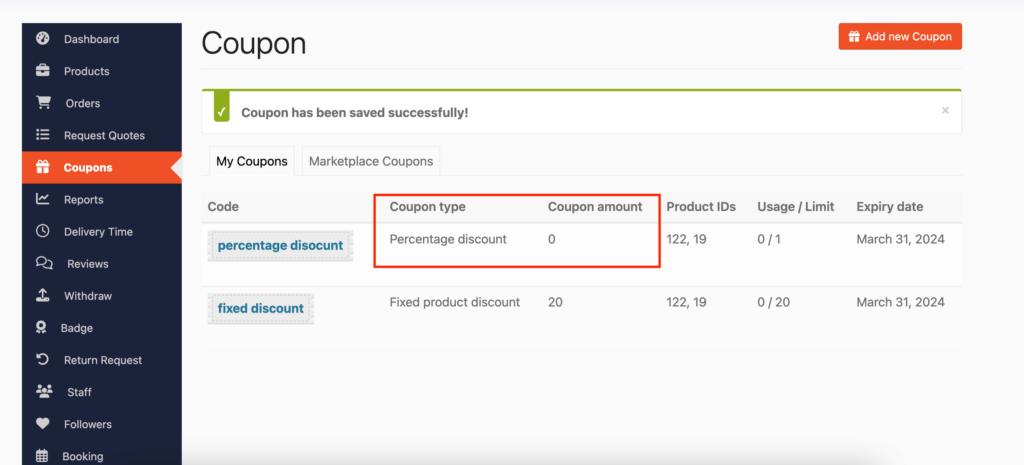
How Vendors Create Coupons
Step 1
Login to Vendor Dashboard.
Step 2
Navigate to:
Coupons → Add New Coupon
Step 3
Enter:
- Coupon Code
- Description
- Discount Type
- Discount Amount
Step 4
Configure:
- Expiry Date
- Usage Limits
- Product Restrictions
- Category Restrictions
- Minimum Spend
- Maximum Spend
Step 5
Publish the coupon.
Customers can immediately start using it.
Coupon Restrictions
Vendors can configure restrictions based on:
Products
Apply discounts only to selected products.
Categories
Limit coupons to specific product categories.
Customer Spend
Require minimum purchase amounts.
Individual Use
Prevent coupon stacking.
Usage Limits
Limit total redemptions.
User Limits
Restrict usage per customer.
Marketplace Benefits
Marketplace owners benefit from vendor coupons because they:
- Increase overall marketplace sales
- Encourage vendor participation
- Reduce marketing workload
- Improve customer retention
- Support seasonal campaigns
- Drive vendor competition
- Increase average order value
Best Coupon Strategies
First Purchase Discount
Offer discounts for new customers.
Example:
WELCOME10
Holiday Promotions
Run campaigns during:
- Black Friday
- Cyber Monday
- Christmas
- New Year
- Diwali
- Eid
Free Shipping Offers
Combine free shipping with minimum purchase requirements.
Bundle Discounts
Encourage customers to buy multiple products together.
Limited-Time Coupons
Create urgency using expiration dates.
Loyalty Rewards
Offer exclusive coupons to repeat customers.
Coupon Analytics
Track important metrics such as:
- Total Coupons Created
- Coupon Usage
- Revenue Generated
- Conversion Rate
- Average Order Value
- Redemption Rate
- Repeat Customers
- Best Performing Vendors
These insights help vendors refine future promotions.
Common Coupon Mistakes
Discounts Too Large
Excessive discounts can reduce profit margins.
No Expiry Date
Always create urgency with expiration dates.
Poor Coupon Codes
Use short, memorable coupon names.
Example:
- SAVE20
- WELCOME15
- FESTIVE25
No Usage Limits
Restrict coupon abuse with redemption limits.
Overlapping Promotions
Avoid running multiple discounts on the same products.
Security Best Practices
Protect your coupon system by:
- Limiting coupon usage
- Restricting duplicate redemptions
- Monitoring suspicious activity
- Using secure vendor permissions
- Auditing coupon performance regularly
- Keeping Dokan and WooCommerce updated
Performance Tips
For large marketplaces:
- Enable object caching
- Use Redis or Memcached
- Optimize WooCommerce database tables
- Monitor coupon queries
- Use a CDN for faster page loads
Vendor Coupon Checklist
✅ Percentage Discounts
✅ Fixed Cart Discounts
✅ Product Restrictions
✅ Category Restrictions
✅ Usage Limits
✅ Expiration Dates
✅ Free Shipping
✅ Minimum Spend
✅ Maximum Spend
✅ Coupon Reports
Final Thoughts
Vendor Coupon Management is a valuable feature for any Dokan-powered marketplace. By allowing vendors to create their own promotions, marketplace owners empower sellers to increase sales while reducing administrative overhead.
A well-planned coupon strategy can improve customer loyalty, increase average order value, reduce cart abandonment, and drive marketplace growth. Encourage vendors to use targeted, time-limited promotions and regularly review coupon analytics to maximize performance.

Hire Me on Upwork – Dokan & WooCommerce Expert

 Chat on WhatsApp