
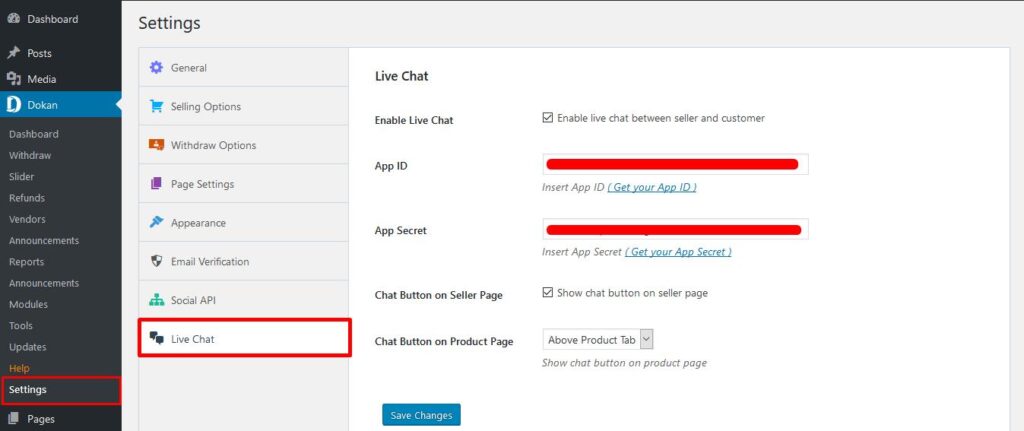
Dokan: Marketplace Live Chat Integration (Complete Guide)
Excellent customer support is one of the biggest factors that influence buying decisions in an online marketplace. Customers often have questions about products, shipping, availability, or returns before making a purchase. If they can’t get answers quickly, they may leave your marketplace and buy elsewhere.
With Dokan Marketplace Live Chat Integration, vendors can communicate directly with customers in real time, answer questions instantly, and build trust that leads to higher conversion rates. Whether you’re running a small marketplace or a large multi-vendor platform, live chat improves both customer satisfaction and vendor engagement.
This guide explains everything you need to know about integrating live chat into a Dokan-powered marketplace.
What is Marketplace Live Chat Integration?
Marketplace Live Chat Integration allows customers to communicate directly with vendors through a live messaging system embedded in the marketplace.
Instead of waiting for emails or support tickets, customers receive instant responses about:
- Product availability
- Shipping information
- Product specifications
- Bulk order inquiries
- Delivery estimates
- Return policies
- Custom orders
- Pricing questions
This real-time communication improves customer confidence and helps vendors close more sales.
Benefits of Live Chat Integration
Faster Customer Support
Customers receive immediate answers without waiting for email responses.
Higher Conversion Rates
Quick responses reduce hesitation and encourage purchases.
Better Vendor Communication
Each vendor manages conversations directly with potential buyers.
Reduced Cart Abandonment
Answering customer questions during checkout helps recover potential sales.
Improved Customer Satisfaction
Real-time support creates a better shopping experience.
Increased Vendor Sales
Better communication leads to stronger customer relationships and repeat purchases.
Key Features
An effective live chat solution should include:
- Real-Time Messaging
- Vendor-to-Customer Chat
- File Sharing
- Image Attachments
- Emoji Support
- Chat Notifications
- Mobile Compatibility
- Online/Offline Status
- Chat History
- Visitor Tracking
- Customer Profiles
- Admin Monitoring
- Spam Protection
- Multi-Language Support
Best Live Chat Solutions for Dokan
1. Tidio Live Chat
Features
- Live Chat
- AI Chatbots
- Visitor Tracking
- Email Integration
- Mobile App
- Analytics
Best For: Small and medium marketplaces.
2. LiveChat
Features
- Real-Time Messaging
- Chat Routing
- File Sharing
- Customer Ratings
- CRM Integration
- Reports
Best For: Professional customer support teams.
3. Crisp Chat
Features
- Team Inbox
- Live Chat
- Chatbot
- Video Calls
- Customer Timeline
- Mobile Support
Best For: Growing marketplaces.
4. Zendesk Messaging
Features
- Omnichannel Support
- AI Bots
- Help Center
- Ticket Conversion
- CRM Integration
- Customer History
Best For: Enterprise marketplaces.
5. Facebook Messenger Integration
Features
- Familiar Chat Interface
- Mobile Friendly
- Fast Customer Communication
- Social Integration
Best For: Businesses with active social media audiences.
How to Integrate Live Chat
Step 1
Install your preferred live chat plugin.
Step 2
Connect it with your WordPress website.
Step 3
Enable vendor chat access.
Step 4
Customize:
- Chat Widget
- Colors
- Welcome Message
- Availability Hours
- Notifications
Step 5
Test conversations between vendors and customers before going live.
Vendor Communication Best Practices
Encourage vendors to:
- Reply quickly.
- Be polite and professional.
- Provide accurate product information.
- Share delivery timelines.
- Recommend related products.
- Follow up after conversations.
Quick, helpful responses improve trust and increase sales.
Customer Support Automation
Modern chat systems include automation features such as:
- Welcome messages
- Frequently asked questions
- AI chatbots
- Offline contact forms
- Automated greetings
- Product recommendations
- Order status responses
Automation reduces repetitive work while keeping customers engaged.
CRM Integration
Many live chat platforms integrate with CRM systems such as:
- HubSpot
- Zoho CRM
- Salesforce
- FluentCRM
- WP ERP
This allows customer conversations to be linked with purchase history, support requests, and marketing campaigns.
Analytics & Reporting
Track metrics such as:
- Total Chats
- Response Time
- Customer Satisfaction
- Chat Duration
- Conversion Rate
- Missed Chats
- Vendor Response Time
- Sales Generated from Chat
Regular analysis helps improve customer service and vendor performance.
Security Best Practices
Protect conversations by:
- Enabling SSL encryption
- Limiting vendor permissions
- Using secure authentication
- Protecting customer data
- Monitoring suspicious activity
- Updating chat plugins regularly
Common Mistakes
Slow Response Times
Customers expect replies within minutes.
Generic Responses
Personalized communication builds trust.
Ignoring Offline Visitors
Use contact forms or automated messages when vendors are unavailable.
No Chat Analytics
Monitor chat performance to identify opportunities for improvement.
Marketplace Live Chat Checklist
✅ Real-Time Messaging
✅ Vendor Chat Access
✅ Mobile Support
✅ File Sharing
✅ Chat Notifications
✅ AI Chatbot (Optional)
✅ CRM Integration
✅ Chat History
✅ Customer Analytics
✅ Secure Communication
Final Thoughts
Live chat integration is a powerful feature for any Dokan marketplace. By enabling direct communication between customers and vendors, you create a faster, more engaging shopping experience that increases trust and boosts conversions.
Whether you choose Tidio, LiveChat, Crisp, Zendesk, or another live chat solution, focus on fast response times, personalized support, and regular performance monitoring. Combined with CRM integration and automation, live chat can become one of the most valuable tools for growing your multi-vendor marketplace.

Hire Me on Upwork – Dokan & WooCommerce Expert

 Chat on WhatsApp