
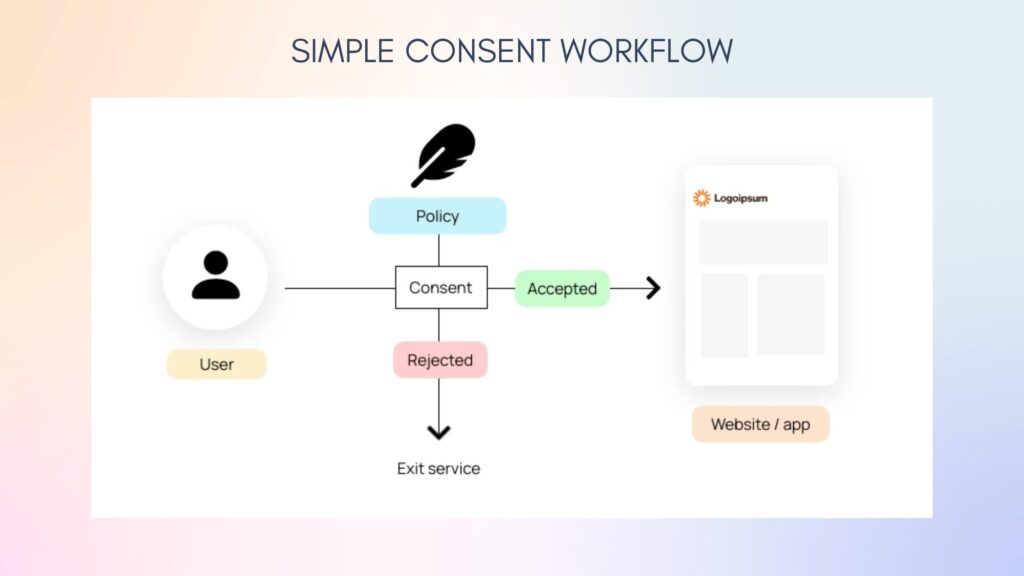


Data privacy is no longer optional — it’s a legal requirement. If your website collects user data (forms, analytics, cookies), you must comply with regulations like GDPR.
If you’re using WordPress, implementing GDPR and cookie compliance is essential to avoid legal issues and build user trust.
In this guide, you’ll learn how to make your WordPress site GDPR compliant step-by-step.
🔴 What is GDPR?
General Data Protection Regulation (GDPR) is a data protection law that applies to websites handling data of EU users.
It requires:
✔ Transparency in data collection
✔ User consent before tracking
✔ Secure data handling
✔ User control over data
👉 Applies globally if you have EU visitors.
🧠 Why GDPR Compliance Matters
Without compliance:
❌ Legal penalties
❌ Fines (up to millions)
❌ Loss of user trust
With compliance:
✔ Legal protection
✔ Increased trust
✔ Better brand reputation
👉 Privacy = user confidence
🍪 What are Cookies?
Cookies are small files stored in user browsers.
Used for:
✔ Analytics (Google Analytics)
✔ Login sessions
✔ Tracking behavior
✔ Marketing ads
👉 Cookies require user consent under GDPR
⚙️ Key GDPR Requirements
To comply with GDPR, your website must:
✔ Ask for cookie consent
✔ Allow users to accept/reject cookies
✔ Provide privacy policy
✔ Allow data access/deletion
✔ Store consent records
👉 These are mandatory.
🧑💻 Step 1: Add Cookie Consent Banner
You must show a cookie banner:
✔ Accept / Reject options
✔ Manage preferences
✔ No pre-checked consent
👉 Consent must be explicit
🔌 Step 2: Use GDPR Plugins
Popular plugins:
✔ Complianz
✔ CookieYes
✔ GDPR Cookie Consent
Features:
✔ Cookie scanning
✔ Consent logging
✔ Geo-targeting
👉 Simplifies compliance.
📄 Step 3: Create Legal Pages
You must include:
✔ Privacy Policy
✔ Cookie Policy
✔ Terms & Conditions
Include:
✔ Data usage details
✔ Third-party tools
✔ Contact information
👉 Required for transparency.
📩 Step 4: Form Compliance
If you use forms:
✔ Add consent checkbox
✔ Link to privacy policy
✔ Store consent proof
👉 Applies to contact forms, signup forms.
📊 Step 5: Handle Analytics Compliance
Tools like Google Analytics require consent.
✔ Delay tracking until consent
✔ Anonymize IP
✔ Update privacy policy
👉 Important for tracking.
🔐 Step 6: Data Protection
Ensure:
✔ Secure storage (SSL/HTTPS)
✔ Limited data access
✔ Regular backups
👉 Protects user data.
👤 Step 7: User Data Rights
GDPR gives users rights:
✔ Access their data
✔ Request deletion
✔ Export data
WordPress provides built-in tools for:
✔ Data export
✔ Data erasure
👉 Must be supported.
🌍 Step 8: Geo-Targeting Compliance
GDPR mainly applies to EU users.
Use plugins to:
✔ Show banner only to EU users
✔ Apply rules based on location
👉 Improves UX for global users.
⚡ Step 9: Performance Optimization
Cookie scripts can slow down your site.
Optimize:
✔ Load scripts after consent
✔ Use lightweight plugins
✔ Minimize tracking scripts
👉 Balance compliance + performance.
🚀 🔟 Test Your Compliance
Before going live:
✔ Check cookie banner
✔ Test accept/reject options
✔ Verify tracking behavior
✔ Review policies
👉 Ensure everything works correctly.
📈 Benefits of GDPR Compliance
✔ Builds user trust
✔ Improves transparency
✔ Protects from legal risks
✔ Enhances brand reputation
👉 Compliance = long-term growth
🚨 Common Mistakes to Avoid
❌ No cookie consent banner
❌ Pre-checked consent boxes
❌ Tracking before consent
❌ Missing privacy policy
❌ Ignoring user data requests
👉 These can lead to penalties.
📌 GDPR Compliance Checklist
✔ Cookie consent banner
✔ Privacy & cookie policy
✔ Consent-based tracking
✔ Secure data storage
✔ User data rights support
👉 Follow this strictly.
📚 Internal Links

Hire Me on Upwork – Dokan & WooCommerce Expert

 Chat on WhatsApp