
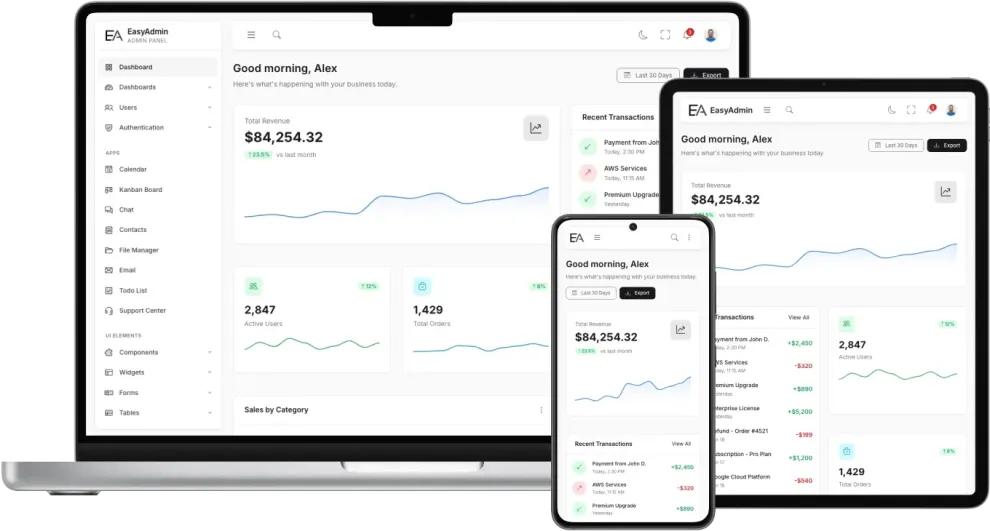


Custom admin panels are one of the most powerful ways to extend and personalize WordPress functionality. While the default WordPress dashboard works well for general website management, many businesses require specialized admin interfaces tailored to their workflows, teams, and operational requirements.
Custom admin panels can simplify website management, improve productivity, and provide advanced tools for:
- eCommerce stores
- Multi-vendor marketplaces
- Membership websites
- Booking systems
- CRM platforms
- Learning management systems
In this complete guide, you’ll learn how to build custom admin panels in WordPress using custom menus, admin pages, dashboard widgets, role management, APIs, and modern UI techniques.
What is a Custom Admin Panel?
A custom admin panel is a personalized backend interface inside WordPress designed for specific functionality or workflows.
Unlike the default WordPress admin dashboard, custom panels can include:
- Custom menus
- Analytics dashboards
- Reports
- User management systems
- Product management tools
- Booking controls
- Vendor management panels
These panels improve usability and reduce unnecessary admin complexity.
Why Build Custom Admin Panels?
Simplify Complex Workflows


Custom admin panels help businesses organize operations more efficiently.
Benefits include:
- Faster task management
- Better workflow organization
- Reduced training time
- Improved team productivity
Improve User Experience
A clean and focused admin panel improves usability for:
- Store managers
- Vendors
- Support teams
- Clients
- Editors
Restrict Unnecessary Features
Custom panels allow developers to remove:
- Unused menu items
- Confusing settings
- Irrelevant WordPress features
This creates a cleaner experience.
Add Business-Specific Functionality
You can create custom panels for:
- Order management
- Vendor analytics
- CRM systems
- Membership tracking
- Booking management
- Subscription controls
Understanding WordPress Admin Architecture
WordPress admin panels are built using:
- Admin menus
- Dashboard widgets
- Custom pages
- Hooks & filters
- Settings API
- User roles & capabilities
These systems provide flexibility for custom backend development.
Creating Custom Admin Menus


Custom menus are created using:
add_menu_page()Example:
add_action( 'admin_menu', 'custom_admin_menu' );

function custom_admin_menu() {

    add_menu_page(
        'Custom Dashboard',
        'Custom Panel',
        'manage_options',
        'custom-panel',
        'custom_panel_page',
        'dashicons-chart-bar',
        6
    );

}
This creates a new custom admin menu page.
Creating Submenu Pages
You can organize features using submenu pages.
Example:
add_submenu_page(
    'custom-panel',
    'Reports',
    'Reports',
    'manage_options',
    'custom-reports',
    'custom_reports_page'
);
Submenus improve admin navigation and organization.
Building Custom Dashboard Widgets


Dashboard widgets display important information quickly.
Useful widgets include:
- Revenue reports
- Order statistics
- User activity
- Support tickets
- Inventory alerts
- Vendor analytics
Example widget:
add_action('wp_dashboard_setup', 'custom_dashboard_widget');

function custom_dashboard_widget() {

    wp_add_dashboard_widget(
        'custom_widget',
        'Sales Overview',
        'custom_dashboard_widget_content'
    );

}
Using WordPress Settings API
The Settings API helps developers create custom settings pages.
You can build:
- Configuration panels
- Theme settings
- Plugin settings
- Marketplace controls
Example:
register_setting(
    'custom_settings_group',
    'custom_option_name'
);
This stores custom admin settings securely.
Role-Based Admin Panels


Different users may require different admin experiences.
Examples:
- Vendors
- Store managers
- Support staff
- Editors
- Customers
Role-based admin panels improve:
- Security
- Workflow control
- User experience
Popular plugin:
- User Role Editor
Custom Admin Panel UI Design
Modern admin panels should be:
- Clean
- Responsive
- Fast
- Mobile-friendly
Recommended UI Features
Analytics Cards
Show important statistics visually.
Responsive Layouts
Ensure admin panels work on:
- Desktop
- Tablet
- Mobile devices
Dark Mode Support
Many users prefer dark admin interfaces.
Quick Action Buttons
Improve workflow speed.
Integrating Charts & Analytics


Modern admin panels often include data visualization.
Popular chart libraries:
- Chart.js
- ApexCharts
Charts can display:
- Revenue trends
- User growth
- Product performance
- Marketplace analytics
Using AJAX in Admin Panels
AJAX improves admin panel performance by loading content dynamically.
Benefits:
- Faster UI interactions
- Reduced page reloads
- Better user experience
Example use cases:
- Live search
- Dynamic reports
- Real-time analytics
- Product filtering
REST API Integration


Custom admin panels can integrate with:
- WordPress REST API
- WooCommerce API
- External services
- CRM platforms
- Inventory systems
This enables advanced business automation.
Security Best Practices
Admin panels contain sensitive data and require strong security.
Important Security Measures
Use Capability Checks
Example:
current_user_can('manage_options')This prevents unauthorized access.
Sanitize & Validate Data
Always validate user input carefully.
Use Nonces
Protect forms from CSRF attacks.
Enable HTTPS
Secure admin sessions using SSL certificates.
Performance Optimization for Admin Panels


Large admin panels can become slow without optimization.
Optimization Tips
Use AJAX Loading
Reduce unnecessary page reloads.
Optimize Database Queries
Avoid heavy queries inside dashboard pages.
Use Object Caching
Improve database response times.
Recommended plugins:
- LiteSpeed Cache
- Redis Object Cache
Load Scripts Conditionally
Only load assets where necessary.
Common Mistakes to Avoid
Overcomplicated Interfaces
Too many features can overwhelm users.
Weak Security
Always secure admin access carefully.
Poor Mobile Experience
Many admins now work from smartphones and tablets.
Slow Database Queries
Heavy queries can slow down admin performance significantly.
Final Thoughts
Building custom admin panels in WordPress allows developers to create highly efficient, scalable, and business-focused backend systems tailored to specific workflows and operational requirements.
By combining:
- Custom admin menus
- Dashboard widgets
- Role-based access
- Analytics dashboards
- REST API integrations
- AJAX functionality
- Modern UI design
- Security best practices
you can transform WordPress into a powerful custom business management platform.
Whether you’re building an eCommerce platform, marketplace, membership site, booking system, or SaaS application, custom admin panels can dramatically improve usability and productivity.