
Push notifications have become one of the most effective ways to engage website visitors, increase return traffic, and improve conversions. Unlike email marketing, push notifications appear directly on a user’s device, making them highly visible and effective.
Whether you run a blog, WooCommerce store, membership website, LMS platform, or multi-vendor marketplace, push notifications can help you instantly communicate with your audience and drive engagement.


WordPress supports various push notification solutions that allow website owners to send real-time alerts to subscribers across desktop and mobile devices.
In this guide, you’ll learn how to implement, optimize, and automate push notifications in WordPress.
What Are Push Notifications?
Push notifications are clickable messages sent directly to users’ browsers or mobile devices after they subscribe.
These notifications can include:
- New blog posts
- Product launches
- Order updates
- Promotions
- Flash sales
- Security alerts
- Event reminders
Unlike emails, push notifications appear instantly and typically achieve higher visibility.
Why Use Push Notifications?
Push notifications provide several benefits for WordPress websites.
Key Benefits
- Increased website traffic
- Higher engagement rates
- Improved customer retention
- Faster communication
- Better conversion rates
- Reduced cart abandonment
- Improved customer experience
Businesses often use push notifications to re-engage inactive visitors and encourage repeat visits.


Types of Push Notifications
Different notification types serve different business goals.
Transactional Notifications
Examples include:
- Order confirmations
- Shipping updates
- Payment alerts
- Account security notifications
Marketing Notifications
Examples include:
- Promotions
- Discounts
- Flash sales
- Product launches
Content Notifications
Useful for:
- Blog updates
- News websites
- Course platforms
- Membership communities
How Push Notifications Work
The process is simple:
Step 1: User Visits Website
Visitors are asked to subscribe to notifications.
Step 2: User Grants Permission
Users click:
- Allow
- Subscribe
- Enable Notifications
Step 3: Notifications Are Delivered
Future notifications appear instantly on supported devices.
This process works across:
- Desktop browsers
- Android devices
- Some mobile browsers


Best Push Notification Plugins for WordPress
Several powerful solutions are available.
OneSignal
One of the most popular push notification platforms.
Features:
- Browser notifications
- Mobile push notifications
- Segmentation
- Automation
- Analytics
Useful tool:
PushEngage
Designed specifically for marketing automation.
Features:
- Drip campaigns
- Cart abandonment recovery
- Audience segmentation
Useful tool:
WonderPush
Lightweight and GDPR-friendly push notification solution.
Useful tool:
Push Notifications for WooCommerce
Push notifications are especially valuable for online stores.
Order Notifications
Automatically notify customers about:
- Order confirmation
- Payment confirmation
- Shipping updates
- Delivery status
Cart Abandonment Recovery
Send reminders when customers leave products in their carts.
Benefits include:
- Increased conversions
- Reduced cart abandonment
- More completed purchases
Product Availability Alerts
Notify customers when:
- Products are back in stock
- Prices drop
- New products launch


Push Notifications for Blogs
Blog owners can use notifications to increase readership.
New Article Alerts
Automatically notify subscribers when:
- New articles are published
- Guides are updated
- News is posted
Category-Based Notifications
Allow users to subscribe to specific interests.
Examples:
- Technology
- Business
- WordPress
- WooCommerce
This improves engagement and relevance.
Audience Segmentation
Sending the same notification to everyone is rarely effective.
Segment Users By
- Location
- Interests
- Purchase history
- Website activity
- Product preferences
Benefits include:
- Better engagement
- Higher click rates
- Improved conversions
Personalized notifications perform significantly better than generic campaigns.
Automate Push Notification Campaigns
Automation reduces manual effort.
Common Automated Workflows
Send notifications when:
- New posts are published
- Orders are placed
- Products launch
- Sales begin
- Coupons become available
Drip Campaigns
Create sequences such as:
- Welcome notification
- Product recommendation
- Promotional offer
- Loyalty reward
Automation improves consistency and scalability.


Improve Push Notification Click Rates
Not all notifications generate engagement.
Use Strong Titles
Examples:
- New Product Just Arrived
- Flash Sale Ends Tonight
- Your Order Has Shipped
Keep Messages Short
Short messages are easier to read and act upon.
Create Urgency
Examples:
- Limited Time Offer
- Only 3 Hours Left
- Back in Stock
Use Personalization
Include:
- Customer names
- Product names
- Relevant recommendations
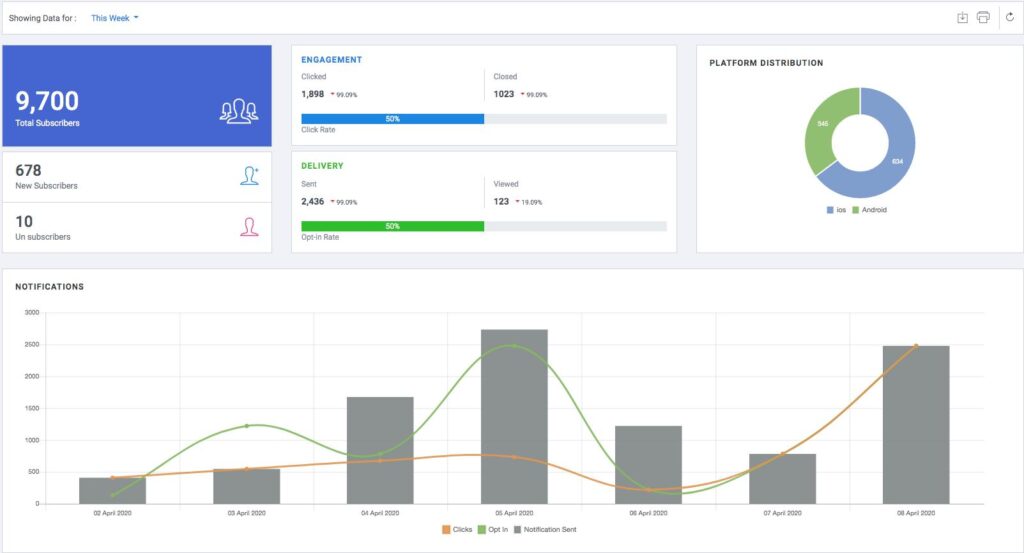
Push Notification Analytics
Analytics help improve campaign performance.
Key Metrics
Monitor:
- Subscribers
- Click-through rate (CTR)
- Delivery rate
- Conversion rate
- Unsubscribe rate
Identify Best Campaigns
Track:
- Most opened notifications
- Highest converting messages
- Best-performing segments
Analytics help improve future campaigns.


Best Practices for Push Notifications
Don’t Overuse Notifications
Too many notifications can annoy users.
Send Relevant Content
Focus on valuable updates.
Segment Your Audience
Improve relevance and engagement.
Optimize Timing
Send notifications when users are most active.
Test Different Messages
A/B testing helps improve performance.
Common Push Notification Mistakes
Sending Too Many Alerts
Can increase unsubscribe rates.
Poor Personalization
Generic messages often perform poorly.
Ignoring Analytics
Without tracking, optimization becomes difficult.
Weak Call-To-Actions
Users need a clear reason to click.
No Audience Segmentation
Broadcasting to everyone reduces effectiveness.
Push Notification Setup Checklist
Choose a Notification Platform
Use OneSignal, PushEngage, or WonderPush.
Enable Subscriber Prompts
Allow users to opt in.
Configure Automated Campaigns
Reduce manual work.
Segment Your Audience
Improve engagement.
Track Analytics
Measure campaign performance.
Optimize Notification Timing
Increase click-through rates.
Personalize Messages
Improve relevance.
Test Regularly
Continuously optimize campaigns.
Final Thoughts
Push notifications are one of the most effective communication channels for WordPress websites. They provide immediate visibility, improve engagement, and help drive traffic and conversions.
With the right tools and strategies, WordPress website owners can create automated notification systems that keep users informed and engaged.
By implementing:
- Browser notifications
- Audience segmentation
- Automated campaigns
- WooCommerce alerts
- Content notifications
- Analytics tracking
- Personalization
- Conversion optimization
you can significantly improve user engagement and business growth.
Whether you’re running a blog, WooCommerce store, membership website, LMS platform, or multi-vendor marketplace, push notifications can become a powerful part of your digital marketing strategy.