
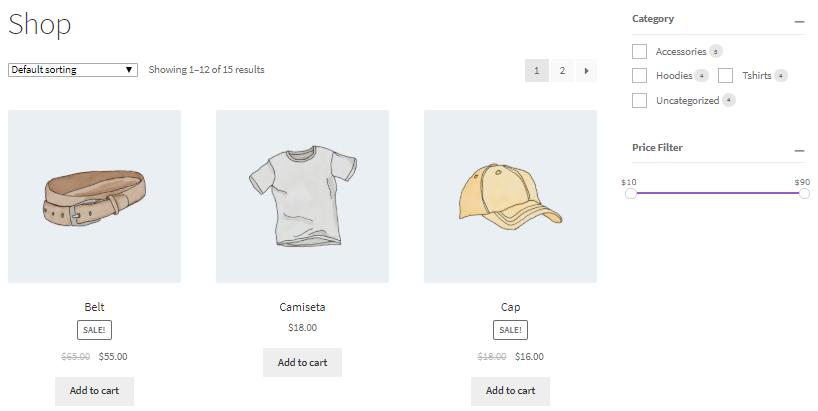
As WooCommerce stores grow, finding products quickly becomes increasingly important for customers. Traditional filtering systems often require full page reloads every time a filter is selected, creating a slow and frustrating shopping experience.
AJAX product filters solve this problem by updating products instantly without reloading the page. This creates a smoother user experience, improves product discovery, and helps increase conversion rates.
Whether you’re running a small WooCommerce store or a large multi-vendor marketplace, AJAX filtering can significantly improve customer satisfaction and store performance.
What Are AJAX Product Filters?
AJAX (Asynchronous JavaScript and XML) allows website content to update dynamically without refreshing the entire page.
In WooCommerce, AJAX filters enable customers to filter products instantly by:
- Category
- Price
- Brand
- Color
- Size
- Rating
- Availability
- Vendor
Instead of reloading the entire page, only the product grid updates, making browsing much faster.
Why AJAX Product Filters Matter
Modern online shoppers expect fast and seamless browsing experiences.
Benefits of AJAX filters include:
- Faster product discovery
- Improved user experience
- Reduced page load times
- Better mobile performance
- Higher conversion rates
- Lower bounce rates
- Increased customer engagement
For stores with hundreds or thousands of products, AJAX filtering is often essential.
How AJAX Product Filters Work
The filtering process is simple:
- Customer selects a filter.
- AJAX sends a request to the server.
- WooCommerce retrieves matching products.
- Product listings update instantly.
- No page refresh occurs.
This creates a smooth and modern shopping experience.
Common AJAX Filter Types
Category Filters
Allow customers to browse products by category.
Examples:
- Electronics
- Clothing
- Home & Garden
- Sports
- Books
Category filters help customers quickly narrow product selections.
Price Filters
Price filtering is one of the most commonly used features.
Popular options include:
- Price sliders
- Minimum price
- Maximum price
- Budget ranges
Customers can quickly find products that fit their budget.
Product Attribute Filters
WooCommerce attributes provide detailed filtering options.
Examples:
Color Filters
- Red
- Blue
- Black
- White
Size Filters
- Small
- Medium
- Large
- XL
Material Filters
- Cotton
- Leather
- Wood
- Metal
Attribute filters improve product discoverability.
Brand Filters
Brand filtering is particularly important for larger stores.
Examples:
- Apple
- Samsung
- Sony
- Nike
- Adidas
Customers often search based on preferred brands.
Rating Filters
Customer reviews influence purchasing decisions.
Rating filters allow users to display:
- 5-star products
- 4-star and above
- Top-rated products
This helps customers identify trusted products quickly.
Stock Availability Filters
Customers prefer products that are ready to purchase.
Common stock filters include:
- In Stock
- Out of Stock
- Backorder
- Pre-Order
Availability filters reduce customer frustration.
AJAX Product Filters for WooCommerce Stores
WooCommerce stores with large inventories benefit greatly from AJAX filtering.
Examples include:
- Fashion stores
- Electronics stores
- Furniture stores
- Automotive stores
- Wholesale stores
The larger the product catalog, the greater the benefit.
AJAX Product Filters for Multi-Vendor Marketplaces
Marketplaces built with Dokan can add vendor-based filtering.
Customers can filter products by:
- Vendor
- Store rating
- Store location
- Featured sellers
This improves transparency and customer trust.
Mobile Optimization
Most online shopping now occurs on mobile devices.
AJAX filters should be optimized for:
- Mobile screens
- Touch controls
- Responsive layouts
- Fast loading speeds
Popular mobile filtering methods include:
- Slide-out filter panels
- Floating filter buttons
- Collapsible filter menus
A poor mobile filtering experience can significantly reduce conversions.
SEO Considerations
AJAX filtering improves user experience but requires proper SEO implementation.
Best practices include:
Use Clean URLs
Maintain search-friendly filter URLs whenever possible.
Avoid Duplicate Content
Prevent indexing of excessive filter combinations.
Use Canonical Tags
Help search engines identify the primary page version.
Optimize Category Pages
Create dedicated landing pages for important filtered results.
Examples:
- Men’s Running Shoes
- Black Leather Jackets
- Gaming Laptops Under $1000
These pages can rank for valuable search terms.
Performance Optimization
AJAX filtering generates additional database queries.
To maintain speed:
Enable Caching
Recommended solutions:
- LiteSpeed Cache
- WP Rocket
Use Redis Object Cache
Reduces WooCommerce query load.
Optimize Product Attributes
Avoid unnecessary attributes that increase query complexity.
Use a CDN
Cloudflare can improve global performance and reduce server load.
Best WooCommerce AJAX Filter Plugins
Filter Everything
Features:
- AJAX filtering
- SEO-friendly URLs
- WooCommerce support
WOOF – WooCommerce Products Filter
Popular filtering plugin with extensive customization options.
JetSmartFilters
Excellent solution for Elementor users.
FacetWP
Premium filtering platform designed for large product catalogs.
YITH WooCommerce AJAX Product Filter
Provides advanced filtering and customization options.
Common AJAX Filter Mistakes
Too Many Filters
Excessive options may overwhelm customers.
Poor Mobile Design
Filters must be easy to use on mobile devices.
Slow Queries
Poor optimization can slow product loading.
Ignoring SEO
Improper implementation may create indexing issues.
No Product Counts
Showing available product counts improves usability.
WooCommerce AJAX Product Filters Checklist
✓ Category Filters
✓ Price Filters
✓ Brand Filters
✓ Attribute Filters
✓ Rating Filters
✓ Availability Filters
✓ Mobile Optimization
✓ AJAX Loading
✓ SEO-Friendly URLs
✓ Caching & Performance Optimization
✓ Product Count Display
✓ Responsive Design
Final Thoughts
AJAX product filters are one of the most effective ways to improve WooCommerce usability and product discovery. They create a faster, smoother shopping experience while helping customers find products more efficiently.
By implementing category filters, attribute filters, brand filters, price filters, vendor filters, and mobile-friendly AJAX filtering systems, store owners can significantly improve engagement and conversion rates.
Whether you’re running a niche online store, enterprise WooCommerce website, or large multi-vendor marketplace, AJAX product filtering is an essential feature for modern eCommerce success.

Hire Me on Upwork – Dokan & WooCommerce Expert

 Chat on WhatsApp