
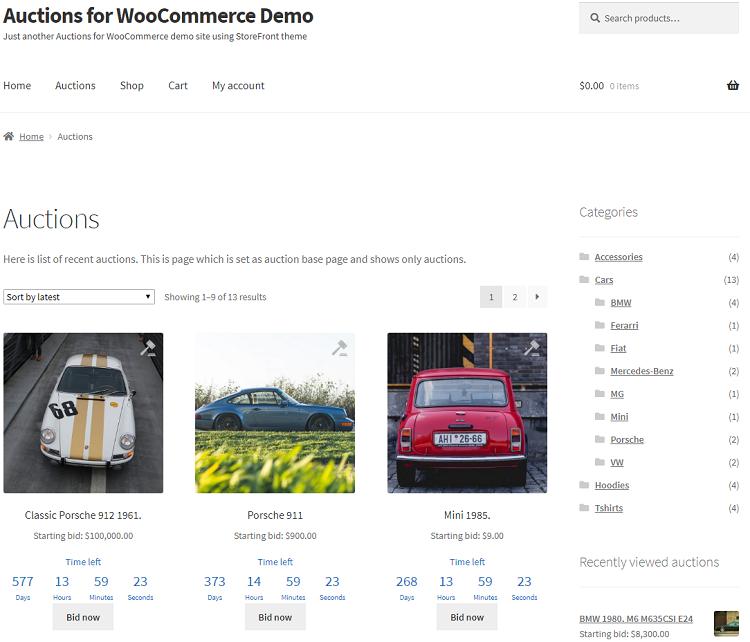
Online auctions have transformed the way products are bought and sold online. From collectibles and antiques to vehicles and luxury items, auction-based selling creates excitement, competition, and often higher selling prices.
WooCommerce makes it possible to build powerful auction websites using specialized auction plugins. Whether you’re running a dedicated auction platform, a marketplace, or simply want to add auction functionality to selected products, WooCommerce provides the flexibility needed to create a successful auction business.
In this guide, you’ll learn everything about WooCommerce auction plugins, their features, setup process, benefits, and optimization strategies.
What Is a WooCommerce Auction Plugin?
A WooCommerce auction plugin extends the standard WooCommerce store functionality by allowing products to be sold through bidding rather than fixed pricing.
Instead of purchasing products immediately, customers place bids, and the highest bidder wins when the auction ends.
Common auction types include:
- Standard Auctions
- Reverse Auctions
- Silent Auctions
- Timed Auctions
- Reserve Price Auctions
- Buy Now Auctions
Auction plugins automate the entire bidding process.
Why Use Auctions in WooCommerce?
Auction-based selling offers several advantages.
Increase Product Value
Competitive bidding can drive prices above the original expected value.
Create Customer Engagement
Customers return frequently to monitor auctions and place bids.
Sell Unique Products
Auctions work particularly well for:
- Collectibles
- Antiques
- Rare items
- Artwork
- Luxury products
- Vehicles
Differentiate Your Store
Auction functionality helps your business stand out from traditional online stores.
Key Features of WooCommerce Auction Plugins
Modern auction plugins provide advanced functionality.
Auction Product Types
Create dedicated auction products with:
- Starting bid
- Reserve price
- Buy Now price
- Auction duration
Real-Time Bidding
Customers can:
- Place bids instantly
- View current bids
- Monitor auction status
Countdown Timers
Auction pages typically display:
- Start date
- End date
- Remaining time
Countdown timers create urgency and encourage participation.
Bid History
Customers can review:
- Previous bids
- Current highest bid
- Number of participants
Transparency builds trust.
Reserve Price Functionality
Reserve prices allow sellers to set a minimum acceptable selling price.
Benefits include:
- Protection against low-value sales
- Better pricing control
- Reduced risk
If bidding fails to meet the reserve price, the seller may choose not to complete the sale.
Buy Now Option
Many auction plugins support a Buy Now feature.
Benefits include:
- Immediate purchases
- Faster inventory turnover
- Flexible customer options
Customers can either:
- Participate in bidding
- Purchase instantly
This improves conversion opportunities.
Automatic Auction Management
Auction plugins automate critical processes.
Auction Start
Auctions launch automatically based on predefined schedules.
Auction Completion
Winning bidders are selected automatically when auctions end.
Winner Notifications
The system sends notifications to:
- Winning bidders
- Sellers
- Administrators
Automation reduces manual management.
Popular WooCommerce Auction Plugins
WooCommerce Simple Auctions
One of the most popular auction plugins for WooCommerce.
Features include:
- Standard auctions
- Reserve prices
- Buy Now options
- Automatic notifications
Suitable for most auction websites.
Ultimate WooCommerce Auction
Provides advanced auction features and customization.
Features include:
- Proxy bidding
- Reverse auctions
- Advanced notifications
YITH WooCommerce Auctions
A user-friendly solution with strong WooCommerce integration.
Features include:
- Bid management
- Auction scheduling
- User notifications
Auction Notifications
Communication is critical for auction websites.
Customers should receive alerts for:
New Bids
Notify users when new bids are placed.
Outbid Notifications
Alert users when another bidder exceeds their bid.
Auction Ending Soon
Create urgency by notifying users before auctions close.
Winning Notifications
Inform winners immediately after auction completion.
Notifications increase participation and conversions.
Mobile Auction Experience
Most users now participate in auctions from mobile devices.
Ensure your auction pages provide:
- Responsive layouts
- Touch-friendly bidding buttons
- Fast page loading
- Mobile notifications
A poor mobile experience can reduce bidding activity significantly.
Payment Integration
Winning bidders need secure payment options.
Popular payment gateways include:
- Stripe
- PayPal
- Razorpay
- Authorize.net
Auction stores may also support:
- Deposits
- Escrow payments
- Partial payments
Depending on business requirements.
Security Considerations
Auction websites are attractive targets for fraudulent activity.
User Verification
Verify:
- Sellers
- Buyers
- High-value accounts
Bid Fraud Prevention
Monitor:
- Fake bidding
- Automated bots
- Suspicious activity
SSL Encryption
Protect customer data and payment information.
Security builds trust and marketplace credibility.
SEO Optimization for Auction Websites
Auction pages can attract significant organic traffic.
Optimize Product Titles
Use descriptive auction titles.
Example:
“Vintage Rolex Submariner Watch Auction”
Detailed Product Descriptions
Provide:
- Specifications
- Condition details
- Auction terms
Schema Markup
Use structured data for:
- Products
- Reviews
- Pricing
- Availability
Schema improves search visibility.
Performance Optimization
High bidding activity can generate heavy server loads.
Enable Caching
Recommended solutions:
- LiteSpeed Cache
- WP Rocket
Use Redis Object Cache
Reduces WooCommerce database load.
CDN Integration
Cloudflare improves global delivery speed.
Optimize Hosting
Choose hosting designed for WooCommerce performance.
Common Auction Website Challenges
Bid Sniping
Last-second bidding may frustrate participants.
Fake Bidders
Fraudulent accounts can manipulate auctions.
Payment Failures
Winning bidders may not complete transactions.
Slow Performance
High traffic can impact bidding speed.
User Education
New customers may require guidance on auction rules.
WooCommerce Auction Setup Checklist
✓ Install WooCommerce
✓ Choose an Auction Plugin
✓ Configure Auction Products
✓ Enable Reserve Prices
✓ Configure Buy Now Options
✓ Set Up Notifications
✓ Integrate Payment Gateways
✓ Optimize Mobile Experience
✓ Enable Security Measures
✓ Configure SEO Settings
✓ Optimize Performance
✓ Test Auction Workflows
Final Thoughts
WooCommerce auction plugins provide a powerful way to expand your online store beyond traditional fixed-price selling. Auctions create excitement, improve customer engagement, and can often generate higher revenues for unique or high-demand products.
By implementing reserve pricing, Buy Now functionality, automated notifications, secure payments, mobile optimization, and performance enhancements, you can build a successful auction-based WooCommerce business.
Whether you’re selling collectibles, luxury goods, antiques, vehicles, artwork, or niche products, WooCommerce auction plugins offer the flexibility needed to create a professional and scalable auction platform.

Hire Me on Upwork – Dokan & WooCommerce Expert

 Chat on WhatsApp