
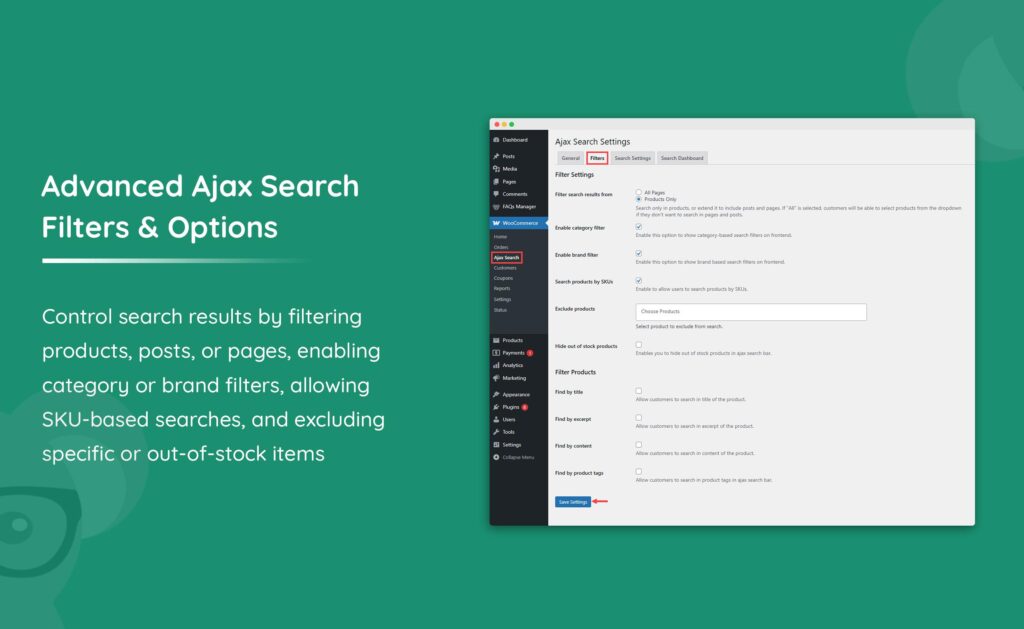
Product search is one of the most important conversion tools in any WooCommerce store. When customers know what they’re looking for, they often head directly to the search bar instead of browsing categories. If your search system is fast, accurate, and user-friendly, customers can quickly find products and complete purchases.
However, the default WooCommerce search functionality has limitations, especially for stores with hundreds or thousands of products. Optimizing product search can significantly improve customer experience, increase conversion rates, and boost revenue.
In this guide, you’ll learn how to optimize WooCommerce product search for speed, accuracy, and better product discovery.
Why Product Search Matters
Customers who use search often have strong buying intent.
Benefits of optimized search include:
- Faster product discovery
- Increased conversion rates
- Improved customer satisfaction
- Lower bounce rates
- Higher average order values
- Better user engagement
A well-designed search system helps customers find products in seconds.
Limitations of Default WooCommerce Search
WooCommerce’s default search works well for small stores but struggles as product catalogs grow.
Common limitations include:
Limited Search Scope
By default, WooCommerce mainly searches:
- Product titles
- Product descriptions
- Short descriptions
It may ignore:
- SKUs
- Product attributes
- Categories
- Tags
- Custom fields
Poor Relevance Ranking
Search results aren’t always ordered by relevance.
No Live Search
Customers must submit searches before seeing results.
Limited Filtering
Advanced filtering options are often missing.
These limitations can negatively impact user experience.
Implementing AJAX Product Search
AJAX search displays results instantly while users type.
Benefits include:
- Real-time product suggestions
- Faster browsing
- Reduced page reloads
- Better mobile usability
Examples:
When users type:
“wire”
Suggestions may include:
- Wireless Earbuds
- Wireless Keyboard
- Wireless Headphones
AJAX search significantly improves product discovery.
Live Search and Autocomplete
Autocomplete helps customers find products faster.
Features include:
Product Suggestions
Show matching products instantly.
Product Images
Display thumbnails within search results.
Pricing Information
Show product prices directly in suggestions.
Category Suggestions
Recommend relevant categories.
Autocomplete reduces friction during the shopping journey.
Search by SKU
Many customers search using product codes.
Especially useful for:
- B2B stores
- Wholesale stores
- Electronics stores
- Automotive stores
SKU search improves precision and helps customers locate exact products quickly.
Search by Product Attributes
Customers often search using attributes rather than product names.
Examples:
Color
- Black
- White
- Blue
Size
- Small
- Medium
- Large
Brand
- Apple
- Samsung
- Sony
Material
- Cotton
- Leather
- Steel
Attribute-based search improves product discoverability.
Advanced Product Filters
Search becomes more powerful when combined with filtering.
Popular filters include:
Price Filters
Allow customers to search within budgets.
Category Filters
Limit searches to specific categories.
Brand Filters
Display products from preferred manufacturers.
Rating Filters
Show highly rated products.
Availability Filters
Display only in-stock items.
Advanced filters help customers narrow results quickly.
Fuzzy Search and Typo Tolerance
Customers frequently misspell product names.
Examples:
Search:
“iphon”
Should still return:
“iPhone”
Fuzzy search helps by supporting:
- Typo correction
- Partial matching
- Synonym recognition
This improves search accuracy and user satisfaction.
Product Tag Search
Product tags provide additional search opportunities.
Examples:
Tags:
- Gaming
- Wireless
- Portable
- Eco-Friendly
Including tags in search indexes improves result relevance.
Search Analytics
Search analytics help identify customer behavior.
Track:
Popular Searches
Discover trending products.
No-Result Searches
Identify missing products or content.
Conversion Rates
Measure search effectiveness.
Search Trends
Understand seasonal demand.
Analytics help store owners improve product organization and inventory planning.
Mobile Search Optimization
Most WooCommerce traffic now comes from mobile devices.
Mobile search should include:
- Large search fields
- Touch-friendly controls
- Fast AJAX results
- Easy filter access
A smooth mobile search experience directly impacts conversions.
Product Search SEO Benefits
Search optimization improves user engagement metrics.
Benefits include:
- Increased session duration
- More page views
- Lower bounce rates
- Better product visibility
While internal search doesn’t directly impact rankings, improved user engagement can indirectly support SEO performance.
Improving Search Performance
Fast search results are critical.
Optimization strategies include:
Redis Object Cache
Reduce database queries.
LiteSpeed Cache
Improve overall site performance.
Database Optimization
Maintain WooCommerce tables regularly.
Product Indexing
Create optimized search indexes.
CDN Integration
Use Cloudflare to improve global speed.
Performance optimization ensures search remains responsive even with large catalogs.
Elasticsearch for Large WooCommerce Stores
Large stores often require more advanced search engines.
Elasticsearch offers:
- Lightning-fast searches
- Better relevance ranking
- Advanced filtering
- Scalability
Benefits include:
- Improved search accuracy
- Faster response times
- Better customer experience
Ideal for stores with thousands of products.
Best WooCommerce Search Plugins
FiboSearch
One of the most popular WooCommerce live search plugins.
Features:
- AJAX search
- Product thumbnails
- SKU support
SearchWP
Advanced search customization.
Features:
- Custom field searching
- WooCommerce integration
Relevanssi
Improves search relevance and ranking.
ElasticPress
Integrates WordPress with Elasticsearch.
Ideal for large stores.
Security Considerations
Search functionality should remain secure.
Best practices include:
Input Validation
Protect against malicious queries.
Rate Limiting
Prevent automated abuse.
Query Optimization
Reduce resource-intensive searches.
Search Logging
Monitor suspicious behavior.
Security protects store stability and performance.
Common Product Search Mistakes
Ignoring Mobile Search
Mobile users often represent the majority of traffic.
No Live Search
Customers expect instant results.
Poor Search Relevance
Irrelevant results reduce conversions.
Missing Filters
Filtering improves product discovery.
No Search Analytics
Optimization requires data.
Avoiding these mistakes improves customer experiences.
WooCommerce Product Search Optimization Checklist
✓ AJAX Search
✓ Live Search Suggestions
✓ SKU Search
✓ Product Attribute Search
✓ Product Tag Search
✓ Advanced Filters
✓ Typo Tolerance
✓ Search Analytics
✓ Mobile Optimization
✓ Redis Caching
✓ Database Optimization
✓ Elasticsearch (For Large Stores)
Final Thoughts
Product search is one of the highest-converting features in any WooCommerce store. Customers who search often know exactly what they want, making it essential to provide fast, accurate, and intelligent search experiences.
By implementing AJAX search, live suggestions, SKU search, attribute indexing, advanced filters, search analytics, and scalable technologies such as Elasticsearch, store owners can dramatically improve product discovery and increase sales.
Whether you’re running a small WooCommerce shop or a large enterprise store, investing in product search optimization can have a direct impact on customer satisfaction, conversion rates, and long-term business growth.

Hire Me on Upwork – Dokan & WooCommerce Expert

 Chat on WhatsApp