
WordPress: SEO Audit for WordPress Websites
Search Engine Optimization (SEO) is one of the most important factors in driving organic traffic to a WordPress website. However, many website owners focus on publishing content and building backlinks while overlooking technical SEO issues that may be limiting their rankings.
A comprehensive SEO audit helps identify problems affecting visibility, user experience, and search engine performance. Whether you run a blog, business website, WooCommerce store, membership platform, or multi-vendor marketplace, regular SEO audits are essential for maintaining strong search rankings.
In this guide, you’ll learn how to perform a complete SEO audit for WordPress websites and uncover opportunities for growth.
What Is an SEO Audit?
An SEO audit is a detailed analysis of your website’s search engine performance.
The goal is to identify:
- Technical SEO issues
- On-page optimization problems
- Performance bottlenecks
- Content gaps
- Mobile usability issues
- Indexing and crawling errors
An audit provides a roadmap for improving rankings and organic traffic.
Why SEO Audits Are Important
Regular SEO audits help:
Improve Search Rankings
Identify factors preventing higher rankings.
Increase Organic Traffic
Optimize pages for better visibility.
Improve User Experience
Fix usability and performance issues.
Discover Technical Problems
Find broken links, crawl errors, and indexing issues.
Stay Ahead of Competitors
SEO audits reveal opportunities your competitors may be missing.
SEO is not a one-time task—it requires ongoing monitoring and optimization.
Step 1: Check Website Indexing
The first step is ensuring search engines can index your website.
Verify:
Indexed Pages
Search:
site:yourdomain.comReview how many pages appear in search results.
Robots.txt File
Ensure important pages are not blocked.
Example:
User-agent: *
Allow: /

Sitemap: https://yourdomain.com/sitemap.xml
Noindex Tags
Check whether important pages have accidental noindex directives.
Indexing issues can prevent pages from appearing in search results.
Step 2: Analyze XML Sitemaps
Sitemaps help search engines discover content efficiently.
Verify:
- Sitemap accessibility
- Updated content inclusion
- Product pages
- Categories
- Blog posts
Popular sitemap tools include:
- Rank Math SEO
- Yoast SEO
- Google Search Console
A healthy sitemap improves crawling efficiency.
Step 3: Review Technical SEO
Technical SEO forms the foundation of search performance.
HTTPS Security
Ensure all pages use HTTPS.
Canonical URLs
Prevent duplicate content issues.
Broken Links
Identify and fix:
- Internal broken links
- External broken links
Redirect Chains
Reduce unnecessary redirects.
Technical issues often limit rankings despite quality content.
Step 4: Audit Website Speed
Page speed is a direct ranking factor.
Review:
Core Web Vitals
- Largest Contentful Paint (LCP)
- Interaction to Next Paint (INP)
- Cumulative Layout Shift (CLS)
Server Response Time
Optimize hosting performance.
Image Optimization
Use:
- WebP
- AVIF
- Lazy loading
Caching
Implement:
- LiteSpeed Cache
- Redis Object Cache
Faster websites provide better user experiences and rankings.
Step 5: Mobile SEO Audit
Google uses mobile-first indexing.
Verify:
Responsive Design
Pages should display properly on all devices.
Mobile Navigation
Menus should be easy to use.
Mobile Speed
Optimize performance for smartphones.
Touch-Friendly Elements
Buttons and forms should be easy to interact with.
A poor mobile experience can negatively impact rankings.
Step 6: On-Page SEO Audit
Review individual pages for optimization opportunities.
SEO Titles
Include primary keywords.
Meta Descriptions
Create compelling summaries.
Heading Structure
Use:
- H1
- H2
- H3
Properly.
Keyword Placement
Include keywords naturally throughout content.
On-page optimization improves relevance and click-through rates.
Step 7: Content Quality Assessment
Content remains one of the strongest ranking factors.
Evaluate:
Content Depth
Provide comprehensive information.
Content Freshness
Update outdated pages.
Readability
Improve user engagement.
Search Intent Alignment
Ensure content matches user expectations.
High-quality content consistently outperforms thin pages.
Step 8: Internal Linking Audit
Internal links help search engines understand site structure.
Check:
Orphan Pages
Pages with no internal links.
Related Content Links
Connect relevant articles.
Category Structure
Maintain logical organization.
Anchor Text Optimization
Use descriptive anchor text.
Strong internal linking improves crawlability and authority distribution.
Step 9: Image SEO Audit
Images contribute significantly to SEO.
Review:
Alt Text
Provide descriptive image text.
File Names
Use keyword-rich names.
Example:
wordpress-seo-audit-checklist.jpgImage Compression
Reduce file sizes without sacrificing quality.
Optimized images improve speed and accessibility.
Step 10: Structured Data Audit
Schema markup helps search engines understand content.
Verify:
Article Schema
Product Schema
FAQ Schema
Review Schema
Organization Schema
Structured data can improve search visibility through rich snippets.
Step 11: WooCommerce SEO Audit
For WooCommerce stores, review:
Product Titles
Product Descriptions
Product Categories
Product Schema
Product Reviews
Product URLs
Well-optimized product pages attract more organic traffic.
Step 12: Backlink Audit
Backlinks remain a critical ranking factor.
Analyze:
Quality Backlinks
Links from authoritative websites.
Toxic Backlinks
Spammy or harmful links.
Referring Domains
Monitor backlink diversity.
Lost Backlinks
Recover valuable links when possible.
A healthy backlink profile improves authority and rankings.
Step 13: Local SEO Audit
For local businesses, verify:
Google Business Profile
Local Citations
NAP Consistency
(Name, Address, Phone)
Local Landing Pages
Customer Reviews
Local SEO helps businesses attract nearby customers.
Step 14: User Experience Audit
Google increasingly values user experience signals.
Review:
Navigation Structure
Page Layout
Content Accessibility
Conversion Paths
Bounce Rates
Better user experiences often result in better rankings.
Step 15: Security Audit
Website security affects SEO performance.
Verify:
SSL Certificate
Malware Scans
Plugin Updates
Firewall Protection
Backup Systems
Secure websites build trust and protect rankings.
Essential SEO Audit Tools
Google Search Console
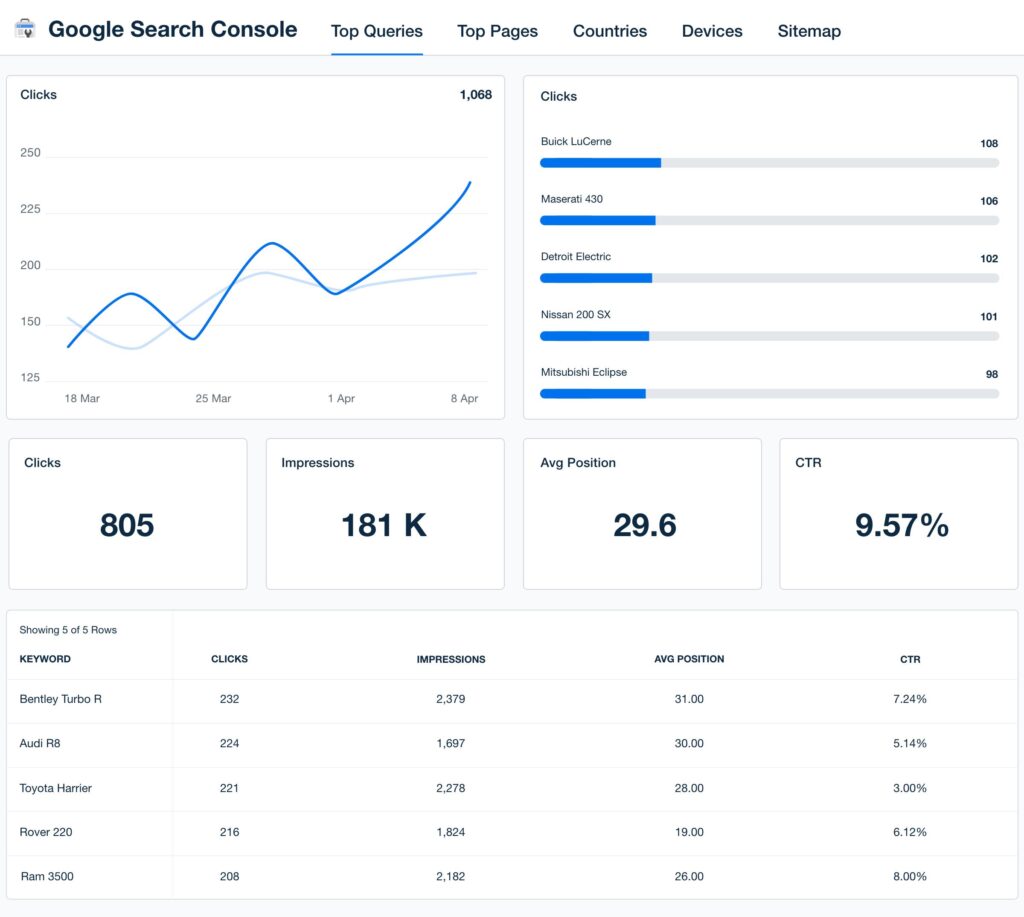
Monitor indexing and keyword performance.
Google Analytics
Track traffic and user behavior.
Rank Math SEO
Manage on-page optimization.
Ahrefs
Backlink and competitor analysis.
SEMrush
Comprehensive SEO auditing.
Screaming Frog
Technical SEO crawling and diagnostics.
These tools provide valuable insights for optimization.
Common SEO Problems Found During Audits
Slow Website Speed
One of the most common ranking issues.
Missing Meta Descriptions
Reduces click-through rates.
Duplicate Content
Confuses search engines.
Broken Links
Harm user experience.
Poor Mobile Optimization
Impacts mobile-first indexing.
Weak Internal Linking
Reduces crawl efficiency.
Identifying these issues is the first step toward improvement.
Recommended WordPress SEO Plugin Stack
Rank Math SEO
Comprehensive SEO management.
LiteSpeed Cache
Performance optimization.
Redis Object Cache
Database performance improvements.
Cloudflare
CDN and security.
ShortPixel
Image optimization.
This stack provides a strong SEO foundation.
WordPress SEO Audit Checklist
✓ Indexing Review
✓ Sitemap Verification
✓ Technical SEO Audit
✓ Core Web Vitals Analysis
✓ Mobile Optimization
✓ On-Page SEO Review
✓ Content Quality Assessment
✓ Internal Linking Audit
✓ Image SEO Optimization
✓ Schema Validation
✓ Backlink Analysis
✓ Security Audit
Final Thoughts
An SEO audit is one of the most valuable activities for any WordPress website. By regularly reviewing technical SEO, content quality, user experience, page speed, mobile performance, backlinks, and structured data, website owners can identify opportunities that directly impact rankings and traffic.
SEO audits are not just about fixing problems—they’re about discovering growth opportunities. Consistent auditing and optimization can help WordPress websites achieve stronger search visibility, attract more qualified visitors, and generate long-term business growth.
Whether you’re managing a personal blog, business website, WooCommerce store, membership platform, or Dokan marketplace, regular SEO audits should be an essential part of your digital strategy.

Hire Me on Upwork – Dokan & WooCommerce Expert

 Chat on WhatsApp