
WordPress: Rental Website Development (Complete Guide)
The rental business has evolved dramatically in recent years. Today, customers expect to browse products or properties online, check real-time availability, make secure payments, and manage bookings from any device. Whether you’re renting vacation homes, vehicles, equipment, event supplies, or professional services, having a modern rental website is essential for business growth.
WordPress is one of the most powerful platforms for building rental websites thanks to its flexibility, extensive plugin ecosystem, and seamless integration with WooCommerce. With the right tools, you can create a professional booking platform that automates reservations, payments, availability management, and customer communication.
This guide explains how to build a high-performing rental website using WordPress.
What is a Rental Website?
A rental website allows customers to reserve products, services, or properties for a specific period instead of purchasing them permanently.
Popular rental businesses include:
- Vacation Homes
- Apartments & Villas
- Cars & Bikes
- Camera Equipment
- Party & Event Supplies
- Construction Machinery
- Musical Instruments
- Furniture Rentals
- Office Equipment
- Sports Equipment
Customers select available dates, complete payment, and receive booking confirmation instantly.
Why Build a Rental Website with WordPress?
WordPress offers several advantages.
Affordable Development
Lower development costs compared to custom software.
Highly Customizable
Thousands of plugins and themes.
SEO Friendly
Built for search engine optimization.
Scalable
Supports startups and enterprise businesses.
WooCommerce Integration
Powerful booking and payment capabilities.
It is suitable for both small rental businesses and large booking platforms.
Types of Rental Websites
WordPress supports many rental business models.
Property Rental
Apartments, villas, holiday homes.
Vehicle Rental
Cars, bikes, scooters, luxury vehicles.
Equipment Rental
Construction tools, cameras, generators.
Event Rental
Tables, chairs, lighting, decorations.
Service Booking
Consultants, photographers, trainers.
Office Equipment Rental
Laptops, projectors, printers.
Medical Equipment Rental
Hospital beds, oxygen concentrators, wheelchairs.
Choose a niche based on your target audience.
Essential Features
A professional rental website should include:
- Booking calendar
- Availability management
- Dynamic pricing
- Customer dashboard
- Secure payments
- Search and filters
- Reviews and ratings
- Mobile responsiveness
- Email notifications
- SEO optimization
These features create a seamless booking experience.
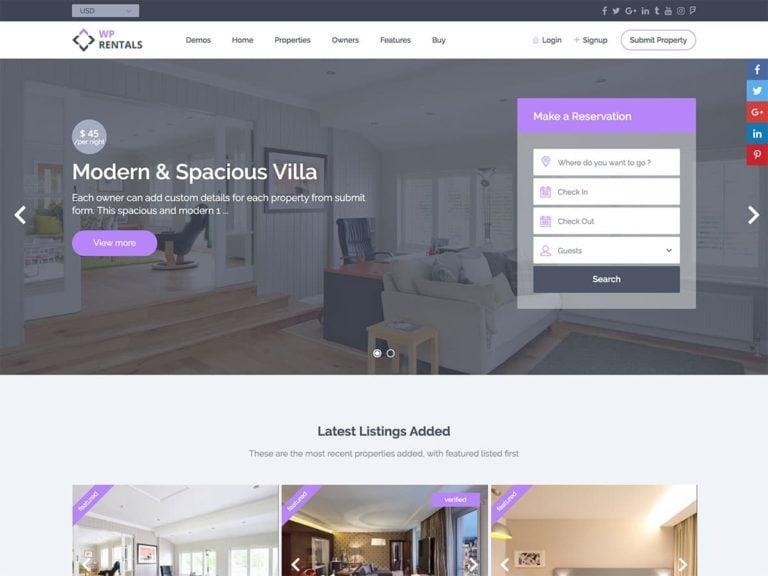
Professional Homepage
Your homepage should clearly explain your rental services.
Include:
Hero Banner
Highlight your most popular rentals.
Search Form
Allow users to search by date and location.
Featured Rentals
Display popular products or properties.
Customer Reviews
Build trust with testimonials.
Call-to-Action
Encourage visitors to book online.
A well-designed homepage improves conversions.
Rental Listings
Each rental listing should include:
Product Title
Description
High-Quality Images
Rental Price
Availability Calendar
Security Deposit
Delivery Options
Reviews
Detailed listings help customers make informed decisions.
Booking Calendar
An interactive calendar allows customers to view availability.
Display:
Available Dates
Reserved Dates
Maintenance Days
Holiday Pricing
Real-time calendars prevent double bookings.
Flexible Rental Durations
Support multiple booking options.
Hourly
Meeting rooms and equipment.
Daily
Cars and cameras.
Weekly
Holiday homes.
Monthly
Furniture and office equipment.
Flexible durations attract more customers.
Dynamic Pricing
Automatically adjust pricing based on demand.
Examples:
Weekend Rates
Holiday Pricing
Seasonal Pricing
Long-Term Discounts
Peak Demand Pricing
Dynamic pricing maximizes profitability.
Security Deposits
Collect refundable deposits for valuable rentals.
Examples:
- Vehicles
- Electronics
- Construction Equipment
- Musical Instruments
Deposits reduce financial risk.
Customer Dashboard
Allow users to manage:
- Active Bookings
- Booking History
- Invoices
- Payment History
- Profile Settings
- Cancellations
A self-service dashboard improves customer satisfaction.
Search & Filters
Help visitors find rentals quickly.
Popular filters include:
Category
Location
Price
Availability
Rating
Brand
Advanced filters improve user experience.
Delivery & Pickup
Offer flexible options.
Store Pickup
Home Delivery
Return Pickup
Local Delivery
Convenient fulfillment increases customer satisfaction.
Payment Gateway Integration
Support secure online payments.
Examples:
Stripe
PayPal
Razorpay
WooCommerce Payments
Bank Transfer
Offering multiple payment methods improves conversions.
Rental Agreements
Display clear policies including:
Usage Rules
Security Deposit
Cancellation Policy
Damage Charges
Late Return Fees
Transparent policies reduce disputes.
Customer Reviews
Enable reviews for:
Rental Experience
Product Quality
Vendor Service
Delivery Experience
Positive reviews increase booking confidence.
Email & SMS Notifications
Automate communications.
Examples:
Booking Confirmation
Payment Receipt
Booking Reminder
Pickup Reminder
Return Reminder
Automation keeps customers informed.
SEO for Rental Websites
Optimize pages using keywords such as:
- Rental services near me
- Equipment rental
- Car rental online
- Property rental website
- Camera rental
Create dedicated pages for categories and service locations.
Marketing Strategy
Promote your rental website through:
Google Ads
Facebook Ads
Instagram Marketing
Email Marketing
WhatsApp Campaigns
Referral Programs
Local SEO
Consistent marketing increases bookings.
Mobile Optimization
Ensure your website offers:
Responsive Design
Mobile Booking Calendar
Fast Checkout
Click-to-Call
GPS Navigation
Most customers book using smartphones.
Performance Optimization
Rental websites must remain fast during high traffic.
Recommended tools:
LiteSpeed Cache
Redis Object Cache
Cloudflare CDN
Image Compression
Database Optimization
Fast websites improve SEO and customer satisfaction.
Security Best Practices
Protect customer data using:
SSL Certificate
Two-Factor Authentication
Secure Payment Processing
Malware Protection
Daily Backups
Role-Based Access
Security builds customer trust.
Analytics & Reporting
Monitor key metrics.
Total Bookings
Booking Revenue
Occupancy Rate
Average Booking Value
Customer Retention
Conversion Rate
Analytics help improve pricing and marketing strategies.
AI Features
Enhance your rental website with AI.
Examples:
AI Chatbot
Smart Search
Personalized Rental Recommendations
Automated Customer Support
AI Pricing Suggestions
AI improves both customer experience and operational efficiency.
Best WordPress Rental Plugins
WooCommerce Bookings
Official booking solution for WooCommerce.
RnB – WooCommerce Rental & Booking
Comprehensive rental management with pricing, deposits, and inventory support.
Amelia
Appointment scheduling and online reservations.
Bookings for WooCommerce
Easy booking management for service businesses.
HivePress
Excellent for creating rental listing marketplaces.
Choose the plugin that best matches your rental business.
Recommended Plugin Stack
WooCommerce
Core eCommerce functionality.
WooCommerce Bookings
Booking management.
RnB – WooCommerce Rental & Booking
Rental products and pricing.
Rank Math SEO
Search engine optimization.
FluentCRM
Customer marketing automation.
WP Mail SMTP
Reliable email delivery.
LiteSpeed Cache
Performance optimization.
Redis Object Cache
Database caching.
Cloudflare
Security and CDN.
This stack provides a scalable and high-performance rental website.
Common Rental Website Mistakes
No Real-Time Availability
Causes double bookings.
Poor Mobile Experience
Leads to abandoned reservations.
Weak Search Functionality
Customers struggle to find rentals.
Slow Website
Reduces conversions.
Unclear Pricing
Creates customer confusion.
Weak Security
Risks customer data.
Avoiding these issues helps create a professional rental platform.
Rental Website Development Checklist
✅ Booking System
✅ Rental Listings
✅ Availability Calendar
✅ Dynamic Pricing
✅ Security Deposits
✅ Customer Dashboard
✅ Search & Filters
✅ Payment Gateway Integration
✅ Email & SMS Notifications
✅ Customer Reviews
✅ SEO Optimization
✅ Mobile Optimization
✅ Performance Optimization
✅ Security Hardening
✅ Analytics Dashboard
Final Thoughts
WordPress is an outstanding platform for developing modern rental websites. Its flexibility, WooCommerce integration, and wide range of booking plugins make it suitable for businesses of all sizes—from local equipment rental companies to enterprise-level booking platforms.
By implementing a user-friendly booking system, real-time availability, secure payments, advanced search, mobile optimization, and strong SEO practices, you can create a rental website that attracts customers, simplifies operations, and generates consistent revenue.
Whether you’re renting properties, vehicles, equipment, or services, WordPress provides everything needed to build a scalable and successful rental business online.

Hire Me on Upwork – Dokan & WooCommerce Expert

 Chat on WhatsApp