
WooCommerce: Custom WooCommerce Email Templates (Complete Guide)
Email communication plays a crucial role in every WooCommerce store. From order confirmations and shipping updates to password resets and refund notifications, transactional emails keep customers informed throughout their buying journey.
While WooCommerce provides default email templates, customizing them to match your brand can significantly improve customer trust, engagement, and conversion rates. Professionally designed email templates create a consistent shopping experience and encourage repeat purchases.
In this complete guide, you’ll learn how to customize WooCommerce email templates, automate notifications, improve deliverability, and create beautiful branded emails.
Why Customize WooCommerce Emails?
Default WooCommerce emails are functional but lack branding and personalization.
Custom email templates help you:
- Build brand recognition
- Improve customer trust
- Increase email open rates
- Enhance the customer experience
- Reduce support requests
- Boost repeat purchases
- Maintain consistent branding
Every email becomes an extension of your online store.
WooCommerce Default Email Types
WooCommerce automatically sends several transactional emails.
These include:
New Order
Sent to store administrators when a new order is placed.
Processing Order
Confirms that payment has been received.
Completed Order
Notifies customers that their order is complete.
On-Hold Order
Sent when payment verification is pending.
Failed Order
Alerts administrators of unsuccessful payments.
Refunded Order
Confirms that a refund has been processed.
Cancelled Order
Informs customers or administrators about cancelled orders.
Customer Invoice
Provides payment details for unpaid orders.
Password Reset
Allows customers to reset their account password.
New Account
Welcomes newly registered customers.
Each email can be customized independently.
Benefits of Branded Email Templates
Professional email templates provide several advantages.
Stronger Brand Identity
Use your logo, colors, and typography.
Better Customer Experience
Consistent communication builds confidence.
Higher Engagement
Well-designed emails receive more clicks.
Increased Sales
Include product recommendations and promotions.
Improved Customer Loyalty
Professional communication encourages repeat purchases.
Customizing Email Design
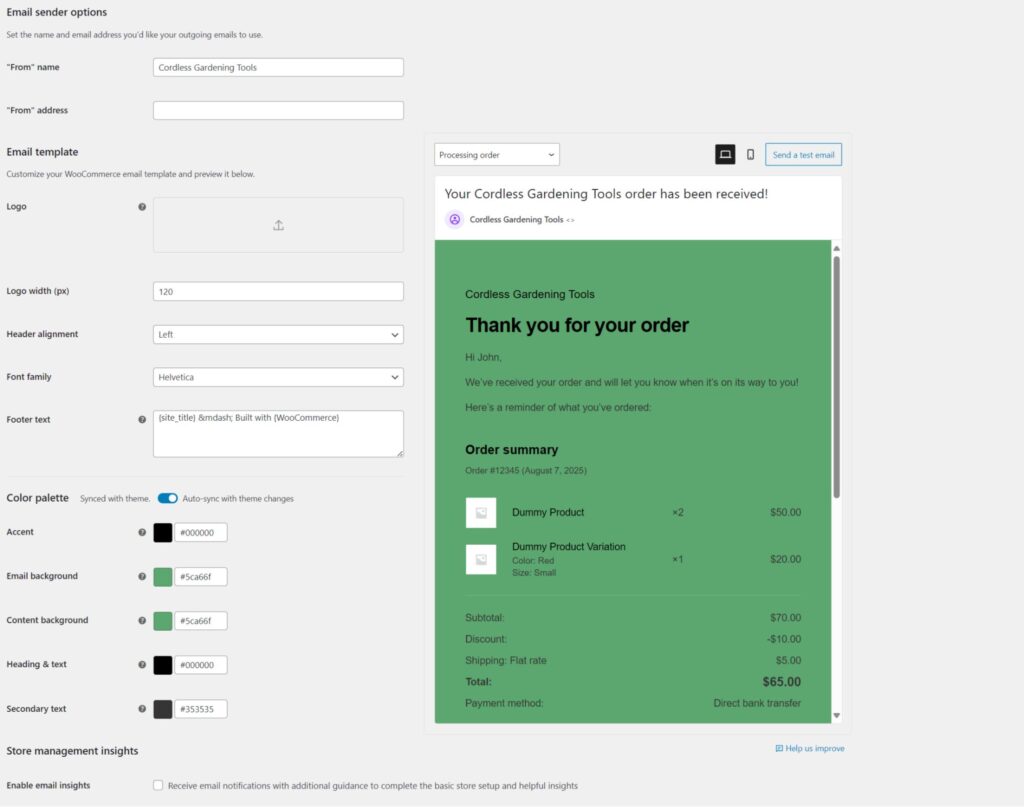
Personalize your WooCommerce emails by updating:
Store Logo
Display your company logo at the top.
Brand Colors
Use your website’s primary color palette.
Typography
Select clean and readable fonts.
Buttons
Customize call-to-action buttons such as:
- View Order
- Track Shipment
- Continue Shopping
- Contact Support
Footer
Add contact details, business address, and social media links.
Consistent branding creates a professional appearance.
Personalizing Email Content
Use dynamic placeholders to display customer-specific information.
Examples include:
- Customer Name
- Order Number
- Product Name
- Billing Address
- Shipping Address
- Order Total
- Payment Method
- Tracking Number
Personalized emails improve customer engagement.
HTML Email Templates
Modern HTML emails should include:
Responsive Layout
Product Images
Order Summary
Shipping Information
Call-to-Action Buttons
Contact Information
Responsive templates display correctly across all devices.
Order Confirmation Emails
Include:
- Thank-you message
- Order details
- Product summary
- Payment information
- Estimated delivery
- Customer support links
Order confirmation emails reassure customers after purchase.
Shipping Notification Emails
Notify customers when their order is dispatched.
Include:
Tracking Number
Courier Name
Estimated Delivery Date
Tracking Link
Shipment updates reduce support inquiries.
Refund & Cancellation Emails
Explain:
- Refund amount
- Refund method
- Processing timeline
- Cancellation reason
- Support contact information
Clear communication builds trust.
Marketing Opportunities
Transactional emails can also include:
Related Products
Best Sellers
Coupon Codes
Seasonal Promotions
Loyalty Rewards
Referral Programs
These additions help increase repeat sales.
Abandoned Cart Emails
Recover lost revenue using automated reminders.
Example workflow:
1 Hour
Friendly reminder.
24 Hours
Offer a small discount.
48 Hours
Final reminder with urgency.
Cart recovery emails improve conversion rates.
Email Automation
Automate important customer communications.
Examples:
Welcome Emails
Order Confirmations
Shipping Updates
Review Requests
Birthday Offers
Reorder Reminders
Automation saves time while improving engagement.
Customer Segmentation
Send targeted emails based on:
Purchase History
Product Categories
Order Value
Customer Location
Buying Frequency
Segmentation increases campaign effectiveness.
Email Deliverability
Ensure emails reach customer inboxes by configuring:
SMTP
Use a dedicated SMTP service instead of PHP mail.
SPF Record
Authorize sending servers.
DKIM
Verify email authenticity.
DMARC
Protect against email spoofing.
Proper authentication improves inbox placement.
Mobile Optimization
Design emails for mobile devices.
Include:
Responsive Layout
Large Buttons
Readable Fonts
Optimized Images
Short Paragraphs
Most customers read emails on smartphones.
Accessibility Best Practices
Create accessible emails by:
Using Alt Text
Describe all images.
High Color Contrast
Improve readability.
Clear Headings
Organize content logically.
Large Clickable Buttons
Enhance usability for all users.
Accessibility improves the experience for every customer.
Performance Optimization
Large WooCommerce stores may send thousands of emails daily.
Improve performance by using:
Queue-Based Email Sending
Image Compression
SMTP Services
Email Logging
Background Processing
Efficient email delivery reduces server load.
Security Best Practices
Protect customer communication using:
SSL Encryption
Secure SMTP Authentication
Two-Factor Authentication
Spam Protection
Email Logs
Regular Updates
Strong security protects customer information.
Analytics & Reporting
Monitor important email metrics.
Delivery Rate
Open Rate
Click-Through Rate
Conversion Rate
Bounce Rate
Revenue from Email
Analytics help improve future campaigns.
Best WooCommerce Email Customization Plugins
YayMail
A drag-and-drop WooCommerce email builder with extensive customization options.
Best For
Store owners who want professional email designs without coding.
Kadence WooCommerce Email Designer
Customize WooCommerce emails using a live visual editor.
Best For
Small and medium-sized businesses.
Decorator – WooCommerce Email Customizer
Free plugin for branding WooCommerce transactional emails.
Best For
Beginners looking for a lightweight solution.
MailPoet
Email marketing platform integrated with WooCommerce.
Best For
Newsletters, promotions, and automated customer campaigns.
FluentSMTP
Reliable SMTP delivery with detailed email logs.
Best For
Improving email deliverability.
Recommended Plugin Stack
WooCommerce
Core eCommerce platform.
YayMail
Drag-and-drop email template customization.
FluentSMTP
Reliable email delivery.
MailPoet
Email marketing automation.
FluentCRM
Customer segmentation and marketing.
WP Mail Logging
Track outgoing emails.
Rank Math SEO
Search engine optimization.
LiteSpeed Cache
Performance optimization.
Cloudflare
Website security and CDN.
This plugin stack creates a professional WooCommerce email system.
Common Email Customization Mistakes
Using Default Templates
Misses branding opportunities.
No SMTP Configuration
Leads to delivery failures.
Overloading Emails
Too much content reduces readability.
Poor Mobile Design
Hurts customer engagement.
Ignoring Analytics
Prevents optimization.
Missing Personalization
Makes emails feel generic.
Avoiding these mistakes improves customer communication.
WooCommerce Email Template Checklist
✅ Custom Logo
✅ Brand Colors
✅ Responsive HTML Design
✅ Personalized Content
✅ Order Confirmation
✅ Shipping Notifications
✅ Refund Emails
✅ Abandoned Cart Emails
✅ SMTP Configuration
✅ Mobile Optimization
✅ Accessibility
✅ Analytics Tracking
✅ Security Hardening
Final Thoughts
Custom WooCommerce email templates are much more than attractive designs—they are a powerful communication tool that strengthens your brand, improves customer satisfaction, and increases repeat purchases.
By combining professional email templates, reliable SMTP delivery, automation, personalization, and marketing opportunities, you can transform every transactional email into a valuable customer touchpoint.
Whether you’re running a small online store or a large WooCommerce business, investing in branded email communication helps build trust, improve engagement, and support long-term business growth.

Hire Me on Upwork – Dokan & WooCommerce Expert

 Chat on WhatsApp