
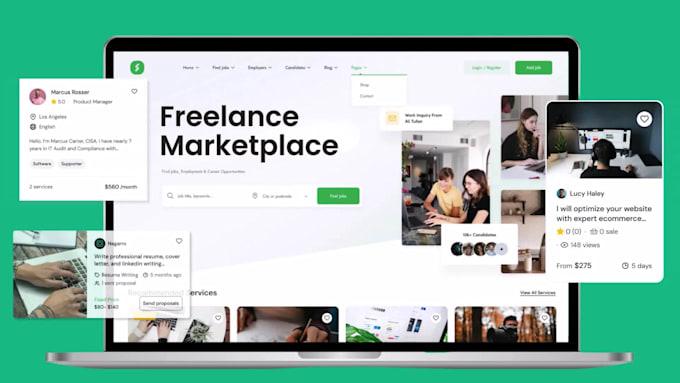
Dokan: Building a Service Marketplace (Complete Guide)
The online service marketplace industry has grown rapidly over the last decade. Platforms connecting customers with freelancers, agencies, consultants, and local professionals have transformed how services are bought and sold. Whether you’re building a platform for web developers, designers, tutors, lawyers, fitness coaches, or home service providers, a service marketplace offers enormous business opportunities.
Using Dokan with WooCommerce, you can build a professional multi-vendor service marketplace where service providers create their own stores, list services, manage bookings, receive payments, and communicate directly with customers.
This comprehensive guide explains how to build a scalable service marketplace using Dokan.
What is a Service Marketplace?
A service marketplace is an online platform where multiple service providers offer their expertise to customers.
Unlike traditional eCommerce stores that sell physical products, service marketplaces sell skills, appointments, consultations, or project-based work.
Examples include:
- Web Development
- Graphic Design
- Digital Marketing
- SEO Services
- Content Writing
- Online Tutoring
- Legal Consultation
- Accounting Services
- Fitness Coaching
- Home Repair Services
Customers search, compare, book, and pay online.
Why Build a Service Marketplace?
Service marketplaces provide several business advantages.
Recurring Revenue
Earn commissions from every booking or completed project.
No Inventory Management
No need to store physical products.
Unlimited Service Categories
Expand by adding new industries and professionals.
Scalable Business Model
Grow your platform by onboarding more service providers.
Global Reach
Offer services locally or internationally.
Why Choose Dokan?
Dokan provides a powerful foundation for multi-vendor marketplaces.
Benefits include:
Individual Vendor Stores
Each provider has a dedicated storefront.
Vendor Dashboard
Manage services, bookings, pricing, and earnings.
Commission Management
Automatically calculate marketplace commissions.
WooCommerce Integration
Supports payments, coupons, taxes, and reporting.
Scalable Architecture
Suitable for thousands of vendors and customers.
Popular Service Marketplace Niches
Examples include:
Freelancers
Developers, designers, writers.
Agencies
Marketing, branding, consulting.
Home Services
Cleaning, plumbing, electricians.
Education
Tutors, trainers, language teachers.
Healthcare
Doctors, therapists, nutritionists.
Legal Services
Lawyers and consultants.
Business Services
Accounting, HR, virtual assistants.
Creative Services
Photography, video editing, animation.
Choose a niche with consistent demand and growth potential.
Vendor Registration
Collect essential information during registration.
Include:
- Business Name
- Service Category
- Experience
- Certifications
- Portfolio
- Contact Details
- Business Address
- Identity Verification
Manual approval helps maintain service quality.
Service Listings
Each service page should include:
Service Title
Detailed Description
Pricing
Delivery Time
Portfolio Images
FAQs
Reviews
Contact Options
Detailed listings increase customer confidence.
Pricing Models
Support different pricing structures.
Fixed Price
One-time project fee.
Hourly Rate
Perfect for consultants.
Package Pricing
Basic, Standard, Premium plans.
Subscription Services
Monthly recurring services.
Flexible pricing attracts more customers.
Booking & Appointment System
Enable customers to:
Select Date
Choose Time
Book Consultation
Request Custom Quotes
Schedule Meetings
Integrate booking plugins for a seamless experience.
Request for Quote (RFQ)
Allow customers to submit project requirements.
Include:
- Budget
- Timeline
- Project Description
- File Uploads
Vendors can respond with custom proposals.
Communication System
Provide secure communication tools.
Features include:
Private Messaging
File Sharing
Project Discussions
Order Updates
Notification Center
Clear communication reduces misunderstandings.
Vendor Profiles
Professional profiles should display:
Bio
Skills
Certifications
Experience
Portfolio
Reviews
Response Time
Completed Projects
Detailed profiles help customers choose the right provider.
Customer Reviews & Ratings
Allow reviews for:
Service Quality
Communication
Delivery Time
Professionalism
Overall Experience
Reviews build trust and improve conversions.
Commission Models
Configure flexible commission structures.
Percentage-Based
Example: 10% per completed order.
Fixed Fee
Example: ₹500 per project.
Category-Based
Different rates for different service categories.
Transparent commission models encourage vendor participation.
Payment Gateways
Support trusted payment methods.
Stripe
PayPal
Razorpay
WooCommerce Payments
Bank Transfer
Multiple payment options improve checkout completion.
Vendor Withdrawals
Allow vendors to withdraw earnings via:
Bank Transfer
PayPal
Stripe Connect
Wise
Payoneer
Fast payouts improve vendor satisfaction.
Membership & Subscription Plans
Offer vendor subscription packages.
Example:
Free Plan
Limited services.
Professional Plan
More listings and lower commissions.
Premium Plan
Unlimited listings and featured placement.
Subscription revenue creates recurring income.
Search & Filters
Help customers find services using:
Category
Location
Price Range
Rating
Experience
Availability
Advanced search improves user experience.
AI-Powered Features
Enhance your marketplace with AI.
Examples:
Smart Service Recommendations
AI Chat Assistant
Automatic Proposal Suggestions
Skill Matching
Customer Support Bot
AI improves engagement and productivity.
SEO for Service Marketplaces
Optimize pages using keywords such as:
- Hire WordPress Developer
- SEO Consultant
- Graphic Designer
- Online Tutor
- Legal Consultant
Create dedicated landing pages for each service category and location.
Marketing Strategies
Promote your marketplace through:
Google Ads
SEO
LinkedIn Marketing
Facebook & Instagram Ads
Email Campaigns
Referral Programs
Influencer Partnerships
Consistent marketing drives vendor and customer growth.
Mobile Optimization
Ensure your marketplace supports:
Responsive Design
Mobile Booking
Click-to-Call
Live Chat
Mobile Payments
Most customers book services using mobile devices.
Performance Optimization
Large marketplaces require excellent performance.
Optimize using:
LiteSpeed Cache
Redis Object Cache
Cloudflare CDN
Image Optimization
Database Optimization
Fast websites improve SEO and user satisfaction.
Security Best Practices
Protect users with:
SSL Certificate
Two-Factor Authentication
Secure Payments
Identity Verification
Role-Based Permissions
Daily Backups
Strong security builds trust among vendors and customers.
Best Plugins for Service Marketplaces
Dokan Pro
Complete multi-vendor marketplace management.
Best For
Building scalable service marketplaces.
WooCommerce Bookings
Supports appointments and scheduled services.
Best For
Consultants, coaches, and service providers.
Request a Quote for WooCommerce
Allows customers to request custom pricing.
Best For
Project-based services.
FluentCRM
Customer relationship management and marketing automation.
Best For
Lead nurturing and email campaigns.
Better Messages
Private messaging system for WordPress.
Best For
Vendor-customer communication.
Recommended Plugin Stack
Dokan Pro
Marketplace management.
WooCommerce
Core eCommerce platform.
WooCommerce Bookings
Appointment scheduling.
Better Messages
Vendor communication.
FluentCRM
Marketing automation.
Request a Quote for WooCommerce
Custom project inquiries.
WP Mail SMTP
Reliable email delivery.
Rank Math SEO
Search engine optimization.
LiteSpeed Cache
Performance optimization.
Redis Object Cache
Database caching.
Cloudflare
Security and CDN.
This plugin stack provides everything needed to build a professional service marketplace.
Common Service Marketplace Mistakes
Weak Vendor Verification
Reduces marketplace trust.
Poor Search Experience
Makes finding services difficult.
Limited Payment Options
Lowers conversion rates.
No Review System
Reduces customer confidence.
Slow Website
Hurts user experience and SEO.
Weak Communication Tools
Creates project misunderstandings.
Avoiding these mistakes helps build a successful marketplace.
Service Marketplace Checklist
✅ Vendor Registration
✅ Service Listings
✅ Booking System
✅ RFQ Functionality
✅ Vendor Profiles
✅ Customer Reviews
✅ Secure Messaging
✅ Commission Management
✅ Payment Gateways
✅ Vendor Withdrawals
✅ Subscription Plans
✅ Search & Filters
✅ SEO Optimization
✅ Mobile Optimization
✅ Performance Optimization
✅ Security Hardening
Final Thoughts
Building a service marketplace with Dokan is an excellent way to connect professionals with customers while generating recurring commission revenue. Whether you’re targeting freelancers, agencies, consultants, educators, or local service providers, Dokan and WooCommerce provide a flexible and scalable foundation.
By combining advanced search, booking systems, secure messaging, vendor subscriptions, AI-powered recommendations, and strong SEO practices, you can create a professional platform that attracts both providers and customers. As your marketplace grows, continue improving vendor tools, customer experience, and marketing efforts to build a trusted and profitable service ecosystem.

Hire Me on Upwork – Dokan & WooCommerce Expert

 Chat on WhatsApp