
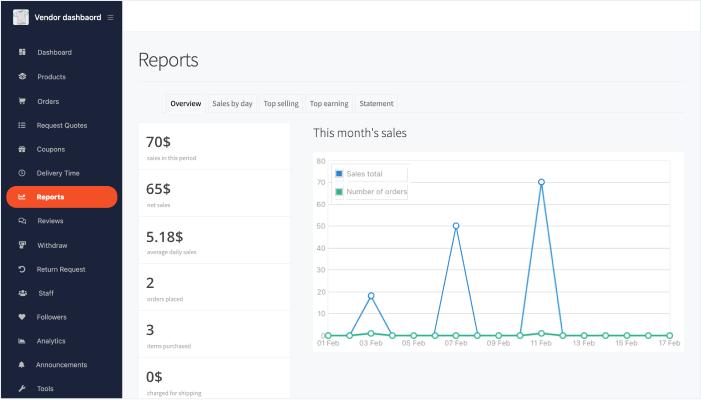
Dokan: Vendor Sales Reports Automation (Complete Guide)
Managing sales reports manually becomes increasingly difficult as your Dokan marketplace grows. Vendors need real-time access to revenue, orders, commissions, taxes, refunds, inventory, and customer insights without relying on administrators. Automated sales reporting empowers vendors to monitor performance, make informed decisions, and grow their businesses while reducing administrative overhead.
Dokan, combined with WooCommerce and reporting tools, enables marketplace owners to automate sales reports, schedule email reports, generate downloadable analytics, and provide vendors with actionable business intelligence.
This comprehensive guide explains how to build an automated vendor sales reporting system in Dokan.
What is Vendor Sales Reports Automation?
Vendor Sales Reports Automation is the process of automatically collecting, analyzing, and presenting vendor sales data in real time.
Instead of creating reports manually, the marketplace automatically generates reports based on marketplace activity.
Typical reports include:
- Sales Revenue
- Orders
- Product Performance
- Customer Reports
- Commission Reports
- Tax Reports
- Inventory Reports
- Refund Reports
- Profit Analysis
Automation saves time while improving business decisions.
Benefits of Automated Sales Reports
Automated reporting provides several advantages.
Real-Time Insights
Vendors can monitor performance instantly.
Better Business Decisions
Analytics reveal opportunities for improvement.
Time Savings
No manual report preparation.
Increased Vendor Satisfaction
Professional reporting tools improve the vendor experience.
Marketplace Growth
Data-driven vendors typically generate more sales.
Dashboard Overview
A vendor dashboard should display:
Total Revenue
Lifetime sales generated.
Monthly Revenue
Current month’s earnings.
Total Orders
Completed and pending orders.
Products Sold
Number of products sold.
Average Order Value
Average spending per customer.
Commission Paid
Marketplace fees deducted.
Available Balance
Withdrawable earnings.
This dashboard gives vendors an instant overview of business performance.
Sales Reports
Generate automated reports for:
Daily Sales
Track daily revenue.
Weekly Sales
Compare weekly performance.
Monthly Sales
Monitor business growth.
Yearly Sales
Analyze long-term trends.
Custom Date Range
Generate reports for any selected period.
Historical reporting helps vendors identify seasonal trends.
Revenue Analytics
Display:
Gross Revenue
Net Revenue
Commission Deductions
Taxes Collected
Shipping Revenue
Discounts Applied
Financial transparency improves vendor trust.
Order Reports
Monitor:
New Orders
Completed Orders
Processing Orders
Cancelled Orders
Refunded Orders
Pending Orders
Order reports improve operational efficiency.
Product Performance Reports
Track product success using:
Best-Selling Products
Low-Performing Products
Product Views
Conversion Rate
Revenue by Product
Product Profitability
These insights help vendors optimize their catalogs.
Customer Reports
Provide valuable customer insights.
Track:
New Customers
Returning Customers
Customer Lifetime Value (CLV)
Repeat Purchase Rate
Customer Location
Purchase Frequency
Customer analytics improve marketing strategies.
Inventory Reports
Automatically monitor:
Low Stock Products
Out-of-Stock Products
Fast-Moving Products
Slow-Moving Products
Inventory Value
Inventory automation prevents stock shortages.
Commission Reports
Display:
Marketplace Commission
Vendor Earnings
Pending Payments
Withdrawal History
Commission Breakdown
Clear reporting reduces payment disputes.
Tax Reports
Generate:
GST Reports
VAT Reports
Sales Tax Reports
Tax by Product
Tax by Order
Tax by Region
Automated tax reporting simplifies accounting.
Refund Reports
Track:
Refund Requests
Refund Amount
Refund Rate
Refund Reasons
Product Returns
Reducing refunds increases profitability.
Profit & Loss Reports
Display:
Revenue
Expenses
Shipping Costs
Taxes
Marketplace Fees
Net Profit
Profit reports help vendors evaluate business performance.
Scheduled Report Automation
Automatically send reports:
Daily
Weekly
Monthly
Quarterly
Annually
Reports can be emailed directly to vendors.
Email Reports
Automatically deliver reports including:
Sales Summary
Revenue Report
Top Products
Low Stock Alerts
Customer Growth
Profit Summary
Email automation keeps vendors informed.
Export Reports
Allow vendors to download reports as:
CSV
Excel
Google Sheets
Exporting simplifies bookkeeping and tax filing.
Interactive Charts
Visualize data with:
Line Charts
Bar Charts
Pie Charts
Revenue Graphs
Sales Trends
Product Performance Charts
Visual analytics improve understanding.
AI-Powered Insights
Enhance reporting with AI.
Examples:
Sales Forecasting
Product Demand Prediction
Inventory Forecasts
Customer Behavior Analysis
Smart Revenue Recommendations
AI enables proactive business planning.
Notifications & Alerts
Notify vendors about:
High Sales Days
Revenue Milestones
Low Inventory
Refund Increases
Best-Selling Products
Payment Releases
Real-time alerts help vendors respond quickly.
Mobile Reporting
Support mobile access with:
Responsive Dashboard
Mobile Charts
Push Notifications
One-Tap Report Downloads
Vendors can monitor sales from anywhere.
Performance Optimization
Optimize large reporting systems using:
LiteSpeed Cache
Redis Object Cache
Database Indexing
Background Report Generation
Cloudflare CDN
Fast reports improve the user experience.
Security Best Practices
Protect financial information with:
SSL Certificate
Role-Based Permissions
Two-Factor Authentication
Audit Logs
Daily Backups
Secure API Connections
Security is essential for business reporting.
Best Plugins for Vendor Sales Reporting
Dokan Pro
Provides vendor dashboards, commission management, and marketplace reporting.
Best For
Complete multi-vendor marketplaces.
Metorik
Advanced WooCommerce analytics with real-time reports, customer insights, and revenue forecasting.
Best For
Growing WooCommerce and Dokan marketplaces.
Advanced WooCommerce Reporting
Offers detailed sales, customer, inventory, and financial reports.
Best For
Businesses requiring custom reports.
WP Mail SMTP
Ensures reliable delivery of scheduled email reports.
Best For
Automated report distribution.
FluentCRM
Automates customer segmentation, email campaigns, and sales reporting notifications.
Best For
Marketing automation and customer management.
Recommended Plugin Stack
Dokan Pro
Marketplace management.
WooCommerce
Core eCommerce platform.
Metorik
Advanced sales analytics.
Advanced WooCommerce Reporting
Custom reporting.
FluentCRM
Marketing automation.
WP Mail SMTP
Reliable email delivery.
Rank Math SEO
Search engine optimization.
LiteSpeed Cache
Performance optimization.
Redis Object Cache
Object caching.
Cloudflare
Security and CDN.
This plugin stack provides a powerful automated reporting system for vendors.
Common Reporting Mistakes
Delayed Report Generation
Reports should update automatically.
Missing Financial Metrics
Include revenue, profit, commissions, and taxes.
No Mobile Support
Many vendors access reports from smartphones.
Ignoring Customer Analytics
Customer insights are valuable for growth.
No Scheduled Reports
Automation saves time and improves communication.
Slow Dashboard Performance
Optimize queries and cache reports.
Avoiding these issues creates a professional vendor experience.
Vendor Sales Reports Automation Checklist
✅ Vendor Dashboard
✅ Sales Reports
✅ Revenue Analytics
✅ Order Reports
✅ Product Performance
✅ Customer Reports
✅ Inventory Reports
✅ Commission Reports
✅ Tax Reports
✅ Profit & Loss Reports
✅ Scheduled Email Reports
✅ Export Options
✅ AI Insights
✅ Mobile Dashboard
✅ Performance Optimization
✅ Security Hardening
Final Thoughts
Automated vendor sales reporting is one of the most valuable features you can provide in a Dokan marketplace. Real-time dashboards, scheduled reports, interactive analytics, and AI-powered insights help vendors understand their performance, optimize product offerings, and increase revenue without relying on manual reporting.
By integrating Dokan with advanced WooCommerce analytics, automated email reporting, CRM tools, and business intelligence solutions, you can create a professional marketplace that empowers vendors with actionable data and improves overall marketplace growth.

Hire Me on Upwork – Dokan & WooCommerce Expert

 Chat on WhatsApp