
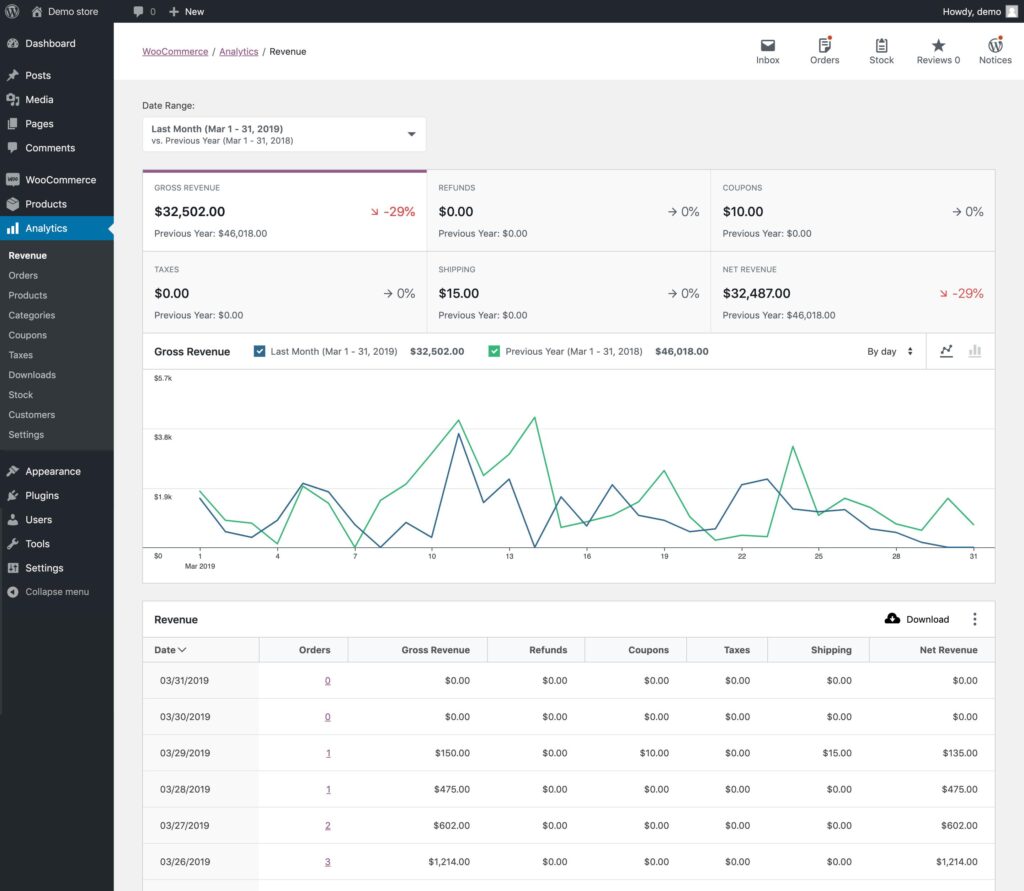
WooCommerce: Automated Reporting System (Complete Guide)
Running a successful WooCommerce store requires more than processing orders—it requires making informed decisions based on accurate data. As your store grows, manually preparing sales reports, inventory summaries, customer analytics, and financial statements becomes time-consuming and inefficient.
An automated reporting system collects data from your WooCommerce store, generates real-time reports, delivers scheduled summaries, and provides valuable business insights without manual effort. Whether you manage a small online shop or a high-volume enterprise store, automated reporting helps improve productivity, profitability, and decision-making.
This guide explains how to build a complete automated reporting system for WooCommerce.
What is an Automated Reporting System?
An automated reporting system continuously collects, analyzes, and presents business data without requiring manual report generation.
Instead of exporting spreadsheets every week, WooCommerce automatically creates reports for:
- Sales
- Revenue
- Orders
- Customers
- Products
- Inventory
- Taxes
- Refunds
- Marketing Performance
- Profitability
Automation saves time while improving reporting accuracy.
Benefits of Automated Reporting
Automated reports provide several business advantages.
Save Time
Eliminate repetitive reporting tasks.
Real-Time Insights
Access live business data.
Better Decision Making
Make informed decisions using accurate analytics.
Reduce Errors
Minimize manual reporting mistakes.
Increase Productivity
Allow your team to focus on business growth.
Improve Profitability
Identify trends and opportunities faster.
WooCommerce Analytics Dashboard
A reporting dashboard should include:
Total Revenue
Overall sales generated.
Net Revenue
Revenue after refunds and discounts.
Orders
Completed, pending, and cancelled orders.
Average Order Value
Customer spending per order.
Products Sold
Top-performing products.
Customer Growth
New and returning customers.
This dashboard provides a complete business overview.
Sales Reports
Automatically generate:
Daily Sales
Weekly Sales
Monthly Sales
Quarterly Sales
Annual Sales
Custom Date Reports
Historical reports reveal seasonal trends and business growth.
Revenue Reports
Track financial performance using:
Gross Revenue
Net Revenue
Taxes Collected
Shipping Revenue
Discounts
Profit Margin
Revenue reports support financial planning.
Order Reports
Monitor:
New Orders
Completed Orders
Processing Orders
Cancelled Orders
Failed Orders
Refunded Orders
Order reports improve operational efficiency.
Product Performance Reports
Track product success.
Include:
Best Sellers
Low-Performing Products
Product Views
Conversion Rate
Revenue by Product
Stock Movement
Product analytics help optimize your catalog.
Customer Reports
Analyze customer behavior.
Track:
New Customers
Returning Customers
Customer Lifetime Value (CLV)
Repeat Purchase Rate
Average Spending
Customer Location
Customer insights improve marketing campaigns.
Inventory Reports
Automatically monitor:
Stock Levels
Low Stock Alerts
Out-of-Stock Products
Fast-Moving Products
Slow-Moving Products
Inventory Value
Inventory automation helps prevent stock shortages.
Marketing Reports
Measure campaign performance.
Track:
Organic Traffic
Paid Advertising
Email Marketing
Social Media
Affiliate Sales
Coupon Performance
Marketing analytics improve return on investment (ROI).
Tax Reports
Generate:
GST Reports
VAT Reports
Sales Tax Reports
Tax by Product
Tax by Region
Tax by Order
Automated tax reports simplify accounting and compliance.
Refund Reports
Monitor:
Refund Requests
Refund Rate
Refund Amount
Refund Reasons
Returned Products
Reducing refunds improves profitability.
Profit & Loss Reports
Display:
Revenue
Expenses
Taxes
Shipping Costs
Discounts
Net Profit
P&L reports help evaluate overall business health.
Scheduled Report Automation
Automatically generate reports:
Daily
Weekly
Monthly
Quarterly
Annually
Schedule reports based on management requirements.
Email Report Delivery
Automatically email reports to:
Store Owners
Managers
Accountants
Marketing Teams
Sales Teams
Reports may include:
- PDF summaries
- Excel spreadsheets
- CSV exports
- KPI dashboards
Automated delivery keeps stakeholders informed.
Export Options
Allow reports to be exported as:
CSV
Excel
Google Sheets
Export functionality simplifies bookkeeping and presentations.
Interactive Dashboards
Visualize business data with:
Line Charts
Bar Charts
Pie Charts
Revenue Graphs
Product Performance Charts
Customer Growth Graphs
Charts make complex data easier to understand.
AI-Powered Reporting
Artificial Intelligence enhances reporting with:
Revenue Forecasting
Sales Predictions
Inventory Forecasting
Customer Behavior Analysis
Marketing Recommendations
Demand Forecasting
AI helps businesses plan proactively.
Real-Time Notifications
Notify administrators about:
High Sales
Revenue Milestones
Low Inventory
Failed Payments
Refund Spikes
Best-Selling Products
Instant alerts enable faster decision-making.
Mobile Reporting
Ensure reports are accessible on:
Smartphones
Tablets
Mobile Dashboards
Push Notifications
Business owners can monitor performance from anywhere.
CRM Integration
Connect reporting with:
FluentCRM
HubSpot
Salesforce
Zoho CRM
ActiveCampaign
CRM integration improves customer analysis.
Accounting Integration
Sync reports with:
QuickBooks
Xero
Zoho Books
FreshBooks
Tally
Automatic synchronization reduces manual accounting work.
Performance Optimization
Large WooCommerce stores generate significant reporting data.
Optimize performance using:
LiteSpeed Cache
Redis Object Cache
Database Optimization
Scheduled Background Processing
Cloudflare CDN
Fast reporting improves user experience.
Security Best Practices
Protect sensitive business data using:
SSL Certificate
Role-Based Permissions
Two-Factor Authentication
Activity Logs
Daily Backups
Secure API Connections
Financial data should only be accessible to authorized users.
Best WooCommerce Reporting Plugins
Metorik
Advanced WooCommerce analytics with real-time dashboards, customer insights, and revenue forecasting.
Best For
Growing WooCommerce stores.
Advanced WooCommerce Reporting
Provides detailed reports with customizable filters and dashboards.
Best For
Businesses requiring advanced analytics.
MonsterInsights
Connects WooCommerce with analytics to measure traffic, conversions, and marketing performance.
Best For
Marketing-focused businesses.
WP Statistics
Privacy-friendly website analytics with visitor tracking.
Best For
Businesses wanting self-hosted analytics.
WP Mail SMTP
Ensures reliable delivery of scheduled email reports.
Best For
Automated reporting notifications.
Recommended Plugin Stack
WooCommerce
Core eCommerce platform.
Metorik
Advanced analytics.
Advanced WooCommerce Reporting
Custom business reports.
MonsterInsights
Marketing insights.
FluentCRM
Customer relationship management.
WP Mail SMTP
Reliable report delivery.
Rank Math SEO
Search engine optimization.
LiteSpeed Cache
Performance optimization.
Redis Object Cache
Database optimization.
Cloudflare
Security and CDN.
This plugin stack provides a complete automated reporting solution.
Common Reporting Mistakes
Delayed Reports
Use scheduled automation instead of manual exports.
Tracking Too Few Metrics
Monitor sales, customers, inventory, and profitability together.
Ignoring Customer Analytics
Customer behavior is essential for long-term growth.
No Mobile Dashboard
Managers often monitor reports on mobile devices.
Poor Dashboard Performance
Optimize queries and enable caching.
Not Reviewing Reports Regularly
Automation is valuable only when reports are analyzed consistently.
Avoiding these mistakes leads to better business decisions.
WooCommerce Automated Reporting Checklist
✅ Analytics Dashboard
✅ Sales Reports
✅ Revenue Reports
✅ Order Reports
✅ Product Analytics
✅ Customer Reports
✅ Inventory Reports
✅ Marketing Reports
✅ Tax Reports
✅ Profit & Loss Reports
✅ Scheduled Reports
✅ Email Automation
✅ Export Options
✅ AI Insights
✅ Mobile Dashboard
✅ Performance Optimization
✅ Security Hardening
Final Thoughts
An automated reporting system is an essential investment for every WooCommerce business. Real-time dashboards, scheduled reports, financial analytics, customer insights, and AI-powered forecasting provide the information needed to make faster and smarter business decisions.
By integrating WooCommerce with advanced analytics platforms, CRM systems, accounting software, and automation tools, you can eliminate manual reporting, improve operational efficiency, and gain a complete view of your business performance. As your store grows, a scalable reporting system will become one of your most valuable business assets.
SEO Details
SEO Title
Meta Description
Focus Keyword
Suggested URL Slug
Suggested Tags

Hire Me on Upwork – Dokan & WooCommerce Expert

 Chat on WhatsApp