
Dokan: Marketplace Performance Monitoring (Complete Guide)
A successful multi-vendor marketplace requires continuous monitoring to ensure excellent performance, high availability, and a seamless shopping experience. As your Dokan marketplace grows with hundreds of vendors and thousands of products, tracking website health, sales activity, vendor performance, customer behavior, and server resources becomes essential.
Marketplace Performance Monitoring enables administrators to identify issues before they impact customers, optimize business operations, improve vendor satisfaction, and increase marketplace revenue.
This comprehensive guide explains how to build a complete performance monitoring system for your Dokan marketplace using WordPress, WooCommerce, analytics platforms, and automation tools.
What is Marketplace Performance Monitoring?
Marketplace Performance Monitoring is the process of continuously measuring and analyzing technical, operational, and business metrics within a Dokan-powered marketplace.
Instead of waiting for problems to occur, monitoring systems provide real-time visibility into marketplace performance.
Areas to monitor include:
- Website Speed
- Server Performance
- Vendor Activity
- Sales Performance
- Orders
- Customer Experience
- Inventory
- Security
- SEO Performance
- Payment Systems
Continuous monitoring improves both business growth and customer satisfaction.
Why Performance Monitoring Matters
Every marketplace owner should monitor performance because it helps:
Detect Problems Early
Identify issues before customers notice them.
Improve User Experience
Fast websites increase customer satisfaction.
Increase Vendor Retention
Reliable marketplaces attract professional vendors.
Boost Revenue
Healthy systems lead to more completed orders.
Improve Decision Making
Data-driven insights support business growth.
Reduce Downtime
Monitor infrastructure before failures occur.
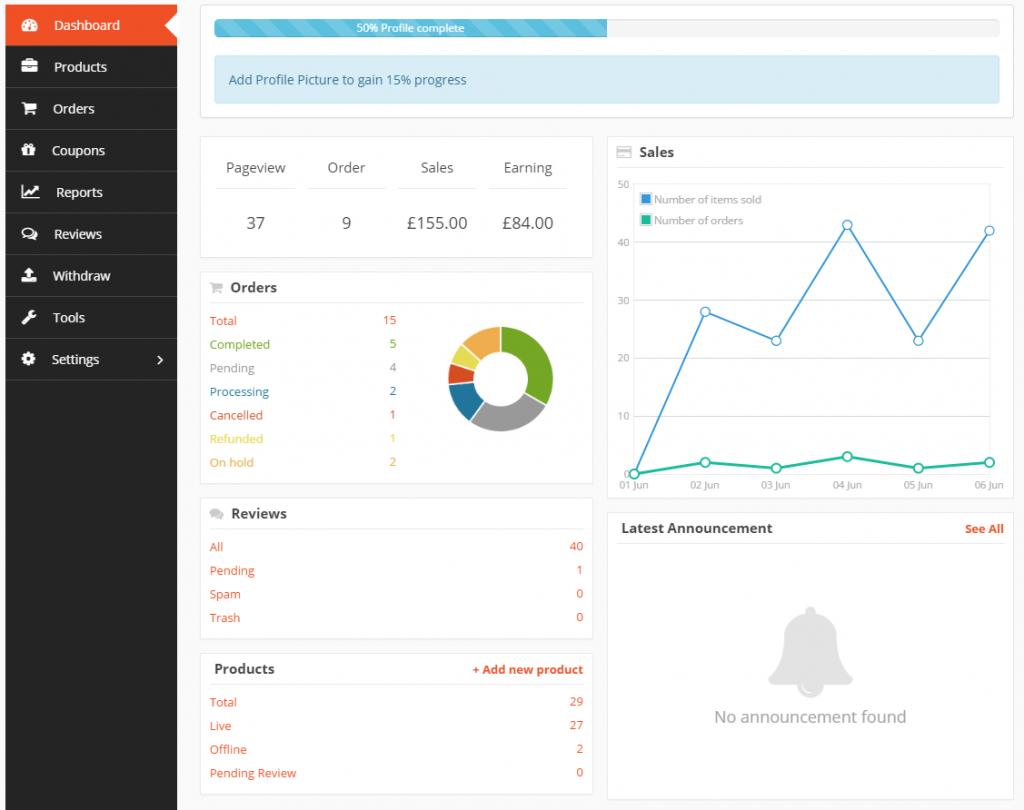
Marketplace KPI Dashboard
A centralized dashboard should display:
Total Revenue
Marketplace sales.
Active Vendors
Currently active sellers.
Orders Today
Live order count.
Products Listed
Marketplace inventory.
Average Order Value
Customer spending.
Conversion Rate
Visitors becoming customers.
Vendor Withdrawals
Pending and completed payouts.
Marketplace Commission
Revenue earned by administrators.
These KPIs provide an instant overview of marketplace performance.
Website Performance Monitoring
Monitor:
Page Load Speed
Target under 2 seconds.
Server Response Time
Reduce latency.
Core Web Vitals
Improve:
- Largest Contentful Paint (LCP)
- Interaction to Next Paint (INP)
- Cumulative Layout Shift (CLS)
Uptime
Target 99.9% or higher.
Fast websites improve rankings and conversions.
Vendor Performance Monitoring
Evaluate each vendor using:
Revenue
Orders
Product Count
Product Views
Conversion Rate
Customer Ratings
Response Time
Refund Rate
Return Rate
Performance metrics help identify top-performing vendors.
Sales Monitoring
Track:
Daily Sales
Weekly Sales
Monthly Revenue
Seasonal Trends
Peak Sales Hours
Top Categories
Best-Selling Products
Sales analytics support strategic planning.
Order Monitoring
Analyze:
New Orders
Processing Orders
Completed Orders
Cancelled Orders
Failed Orders
Refunded Orders
Order tracking improves operational efficiency.
Customer Experience Monitoring
Measure:
Customer Satisfaction
Review Ratings
Average Session Duration
Bounce Rate
Checkout Completion
Cart Abandonment
Repeat Purchases
Customer insights help optimize the buying experience.
Inventory Monitoring
Automatically track:
Low Stock
Out-of-Stock Products
Overstock Items
Fast-Moving Products
Slow-Moving Products
Inventory Value
Inventory automation helps vendors avoid lost sales.
Payment Monitoring
Track payment health.
Monitor:
Successful Payments
Failed Transactions
Pending Payments
Vendor Withdrawals
Commission Distribution
Payment Gateway Errors
Reliable payments build trust.
SEO Performance Monitoring
Measure organic growth using:
Organic Traffic
Keyword Rankings
Indexed Pages
Click-Through Rate (CTR)
Core Web Vitals
Search Visibility
SEO monitoring improves long-term marketplace growth.
Security Monitoring
Continuously monitor:
Login Attempts
Malware Detection
Firewall Activity
File Changes
Suspicious Traffic
User Permissions
Failed Login Alerts
Security monitoring protects both vendors and customers.
Database Performance
Monitor:
Database Size
Slow Queries
Table Optimization
Object Cache Usage
Database Errors
Healthy databases improve website speed.
Server Monitoring
Track infrastructure.
Important metrics include:
CPU Usage
RAM Usage
Disk Space
Bandwidth
PHP Workers
MySQL Performance
Server Load
Infrastructure monitoring prevents downtime.
Real-Time Alerts
Configure instant notifications for:
Website Downtime
Failed Payments
High CPU Usage
Low Disk Space
Security Incidents
Revenue Drops
Order Failures
Receive alerts through:
- Slack
- SMS
- Microsoft Teams
- Discord
AI-Powered Monitoring
Artificial Intelligence helps predict issues.
Examples:
Sales Forecasting
Demand Prediction
Vendor Risk Analysis
Fraud Detection
Customer Behavior Analysis
Performance Recommendations
AI enables proactive management instead of reactive troubleshooting.
Scheduled Reports
Automatically generate:
Daily Reports
Weekly Reports
Monthly Reports
Vendor Reports
Financial Reports
Performance Reports
Email reports to administrators automatically.
Mobile Monitoring
Administrators should monitor the marketplace from anywhere.
Support:
Mobile Dashboard
Push Notifications
Quick Reports
Live KPI Cards
Responsive dashboards improve operational efficiency.
API Integrations
Connect your marketplace with:
Google Analytics 4
Google Search Console
Cloudflare Analytics
Stripe
PayPal
Slack
Zapier
FluentCRM
HubSpot
APIs centralize performance data into one dashboard.
Performance Optimization Best Practices
Improve marketplace speed using:
LiteSpeed Cache
Redis Object Cache
Cloudflare CDN
Image Optimization
Lazy Loading
CSS & JavaScript Minification
Database Cleanup
Background Processing
Performance optimization reduces loading time and server load.
Best Plugins for Marketplace Monitoring
Dokan Pro
Vendor management, marketplace analytics, and reporting.
Best For
Multi-vendor marketplace management.
Query Monitor
Displays database queries, PHP errors, hooks, API requests, and performance bottlenecks.
Best For
Developers optimizing marketplace performance.
WP Statistics
Privacy-focused visitor analytics and reporting.
Best For
Website traffic monitoring.
MonsterInsights
Integrates analytics into the WordPress dashboard.
Best For
Marketing and conversion tracking.
Activity Log
Tracks user activity, vendor actions, and administrative changes.
Best For
Security and auditing.
UptimeRobot
Monitors website uptime and availability.
Best For
Downtime alerts.
Recommended Plugin Stack
Dokan Pro
Marketplace management.
WooCommerce
eCommerce platform.
Query Monitor
Performance diagnostics.
MonsterInsights
Analytics reporting.
WP Statistics
Visitor analytics.
Activity Log
User activity tracking.
LiteSpeed Cache
Performance optimization.
Redis Object Cache
Database acceleration.
Cloudflare
CDN and security.
WP Mail SMTP
Reliable email notifications.
UpdraftPlus
Automated backups.
This stack provides complete marketplace monitoring and optimization.
Common Performance Monitoring Mistakes
Monitoring Only Sales
Track technical, operational, and business KPIs together.
Ignoring Vendor Metrics
Vendor success directly impacts marketplace growth.
No Real-Time Alerts
Problems should be detected immediately.
Slow Dashboards
Optimize database queries and enable caching.
Ignoring Security Logs
Monitor suspicious activity continuously.
Not Reviewing Reports
Use scheduled reports to identify trends and opportunities.
Avoiding these mistakes leads to a healthier marketplace.
Marketplace Performance Monitoring Checklist
✅ KPI Dashboard
✅ Website Speed Monitoring
✅ Vendor Performance Tracking
✅ Sales Analytics
✅ Order Monitoring
✅ Customer Experience Metrics
✅ Inventory Monitoring
✅ Payment Monitoring
✅ SEO Performance Tracking
✅ Security Monitoring
✅ Database Monitoring
✅ Server Resource Monitoring
✅ AI Insights
✅ Real-Time Alerts
✅ Scheduled Reports
✅ Mobile Dashboard
✅ Performance Optimization
Final Thoughts
Marketplace Performance Monitoring is essential for maintaining a reliable, scalable, and profitable Dokan marketplace. By monitoring website speed, vendor activity, customer behavior, infrastructure, payments, and SEO performance, administrators can identify issues before they affect users and make data-driven decisions with confidence.
Combining Dokan with analytics platforms, performance monitoring tools, AI-powered insights, and automation creates a proactive management system that supports long-term marketplace growth. Continuous monitoring not only improves technical stability but also strengthens vendor relationships, customer satisfaction, and overall marketplace success.

Hire Me on Upwork – Dokan & WooCommerce Expert

 Chat on WhatsApp