
WordPress: Website Monitoring Tools (Complete Guide)
A successful WordPress website requires more than attractive design and quality content—it needs continuous monitoring to ensure optimal performance, security, uptime, and user experience. Whether you manage a business website, WooCommerce store, membership platform, blog, or multi-vendor marketplace, website monitoring helps you identify problems before they affect visitors or revenue.
Modern WordPress monitoring tools provide real-time insights into website availability, page speed, server health, database performance, security threats, SEO, uptime, backups, and user activity. With automated alerts and intelligent analytics, website owners can respond quickly to issues and maintain peak performance.
This comprehensive guide explains the best website monitoring tools for WordPress, what metrics to track, and how to build a complete monitoring system.
What Are Website Monitoring Tools?
Website monitoring tools continuously track your website’s health, performance, and availability.
These tools automatically detect issues such as:
- Website Downtime
- Slow Loading Pages
- Server Errors
- Security Threats
- Database Problems
- Broken Links
- SSL Certificate Issues
- Performance Bottlenecks
- SEO Errors
- Plugin Failures
Instead of manually checking your website, monitoring tools work 24/7.
Why Website Monitoring Matters
Continuous monitoring offers significant benefits.
Minimize Downtime
Detect outages immediately.
Improve User Experience
Identify slow pages before visitors complain.
Protect Revenue
Prevent performance issues that reduce conversions.
Strengthen Security
Receive alerts about suspicious activity.
Improve SEO
Fast, reliable websites perform better in search engines.
Simplify Maintenance
Monitor updates, backups, and plugin health from one dashboard.
Essential Website Metrics
Monitor these key performance indicators.
Website Uptime
Target: 99.9% or higher.
Page Load Time
Target: Under 2 seconds.
Server Response Time
Measure backend performance.
Core Web Vitals
Monitor:
- Largest Contentful Paint (LCP)
- Interaction to Next Paint (INP)
- Cumulative Layout Shift (CLS)
Error Rate
Track 404, 500, and PHP errors.
Resource Usage
CPU, memory, and disk utilization.
Uptime Monitoring
Uptime monitoring checks whether your website is accessible.
Monitor:
Homepage
Product Pages
Checkout Pages
Login Pages
API Endpoints
Receive instant notifications if any critical page becomes unavailable.
Performance Monitoring
Track website speed continuously.
Monitor:
Homepage Speed
Landing Pages
Product Pages
Blog Posts
Contact Forms
Search Performance
Consistent monitoring helps maintain fast page loading times.
Server Monitoring
Track server health.
Important metrics include:
CPU Usage
RAM Usage
Disk Space
PHP Workers
MySQL Performance
Network Traffic
Server monitoring helps prevent outages during traffic spikes.
Database Monitoring
Monitor database performance.
Track:
Slow Queries
Database Size
Table Optimization
Failed Queries
Object Cache Efficiency
Healthy databases improve WordPress performance.
Security Monitoring
Protect your website with continuous security monitoring.
Track:
Malware Detection
Firewall Activity
Login Attempts
File Changes
User Activity
Suspicious IP Addresses
Brute Force Attacks
Early detection minimizes security risks.
SEO Monitoring
Monitor your search engine performance.
Track:
Organic Traffic
Keyword Rankings
Indexed Pages
Broken Links
XML Sitemap Health
Core Web Vitals
Structured Data Errors
SEO monitoring helps maintain search visibility.
SSL Certificate Monitoring
Monitor SSL certificates to avoid security warnings.
Check:
Certificate Expiration
HTTPS Availability
SSL Configuration
Mixed Content Issues
Timely renewals protect visitor trust.
Backup Monitoring
Ensure backups run successfully.
Track:
Daily Backups
Backup Integrity
Cloud Storage Status
Restore Testing
Reliable backups protect against data loss.
User Activity Monitoring
Track administrative activity.
Monitor:
Logins
Content Updates
Plugin Changes
Theme Modifications
User Role Changes
Failed Login Attempts
Activity logs improve accountability and troubleshooting.
WooCommerce Monitoring
For online stores, monitor:
Orders
Checkout Performance
Payment Success Rate
Cart Abandonment
Inventory Levels
Customer Registrations
Store monitoring directly impacts revenue.
API Monitoring
Monitor integrations with external services.
Examples:
Payment Gateways
Shipping APIs
CRM Integrations
Marketing Platforms
Email Services
Third-Party Plugins
Broken APIs can interrupt critical business processes.
Real-Time Alerts
Configure notifications for:
Website Downtime
High CPU Usage
Low Disk Space
Security Threats
Failed Backups
SSL Expiration
Slow Response Times
Receive alerts through:
- Slack
- Microsoft Teams
- SMS
- Discord
- Push Notifications
Instant alerts reduce response time.
AI-Powered Monitoring
Artificial Intelligence enhances monitoring by providing:
Predictive Failure Detection
Performance Forecasting
Security Threat Analysis
Traffic Pattern Recognition
Automated Recommendations
Anomaly Detection
AI helps identify problems before they become critical.
Automated Reporting
Generate scheduled reports.
Options include:
Daily Reports
Weekly Reports
Monthly Reports
Performance Reports
Security Reports
SEO Reports
Automatically send reports to administrators and stakeholders.
Mobile Monitoring
Access website health from anywhere.
Features include:
Mobile Dashboard
Push Notifications
Live Status Reports
One-Tap Incident Reports
Responsive monitoring ensures administrators stay informed.
Performance Optimization
Improve monitoring results using:
LiteSpeed Cache
Redis Object Cache
Cloudflare CDN
Image Optimization
Database Cleanup
Lazy Loading
CSS & JavaScript Minification
Optimization reduces performance issues over time.
Best WordPress Website Monitoring Tools
UptimeRobot
Monitors uptime and response time with instant downtime alerts.
Best For
Website availability monitoring.
Jetpack Monitor
Automatically checks website availability and downtime.
Best For
WordPress beginners.
ManageWP
Provides centralized monitoring, backups, updates, and security management.
Best For
Managing multiple WordPress websites.
Query Monitor
Developer-focused plugin for monitoring database queries, PHP errors, REST API calls, hooks, and performance.
Best For
Performance optimization and debugging.
Wordfence Security
Offers malware scanning, firewall protection, login monitoring, and threat detection.
Best For
Website security.
WP Activity Log
Tracks user activity, content changes, plugin updates, and administrative actions.
Best For
Audit trails and troubleshooting.
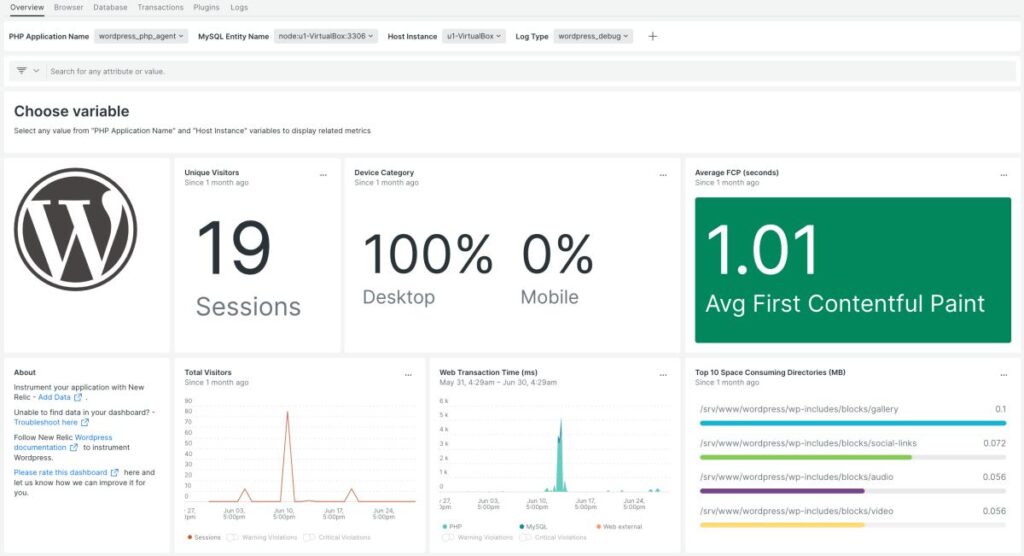
New Relic
Enterprise-grade application performance monitoring with server diagnostics.
Best For
High-traffic and enterprise websites.
Google Search Console
Monitors indexing, Core Web Vitals, search performance, and crawl errors.
Best For
SEO monitoring.
Recommended Monitoring Stack
WordPress
Core CMS.
UptimeRobot
Uptime monitoring.
Query Monitor
Performance diagnostics.
Wordfence
Security monitoring.
WP Activity Log
User activity tracking.
Google Search Console
SEO monitoring.
LiteSpeed Cache
Performance optimization.
Redis Object Cache
Database acceleration.
Cloudflare
CDN and security.
UpdraftPlus
Automated backups.
WP Mail SMTP
Reliable email notifications.
This stack provides comprehensive website monitoring for WordPress.
Common Monitoring Mistakes
Only Monitoring Uptime
Also monitor performance, security, SEO, and database health.
Ignoring Alerts
Respond to notifications promptly to minimize downtime.
No Backup Verification
Regularly test backup restoration.
Skipping Security Monitoring
Monitor login attempts, malware, and firewall events.
Not Reviewing Reports
Scheduled reports reveal long-term trends.
Using Too Many Monitoring Plugins
Choose a balanced set of tools to reduce server load.
Avoiding these mistakes improves website reliability.
Website Monitoring Checklist
✅ Uptime Monitoring
✅ Performance Monitoring
✅ Server Health Monitoring
✅ Database Monitoring
✅ Security Monitoring
✅ SEO Monitoring
✅ SSL Certificate Monitoring
✅ Backup Monitoring
✅ User Activity Logs
✅ WooCommerce Monitoring
✅ API Monitoring
✅ Real-Time Alerts
✅ Automated Reports
✅ Mobile Dashboard
✅ AI Monitoring
✅ Performance Optimization
Final Thoughts
Website monitoring is an essential part of maintaining a successful WordPress website. Continuous monitoring of uptime, performance, security, SEO, server health, and user activity enables you to detect issues quickly, protect your business, and deliver a consistently excellent experience to visitors.
By combining monitoring tools with caching, CDN services, automated backups, and AI-powered analytics, you can build a resilient WordPress infrastructure capable of supporting business growth while minimizing downtime and operational risks.

Hire Me on Upwork – Dokan & WooCommerce Expert

 Chat on WhatsApp