
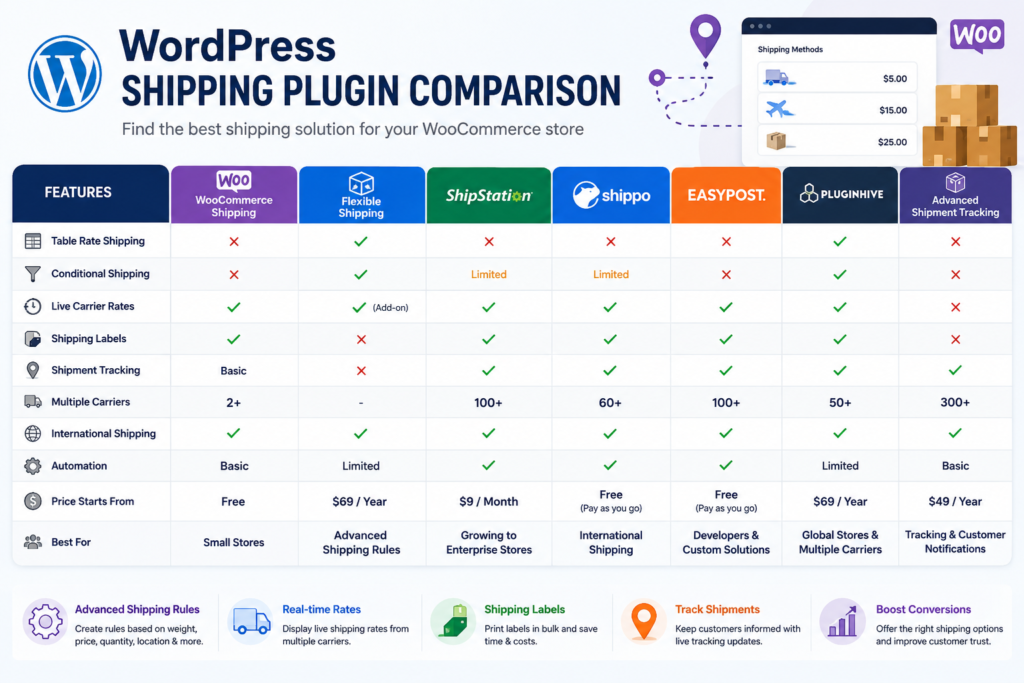
WordPress: Shipping Plugin Comparison (Complete Guide)
Shipping is one of the most critical aspects of running a successful WooCommerce store. Whether you’re selling physical products locally or shipping worldwide, choosing the right shipping plugin can significantly impact your customer experience, operational efficiency, and overall profitability.
The WordPress ecosystem offers dozens of shipping plugins, each with unique capabilities such as table rate shipping, conditional shipping, real-time carrier rates, shipment tracking, shipping label generation, and fulfillment automation.
This comprehensive guide compares the best WordPress shipping plugins, explains their features, strengths, pricing considerations, and helps you choose the right solution for your business.
Why Use a Shipping Plugin?
WooCommerce includes basic shipping features, but many businesses require advanced functionality.
Shipping plugins help you:
- Automate shipping calculations
- Display live carrier rates
- Create shipping rules
- Print shipping labels
- Track shipments
- Manage international shipping
- Reduce shipping costs
- Improve checkout experience
As your business grows, advanced shipping becomes essential.
What Features Should You Look For?
A quality shipping plugin should support:
- Shipping Zones
- Conditional Shipping Rules
- Table Rate Shipping
- Weight-Based Shipping
- Product-Based Shipping
- Shipping Classes
- Carrier Integrations
- Shipment Tracking
- Shipping Labels
- Multi-Warehouse Support
- Tax Calculation
- International Shipping
- Order Automation
- Reporting & Analytics
Best WordPress Shipping Plugins
1. WooCommerce Shipping
Overview
WooCommerce Shipping is the official shipping extension that integrates directly with WooCommerce.
Features
- USPS Support
- DHL Support
- Shipping Labels
- Built-in Integration
- Automatic Label Printing
Pros
- Official WooCommerce extension
- Easy setup
- Reliable updates
Cons
- Limited advanced shipping rules
Best For
Small and medium WooCommerce stores.
2. Flexible Shipping
One of the most popular WooCommerce shipping plugins.
Features
- Table Rate Shipping
- Weight-Based Shipping
- Cart Total Rules
- Quantity Rules
- Shipping Classes
- Conditional Shipping
Pros
- Extremely flexible
- Beginner-friendly
- Excellent documentation
Cons
- Some advanced features require the premium version.
Best For
Stores requiring advanced shipping rules.
3. Table Rate Shipping
Perfect for stores needing custom pricing structures.
Features
- Weight Rules
- Quantity Rules
- Price Rules
- Destination Rules
- Shipping Class Support
Pros
- Highly customizable
- Great for wholesalers
Cons
- Initial configuration may take time.
Best For
Large WooCommerce stores.
4. ShipStation
A powerful shipping and fulfillment platform.
Features
- Multi-Carrier Support
- Shipping Labels
- Bulk Fulfillment
- Inventory Sync
- Automation Rules
- Order Management
Pros
- Enterprise-ready
- Supports high-volume stores
Cons
- Monthly subscription required.
Best For
Growing and enterprise businesses.
5. Shippo
Shippo connects WooCommerce with major shipping carriers.
Features
- UPS
- DHL
- USPS
- FedEx
- Live Rates
- Tracking
- Label Printing
Pros
- Discounted carrier rates
- Excellent API
Cons
- Advanced automation requires paid plans.
Best For
Domestic and international shipping.
6. Advanced Shipment Tracking
Adds shipment tracking to WooCommerce orders.
Features
- Tracking Numbers
- Carrier Detection
- Customer Notifications
- Email Updates
- Order Tracking Page
Pros
- Easy integration
- Improves customer experience
Cons
- Doesn’t calculate shipping rates.
Best For
Stores wanting shipment tracking.
7. EasyPost
EasyPost provides a unified shipping API.
Features
- Live Carrier Rates
- Address Validation
- Label Generation
- Tracking APIs
- Insurance Support
Pros
- Excellent developer API
- Enterprise scalability
Cons
- Requires API configuration.
Best For
Custom WooCommerce solutions.
8. PluginHive WooCommerce Shipping
Supports many global carriers.
Features
- FedEx
- UPS
- USPS
- DHL
- Canada Post
- Australia Post
Pros
- Large carrier ecosystem
- Excellent documentation
Cons
- Premium licensing.
Best For
International stores.
Feature Comparison
| Feature | WooCommerce Shipping | Flexible Shipping | ShipStation | Shippo | PluginHive |
|---|---|---|---|---|---|
| Shipping Zones | ✅ | ✅ | ✅ | ✅ | ✅ |
| Table Rate Shipping | ❌ | ✅ | ❌ | ❌ | ✅ |
| Conditional Shipping | Limited | ✅ | Limited | Limited | ✅ |
| Live Carrier Rates | ✅ | Optional | ✅ | ✅ | ✅ |
| Shipping Labels | ✅ | ❌ | ✅ | ✅ | ✅ |
| Tracking | Basic | ❌ | ✅ | ✅ | ✅ |
| International Shipping | ✅ | ✅ | ✅ | ✅ | ✅ |
| API Support | Basic | Limited | Excellent | Excellent | Good |
Choosing the Right Plugin
Small Stores
Recommended:
- WooCommerce Shipping
- Advanced Shipment Tracking
Medium Businesses
Recommended:
- Flexible Shipping
- Table Rate Shipping
- Shippo
Enterprise Stores
Recommended:
- ShipStation
- EasyPost
- PluginHive
B2B Stores
Recommended:
- Flexible Shipping
- Table Rate Shipping
Marketplace Stores
Recommended:
- Dokan Pro
- ShipStation
- Shippo
Conditional Shipping Support
The best plugins allow conditions based on:
Cart Value
Product Category
Product Weight
Product Quantity
Customer Role
ZIP Code
Shipping Class
Country
State
Payment Method
These rules create a personalized checkout experience.
Carrier Integrations
Most premium shipping plugins support:
- UPS
- FedEx
- DHL
- USPS
- Canada Post
- Australia Post
- Royal Mail
- Aramex
- BlueDart
- Delhivery
Choose a plugin based on your shipping regions.
Performance Considerations
Shipping plugins should not slow your website.
Best practices include:
Object Caching
LiteSpeed Cache
Cloudflare CDN
Redis Cache
Background Processing
Optimized Database
Fast shipping calculations improve conversions.
Security Best Practices
Protect customer shipping information.
Use:
- SSL Certificates
- Secure API Keys
- Role-Based Access
- Audit Logs
- Daily Backups
- Firewall Protection
AI & Automation
Modern shipping plugins now include:
AI Shipping Recommendations
Delivery Time Prediction
Shipping Cost Forecasting
Smart Carrier Selection
Automated Fulfillment
Predictive Analytics
AI improves shipping efficiency while reducing costs.
Common Mistakes
Choosing Based Only on Price
Evaluate long-term features and scalability.
Ignoring Carrier Support
Ensure your preferred shipping carrier is supported.
No Shipment Tracking
Customers expect real-time tracking.
Poor Shipping Rules
Configure conditional shipping carefully.
No Performance Testing
Always test shipping calculations before launch.
Plugin Selection Checklist
✅ Shipping Zones
✅ Conditional Shipping
✅ Table Rate Shipping
✅ Weight-Based Shipping
✅ Carrier Integration
✅ Shipment Tracking
✅ Shipping Labels
✅ International Shipping
✅ API Support
✅ Analytics
✅ Performance
✅ Security
Final Thoughts
Selecting the right WordPress shipping plugin depends on your store size, shipping complexity, carrier requirements, and growth plans. Small businesses may only need basic label printing and shipping zones, while enterprise stores often require real-time carrier rates, automated fulfillment, and advanced shipping rules.
By investing in a scalable shipping solution, you can reduce operational costs, improve checkout conversions, automate logistics, and provide a better customer experience. Review your shipping strategy regularly and upgrade your tools as your business expands.

Hire Me on Upwork – Dokan & WooCommerce Expert

 Chat on WhatsApp