
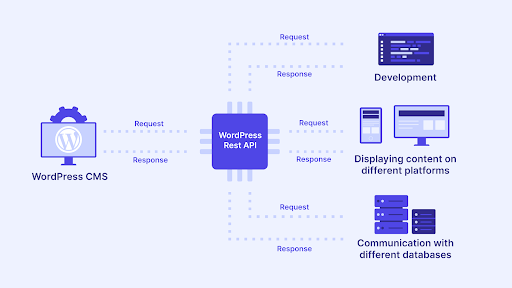
Dokan is powerful out of the box, but real marketplaces often need custom workflows, integrations, and automation. That’s where Dokan API custom development comes in—letting you extend Dokan beyond its default limits using WooCommerce & WordPress REST APIs.
Why Use Dokan API Custom Development?
Every marketplace is different. APIs allow you to connect Dokan with external systems, mobile apps, CRMs, ERPs, and custom dashboards—without hacking core files.
Key benefits:
-
Full control over vendor & product data
-
Faster integrations with third-party services
-
Custom vendor experiences (web & mobile)
-
Scalable, future-proof architecture
What Can Be Built with Dokan APIs?
1. Custom Vendor Dashboards
Create lightweight or mobile-friendly dashboards that show:
-
Sales reports & earnings
-
Order management
-
Product approvals
-
Commission summaries
2. Mobile App Integration
Use Dokan + WooCommerce REST APIs to power:
-
Android / iOS marketplace apps
-
Vendor apps for order & inventory control
-
Customer apps with real-time order tracking
3. Advanced Product & Order Management
-
Bulk product creation & updates
-
Custom product fields & meta via API
-
Automated order status updates
-
External fulfillment or delivery sync
4. Custom Commission & Payout Logic
-
Dynamic commission rules
-
API-based payout triggers
-
Integration with payment gateways or accounting tools
5. Third-Party Integrations
Connect Dokan with:
-
CRMs (sales & vendor management)
-
Accounting software
-
Shipping & logistics APIs
-
Marketing & analytics tools
Example: Custom Dokan API Use Case
Scenario:
A marketplace owner wants vendors to create products from a mobile app with custom delivery dates and quantity rules.
Solution:
-
Extend WooCommerce REST API
-
Add Dokan-specific endpoints
-
Validate vendor permissions
-
Save custom meta securely
-
Return clean JSON responses for the app
Result: Faster vendor onboarding and fewer admin issues.
Best Practices for Dokan API Customization
-
Never modify Dokan core files
-
Use custom plugins or mu-plugins
-
Secure endpoints with authentication & permission checks
-
Follow WooCommerce REST API standards
-
Optimize queries for large marketplaces
When Should You Go for Custom API Development?
You should consider Dokan API customization if:
-
Default Dokan features are limiting your growth
-
You’re building a mobile app
-
You need automation or external system sync
-
You want a unique vendor experience
Final Thoughts
Dokan API custom development unlocks the true potential of your multi-vendor marketplace. From custom dashboards to mobile apps and enterprise integrations, APIs give you the flexibility to scale without compromise.
If you’re planning a serious marketplace, API-first customization is the smartest investment you can make.
I can help you make the right technical and business decision.
💬 Helping businesses worldwide build and scale Dokan marketplaces.

Hire Me on Upwork – Dokan & WooCommerce Expert

 Chat on WhatsApp