
Refunds are an unavoidable part of every multivendor marketplace.
Whether it’s:
-
A damaged product
-
Late delivery
-
Wrong item
-
Customer dissatisfaction
👉 How you handle refunds directly affects customer trust, vendor satisfaction, and platform credibility.
In a Dokan-powered marketplace, refunds involve three parties:
-
Customer
-
Vendor
-
Marketplace admin
This guide explains the Dokan refund system step by step, including:
-
How refunds work
-
Who controls what
-
Common issues
-
Best practices for smooth refund handling
🔴 Why Refund Management Is Critical in Dokan
Unlike single-vendor stores, Dokan marketplaces have shared responsibility.
Poor refund handling leads to:
❌ Customer disputes
❌ Vendor frustration
❌ Payment gateway chargebacks
❌ Marketplace reputation damage
👉 A clear refund system protects everyone.
🧠 How the Dokan Refund System Works (High-Level Flow)
Here’s the standard Dokan refund lifecycle:
1️⃣ Customer requests a refund
2️⃣ Vendor reviews the request
3️⃣ Refund is approved or rejected
4️⃣ Admin oversight (if enabled)
5️⃣ Refund processed via wallet/gateway
6️⃣ Order & balance updated
If any step is unclear or misconfigured, refund chaos begins.
1️⃣ Who Can Request a Refund in Dokan?
✅ Customers
Customers can request refunds:
-
From My Account → Orders
-
Within the allowed refund period
Refund reasons are usually provided during the request.
📌 Refund eligibility depends on:
-
Order status
-
Refund policy
-
Marketplace rules
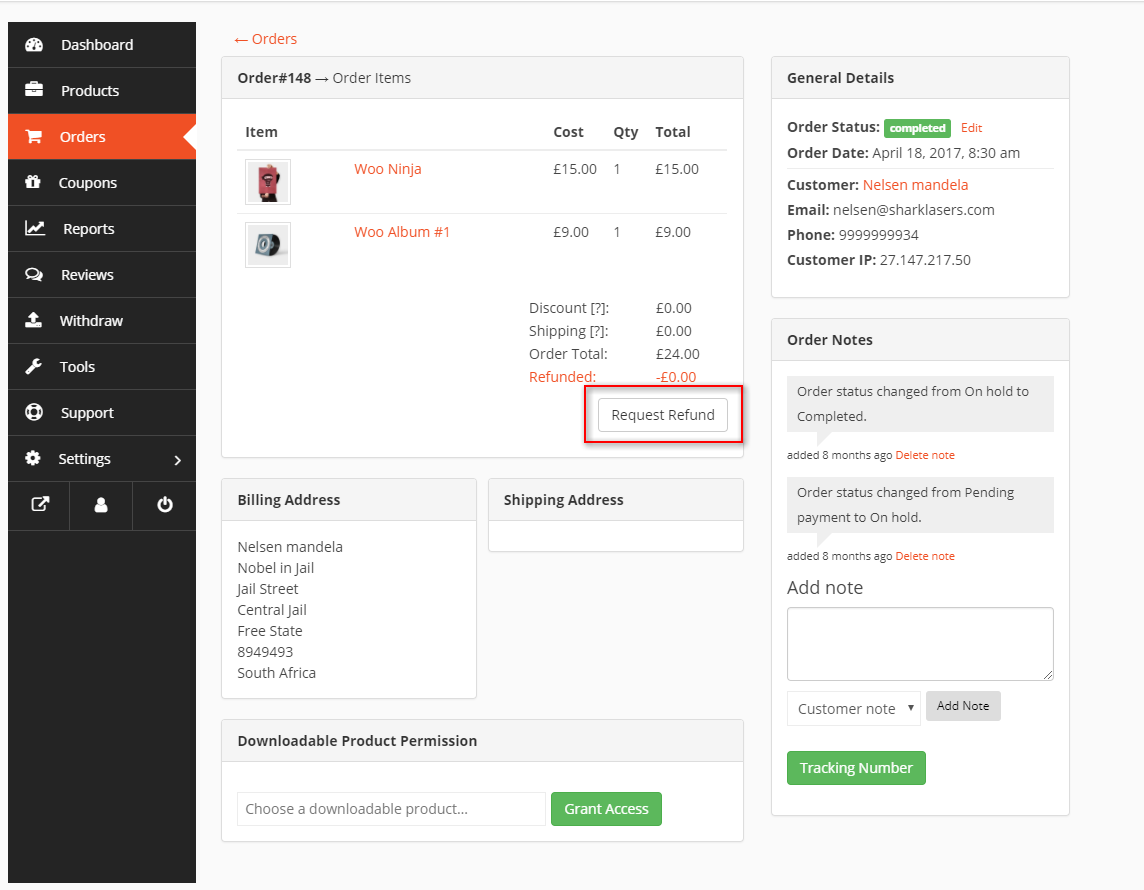
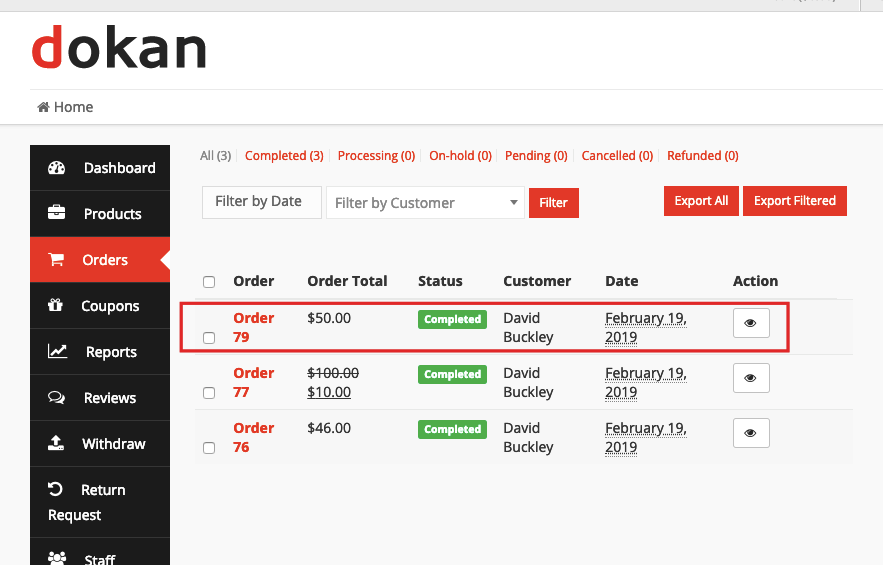
2️⃣ Vendor Role in the Refund Process
🔹 What Vendors Can Do
Depending on settings, vendors can:
-
View refund requests
-
Approve or reject refunds
-
Communicate with customers
🔹 Common Vendor Mistake
Ignoring refund requests.
👉 This increases disputes and admin workload.
3️⃣ Admin Control Over Refunds (Very Important)
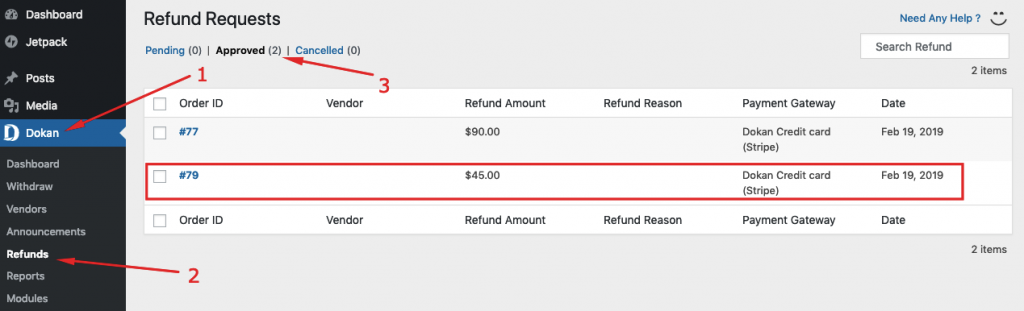
As the marketplace owner, you decide how much power vendors get.
✅ Admin Can:
-
Enable or disable vendor refunds
-
Require admin approval for refunds
-
Limit refund amount
-
Monitor refund abuse
📌 Best practice:
Allow vendors to initiate refunds, but keep admin oversight enabled.
4️⃣ Refund Methods in Dokan
Dokan supports multiple refund handling methods.
🔹 Wallet-Based Refunds
-
Refund amount goes to customer wallet
-
Faster resolution
-
No payment gateway delay
✔ Best for internal balance systems
🔹 Payment Gateway Refunds
-
Refund processed via Stripe, PayPal, etc.
-
Requires proper gateway configuration
❌ Common issue: gateway doesn’t support partial refunds.
5️⃣ Partial vs Full Refunds
🔹 Full Refund
-
Entire order amount returned
-
Order marked as refunded
🔹 Partial Refund
-
Only part of order refunded
-
Common for:
-
Multi-item orders
-
Partial damage
-
Shipping issues
-
📌 Ensure vendors understand when partial refunds are allowed.
6️⃣ Refund Policies You Must Define Clearly
Most refund problems are policy problems, not technical ones.
✅ Your Marketplace Should Clearly Define:
-
Refund eligibility period (e.g. 7 or 14 days)
-
Non-refundable items
-
Digital vs physical products
-
Shipping refund rules
👉 Publish refund policy visibly on:
-
Vendor store pages
-
Checkout
-
Terms & Conditions
7️⃣ Handling Refund Disputes in Dokan
Disputes happen when:
-
Vendor rejects refund
-
Customer disagrees
-
Product condition is unclear
✅ Best Practice Dispute Flow:
-
Customer raises dispute
-
Vendor responds
-
Admin reviews evidence
-
Final admin decision
📌 Always:
-
Document communication
-
Stay neutral
-
Be consistent
8️⃣ Preventing Refund Abuse (Very Important)
Refund abuse can silently kill profitability.
🚨 Common Abuse Patterns:
-
Frequent refund requests
-
Refund after product usage
-
Fake damage claims
✅ Prevention Strategies:
-
Track refund frequency per user
-
Set refund limits
-
Flag suspicious accounts
-
Restrict repeat offenders
👉 Smart monitoring protects honest vendors.
9️⃣ How Refunds Affect Vendor Earnings & Commission
Refunds impact:
-
Vendor balance
-
Admin commission
-
Withdrawal eligibility
Important Notes:
-
Commission is usually reversed
-
Vendor balance is adjusted
-
Withdrawal requests may be blocked
📌 Vendors must understand:
Refunds directly affect their earnings.
🔟 Best Practices for Smooth Dokan Refund Management
✔ Clear refund policy
✔ Vendor education
✔ Admin oversight
✔ Fast response time
✔ Transparent communication
✔ Proper payment gateway setup
👉 A smooth refund process increases customer trust and vendor retention.
🚨 Common Dokan Refund System Mistakes
❌ No refund policy
❌ Giving vendors full refund power without monitoring
❌ Ignoring gateway limitations
❌ Delayed responses
❌ No dispute resolution process
These mistakes damage marketplace credibility.
📚 Also Read (Internal Links)

Hire Me on Upwork – Dokan & WooCommerce Expert

 Chat on WhatsApp