
Dokan vendor approval workflow
Launching a multivendor marketplace is easy.
Managing who can sell on your platform?
That’s where real marketplace control begins.
If you allow vendors to register and start selling without proper approval:
❌ Low-quality products flood your store
❌ Fake vendors join
❌ Refunds increase
❌ Customer trust drops
This guide explains the Dokan vendor approval workflow, including:
-
How vendor approval works
-
Manual vs automatic approval
-
Product approval flow
-
Best practices for secure scaling
🔴 Why Vendor Approval Is Critical in Dokan
In a Dokan marketplace, vendors control:
-
Product listings
-
Pricing
-
Inventory
-
Shipping
-
Customer interaction
If vendor approval is weak, your entire marketplace quality suffers.
👉 Strong vendor approval = controlled growth + trusted marketplace.
🧠 How Dokan Vendor Registration Works
Basic vendor registration flow:
1️⃣ User registers on your website
2️⃣ User selects “Vendor” during signup
3️⃣ Vendor profile created
4️⃣ Approval decision made
5️⃣ Vendor dashboard access granted
If approval settings are misconfigured, vendors may gain access automatically.
1️⃣ Automatic vs Manual Vendor Approval
🔹 Automatic Approval (Not Recommended for Serious Marketplaces)
-
Vendor gets instant selling access
-
No admin review required
✔ Faster onboarding
❌ High risk of spam or low-quality vendors
🔹 Manual Approval (Recommended)
-
Vendor must wait for admin approval
-
Admin reviews vendor profile
-
Access granted after verification
✔ Better control
✔ Higher marketplace quality
📌 For professional marketplaces, manual approval is strongly recommended.
2️⃣ Enabling Manual Vendor Approval in Dokan
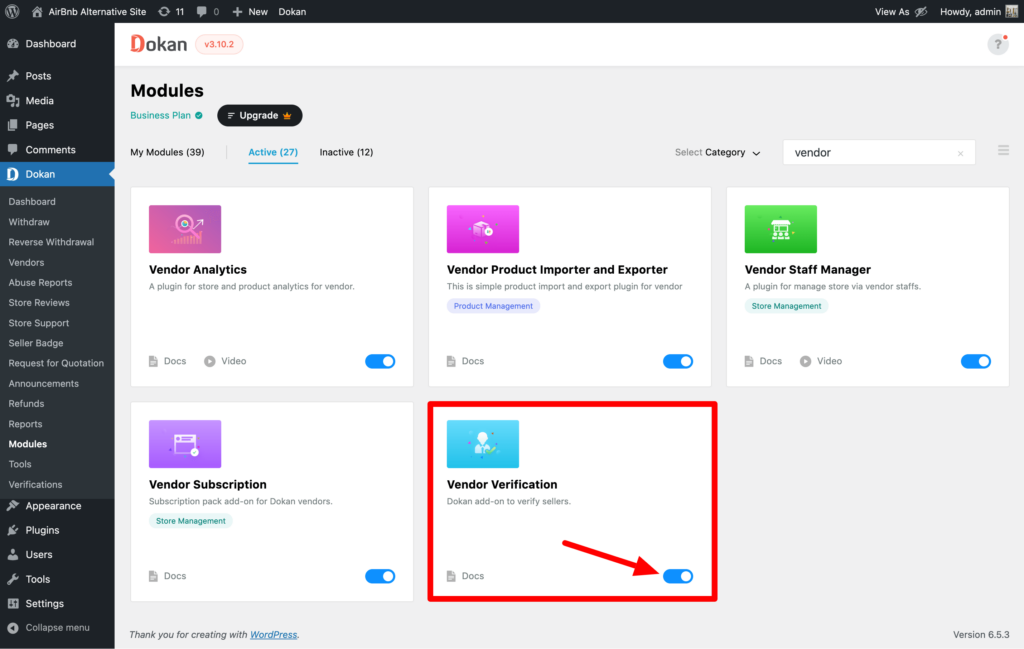
Inside your Dokan settings, you can:
-
Disable automatic vendor publishing
-
Require admin approval
-
Control vendor dashboard access
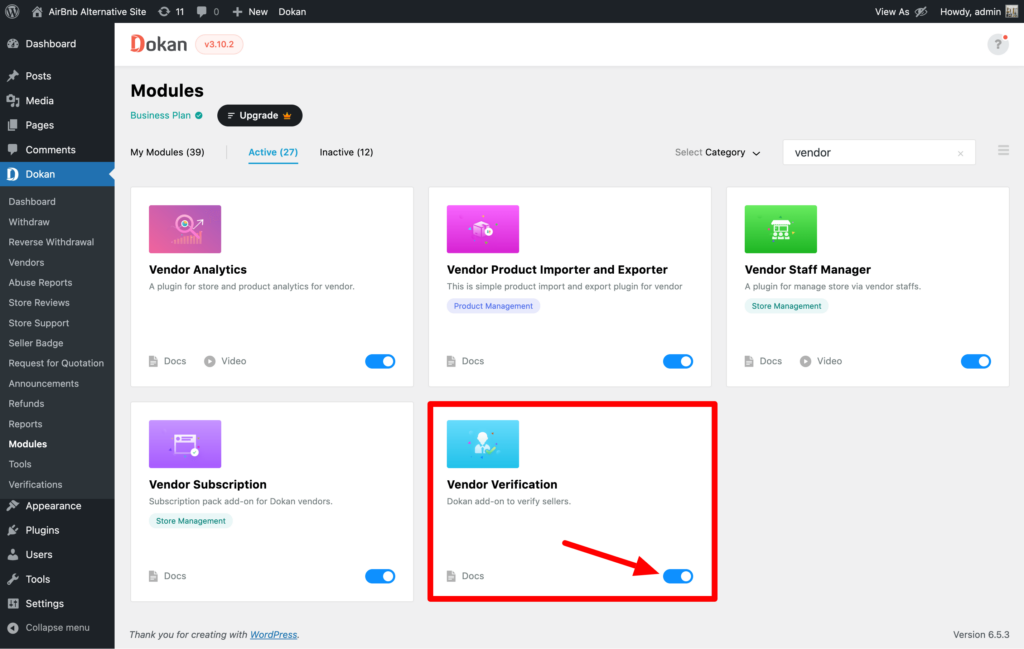
Best Configuration:
✔ Enable manual vendor approval
✔ Enable product approval for new vendors
✔ Review vendor store setup before approval
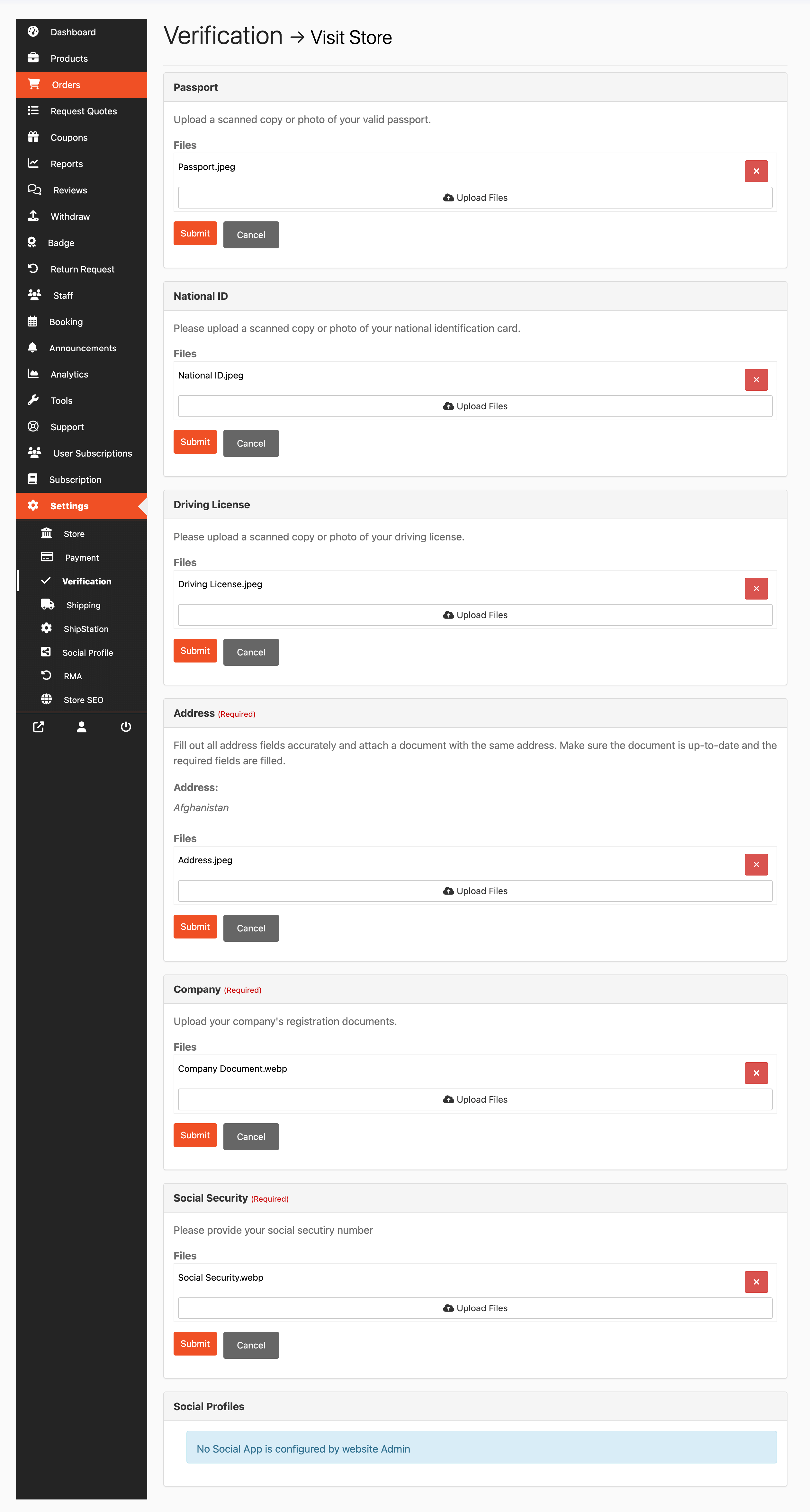
3️⃣ Vendor Profile Review Checklist (Best Practice)
Before approving a vendor, check:
✔ Business name
✔ Contact details
✔ Product category relevance
✔ Store description quality
✔ Identity (if required)
✔ Payment details
👉 Approve vendors who fit your marketplace vision.
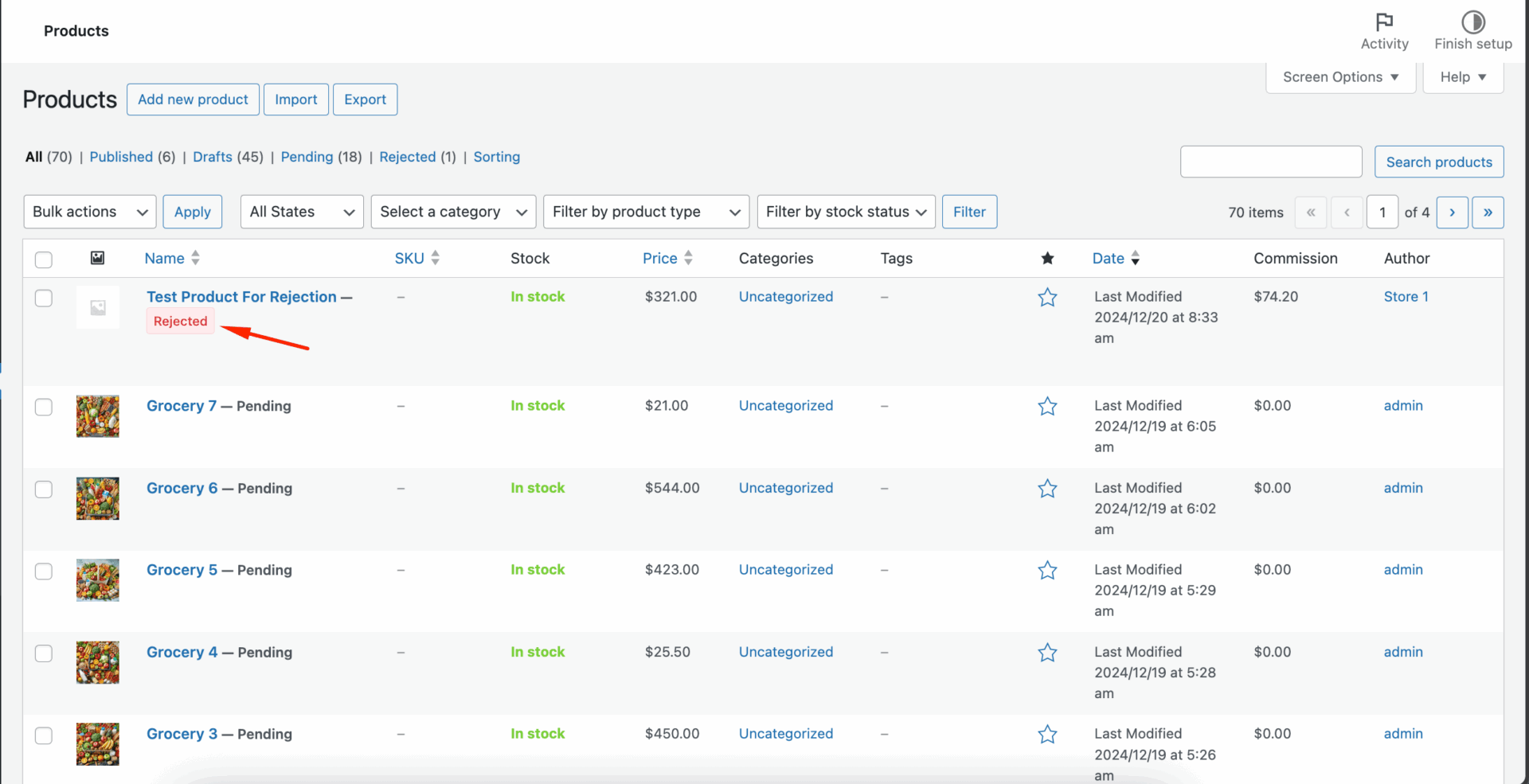
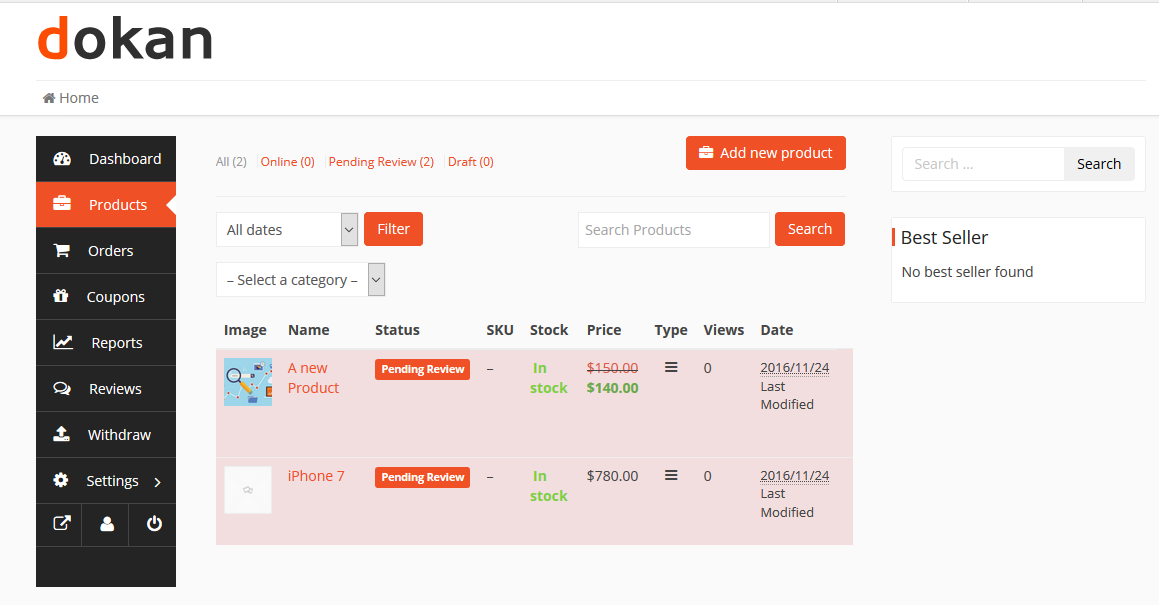
4️⃣ Product Approval Workflow (Very Important)
Vendor approval alone is not enough.
You should also control product quality.
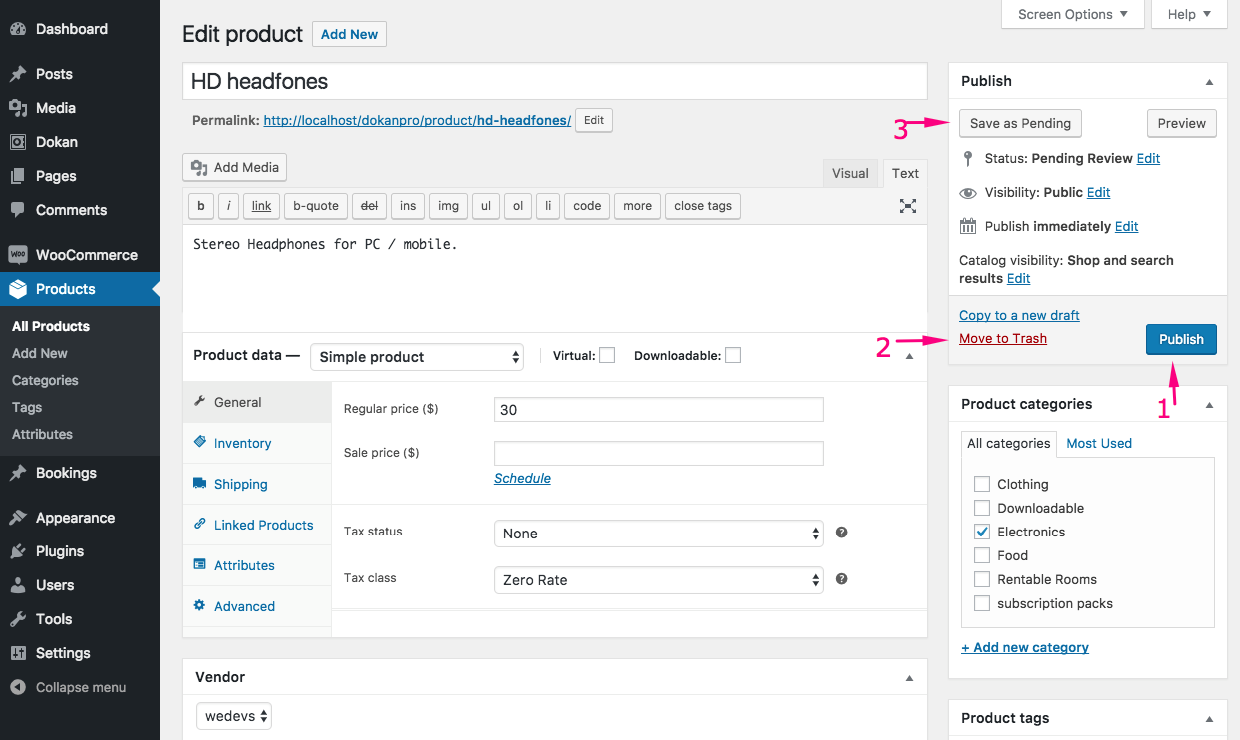
Product Workflow:
1️⃣ Vendor submits product
2️⃣ Product marked as “Pending Review”
3️⃣ Admin reviews product
4️⃣ Product published or rejected
Why Product Approval Matters:
-
Prevents duplicate listings
-
Avoids copyright violations
-
Maintains brand consistency
5️⃣ Multi-Level Vendor Approval Strategy (Advanced)
For scaling marketplaces, use layered control:
New Vendors
-
Manual approval
-
Product approval required
Verified Vendors
-
Faster product approval
-
Higher listing limits
Premium Vendors
-
Instant product publishing
-
Lower commission
-
Priority support
👉 This motivates vendors to perform better.
6️⃣ Common Vendor Approval Mistakes
❌ Auto-approving all vendors
❌ No product review process
❌ No identity verification
❌ Ignoring vendor categories
❌ Not documenting approval criteria
These mistakes cause:
-
Marketplace clutter
-
Refund spikes
-
Vendor conflicts
7️⃣ Security Considerations in Vendor Approval
Vendor accounts can become entry points for attacks.
Security Best Practices:
✔ Require strong passwords
✔ Enable email verification
✔ Use CAPTCHA on registration
✔ Monitor suspicious signups
👉 A secure approval process protects your entire website.
8️⃣ How Vendor Approval Affects Marketplace Growth
A controlled vendor workflow leads to:
✔ Higher product quality
✔ Better customer satisfaction
✔ Fewer refunds
✔ Stronger brand reputation
A weak workflow leads to:
❌ Chaos
❌ Spam
❌ Low trust
📌 Quality vendors attract quality customers.
9️⃣ Automating Parts of Vendor Approval
You can partially automate:
-
Email verification
-
Document uploads
-
Category-based rules
-
Role assignments
But always keep final approval under admin control.
👉 Smart automation reduces workload without sacrificing quality.
🔟 Best Practices for Dokan Vendor Approval Workflow
✔ Use manual approval
✔ Create vendor approval checklist
✔ Require product review for new sellers
✔ Segment vendors by performance
✔ Monitor vendor activity regularly
👉 Approval workflow should evolve as your marketplace grows.
📚 Also Read (Internal Links)

Hire Me on Upwork – Dokan & WooCommerce Expert

 Chat on WhatsApp