
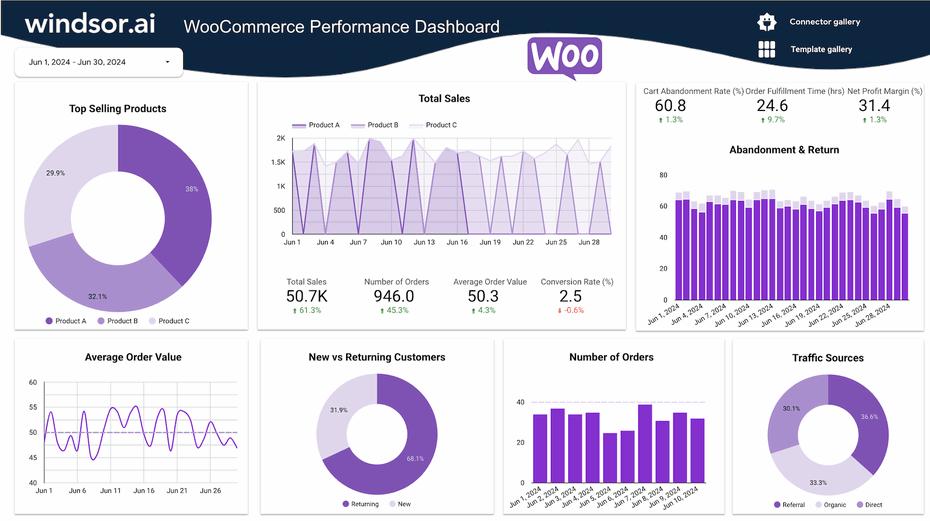


If you’re running an online store, tracking sales is not enough — you need to track the right metrics (KPIs) to understand performance and grow your business.
With WooCommerce on WordPress, you can monitor powerful KPIs to improve revenue, conversions, and customer behavior.
In this guide, you’ll learn how to track and use sales KPIs in WooCommerce effectively.
🔴 What are Sales KPIs?
KPI (Key Performance Indicators) are measurable values that show how well your store is performing.
Examples:
✔ Revenue
✔ Conversion rate
✔ Average order value
✔ Customer lifetime value
👉 KPIs = data-driven decision making
🧠 Why KPI Tracking Matters
Without KPI tracking:
❌ No clear growth direction
❌ Poor decision making
❌ Missed opportunities
With KPI tracking:
✔ Identify problems
✔ Optimize performance
✔ Increase revenue
✔ Scale business
👉 KPIs guide your strategy.
📊 Most Important WooCommerce KPIs
💰 1️⃣ Revenue (Total Sales)
✔ Total income from orders
✔ Daily / monthly / yearly trends
👉 Measures overall business growth.
🛒 2️⃣ Conversion Rate
✔ Visitors → Buyers
Formula:
(Orders ÷ Visitors) × 100
👉 Shows how effective your store is.
💳 3️⃣ Average Order Value (AOV)
✔ Average spending per order
Formula:
Total Revenue ÷ Total Orders
👉 Helps increase revenue per customer.
🔁 4️⃣ Cart Abandonment Rate
✔ Users who leave without purchasing
👉 Indicates checkout issues.
👥 5️⃣ Customer Lifetime Value (CLV)
✔ Total revenue per customer over time
👉 Measures long-term value.
📦 6️⃣ Order Volume
✔ Total number of orders
👉 Shows demand.
🔄 7️⃣ Refund & Return Rate
✔ Percentage of returned orders
👉 Indicates product quality issues.
⚙️ How to Track KPIs in WooCommerce
📊 Built-in WooCommerce Reports
WooCommerce provides:
✔ Sales reports
✔ Orders analytics
✔ Customer data
👉 Good for basic tracking.
🔌 Use Analytics Plugins
For advanced tracking:
✔ WooCommerce Analytics (default)
✔ Metorik
✔ Google Analytics integration
👉 Provides deeper insights.
🔗 Integrate Google Analytics
Track:
✔ Traffic sources
✔ Conversion funnel
✔ User behavior
👉 Essential for marketing insights.
📈 KPI Dashboard Setup
Create a dashboard showing:
✔ Revenue
✔ Orders
✔ Conversion rate
✔ AOV
👉 Helps monitor performance in real-time.
🎯 How to Improve KPIs
🚀 Increase Conversion Rate
✔ Improve UI/UX
✔ Optimize checkout
✔ Add trust signals
💰 Increase AOV
✔ Upsell products
✔ Bundle offers
✔ Free shipping threshold
📉 Reduce Cart Abandonment
✔ Simplify checkout
✔ Offer guest checkout
✔ Use reminders
🔁 Improve Customer Retention
✔ Email marketing
✔ Loyalty programs
✔ Better support
👉 Focus on improvement strategies.
📊 Real Example KPI Growth
After optimization:
✔ Conversion rate: +40%
✔ AOV: +25%
✔ Revenue: 2X increase
👉 KPIs directly impact growth.
🚨 Common Mistakes to Avoid
❌ Tracking too many metrics
❌ Ignoring key KPIs
❌ No action on data
❌ Poor analytics setup
👉 Focus on actionable data.
📌 KPI Tracking Checklist
✔ Track key metrics
✔ Use analytics tools
✔ Monitor regularly
✔ Optimize based on data
✔ Improve continuously
👉 Follow this consistently.
📚 Internal Links

Hire Me on Upwork – Dokan & WooCommerce Expert

 Chat on WhatsApp