
What Is WooCommerce? Complete Guide to Building an Online Store
Introduction
Are you planning to start an online business and sell products through your own website? If yes, WooCommerce is one of the best solutions to consider.
WooCommerce is a powerful eCommerce plugin built for WordPress that allows you to turn a regular website into a fully functional online store.
Whether you want to sell physical products, digital downloads, clothing, electronics, furniture, or subscriptions, WooCommerce provides the flexibility and tools to manage your online business.
The best part is that WooCommerce is free to install and offers thousands of customization options through themes, extensions, and integrations.
In this complete beginner’s guide, we will explain what WooCommerce is, how it works, its features, benefits, costs, and how you can build your first online store.
1. What Is WooCommerce?
WooCommerce is a free, open-source eCommerce plugin for WordPress. It helps website owners create and manage online stores without building an eCommerce platform from scratch.
After installing WooCommerce on your WordPress website, you can manage almost every aspect of your online business from one dashboard.
With WooCommerce, you can:
- Add and manage products.
- Set product prices and discounts.
- Manage inventory and stock.
- Accept online payments.
- Configure shipping methods and rates.
- Manage customer accounts.
- Track orders and sales.
- Create coupons and promotional offers.
- Generate sales reports.
WooCommerce is suitable for small businesses, startups, growing brands, and established online retailers.
2. Why Is WooCommerce So Popular?
WooCommerce is popular because it combines the flexibility of WordPress with powerful eCommerce functionality.
Here are some important reasons businesses choose WooCommerce:
1. Free and Open Source
WooCommerce is free to download and install. You can customize its functionality according to your business requirements.
2. Easy Product Management
You can add products, upload images, write descriptions, manage prices, and update stock directly from your WordPress dashboard.
3. Flexible Customization
WooCommerce supports different themes, plugins, and custom development solutions, allowing you to create a unique online shopping experience.
4. Multiple Payment Options
You can integrate payment gateways to accept payments through credit cards, debit cards, UPI, wallets, and other supported payment methods.
5. Shipping Management
WooCommerce supports shipping zones, shipping classes, flat rates, free shipping, and integrations with shipping providers.
6. SEO Friendly
WooCommerce works with WordPress SEO plugins such as Yoast SEO and Rank Math to help optimize product pages and category pages for search engines.
3. How Does WooCommerce Work?
WooCommerce works as an extension of WordPress.
First, you install WordPress on your hosting account. Then, you install and activate the WooCommerce plugin.
Once activated, WooCommerce provides the essential eCommerce functionality required to operate your online store.
The basic process looks like this:
- Install WordPress.
- Install the WooCommerce plugin.
- Configure your store settings.
- Add products and product categories.
- Set up payment gateways.
- Configure shipping options.
- Customize your store design.
- Test the checkout process.
- Launch your online store.
Once your store is live, customers can browse products, add items to their shopping cart, complete checkout, and place orders.
You can manage orders, payments, products, and customers through your WordPress admin dashboard.
4. What Types of Products Can You Sell With WooCommerce?
One of the biggest advantages of WooCommerce is its flexibility. You can sell different types of products depending on your business model.
1. Simple Products
These are products without variations, such as books, mobile accessories, furniture, and household items.
2. Variable Products
These products have multiple variations, such as size, color, material, or other attributes.
For example, a T-shirt may be available in Small, Medium, Large, and different colors.
3. Virtual Products
These are products that customers purchase online without requiring physical shipping, such as consulting services or online services.
4. Downloadable Products
You can sell digital products such as eBooks, software, templates, music files, and downloadable documents.
5. Grouped Products
Grouped products allow you to display multiple related products together on a single product page.
6. External or Affiliate Products
You can display products on your website and direct customers to another website to complete their purchases.
7. Subscription Products
With suitable extensions, you can offer recurring payments for memberships, subscription boxes, and other subscription-based services.
5. Important Features of WooCommerce
WooCommerce offers several features that help you manage an online store efficiently.
Product Management
Add unlimited products, organize them into categories, upload product images, and manage product attributes.
Shopping Cart and Checkout
Customers can add products to their cart, review their orders, apply coupons, enter shipping details, and complete checkout.
Order Management
Manage customer orders, update order statuses, process refunds, and view order details.
Inventory Management
Track product stock, configure stock notifications, and manage out-of-stock products.
Coupon Management
Create discount codes, percentage discounts, fixed cart discounts, and promotional offers.
Customer Management
View customer information, order history, and account details.
Reporting and Analytics
Monitor sales, revenue, orders, products, and other store performance metrics.
6. What Are WooCommerce Themes and Plugins?
Themes and plugins play an important role in customizing your WooCommerce store.
WooCommerce Themes
A WooCommerce-compatible theme controls the appearance and layout of your online store.
Popular themes include:
- Astra
- Storefront
- Kadence
- Flatsome
- GeneratePress
- Hello Elementor
Choose a theme based on your design requirements, performance, mobile responsiveness, and compatibility with your plugins.
Essential WooCommerce Plugins
You can extend WooCommerce functionality by installing additional plugins.
Some popular options include:
- Elementor: Design custom website pages.
- Yoast SEO: Manage SEO optimization.
- Rank Math: Improve SEO management.
- Dokan: Build a multi-vendor marketplace.
- WooCommerce Subscriptions: Manage recurring subscriptions.
- WP Rocket: Improve website performance.
- WooCommerce PDF Invoices & Packing Slips: Generate order invoices and packing slips.
Always choose trusted plugins and avoid installing unnecessary extensions.
7. How to Set Up a WooCommerce Online Store
If you are a beginner, follow these steps to create your first online store.
Step 1: Purchase a Domain and Hosting
Choose a domain name that represents your business and select a reliable WordPress hosting provider.
Step 2: Install WordPress
Install WordPress using your hosting provider’s installation process.
Step 3: Install WooCommerce
Go to your WordPress dashboard:
Plugins → Add New Plugin → Search for WooCommerce → Install → Activate.
Step 4: Configure Store Settings
Configure important details such as:
- Store address.
- Selling locations.
- Currency.
- Product settings.
- Tax options.
- Shipping settings.
- Payment methods.
Step 5: Add Your Products
Go to:
Products → Add New Product.
Enter the product name, description, price, images, categories, and inventory information.
Step 6: Configure Payment Gateways
Choose payment gateways that support your business location and requirements.
For example, Indian businesses may consider Razorpay, Cashfree, or other supported payment providers.
Step 7: Configure Shipping Methods
Set up shipping zones and shipping methods based on your delivery locations.
You can offer free shipping, flat-rate shipping, local pickup, or carrier integrations.
Step 8: Customize Your Website
Select a suitable WooCommerce theme and customize your homepage, shop page, product pages, header, footer, and navigation.
Step 9: Test Your Online Store
Before launching, test:
- Product pages.
- Add-to-cart functionality.
- Cart calculations.
- Checkout forms.
- Payment gateway.
- Shipping charges.
- Order confirmation emails.
- Mobile responsiveness.
Once everything works correctly, your WooCommerce store is ready to launch!
8. How Much Does It Cost to Build a WooCommerce Website?
WooCommerce itself is free, but running an online store involves additional expenses.
Your total investment depends on your business requirements, design, hosting, plugins, and custom development.
Common expenses include:
- Domain registration.
- Web hosting.
- Premium themes (optional).
- Premium plugins and extensions (optional).
- Payment gateway transaction fees.
- Website development and maintenance.
A basic store can be started with a relatively small budget. However, a large eCommerce store with advanced integrations and custom features may require a higher investment.
9. WooCommerce vs Shopify: Which Is Better?
WooCommerce and Shopify are two popular eCommerce platforms, but they work differently.
| Feature | WooCommerce | Shopify |
|---|---|---|
| Platform | WordPress plugin | Hosted eCommerce platform |
| Software cost | Free core plugin | Paid subscription plans |
| Hosting | Separate hosting required | Hosting included |
| Customization | Highly flexible | Flexible within platform limits |
| Plugins | Large extension ecosystem | Shopify app ecosystem |
| Maintenance | Mostly your responsibility | Platform-managed infrastructure |
| Source code control | Open-source core | Proprietary platform |
Which Platform Should You Choose?
Choose WooCommerce if you want more control over your website, customization, hosting, and development.
Choose Shopify if you prefer a hosted platform with less server and technical maintenance.
The right choice depends on your business model, technical requirements, budget, and long-term goals.
10. Can You Create a Multi-Vendor Marketplace With WooCommerce?
Yes! One of the most interesting things about WooCommerce is that you can extend it into a multi-vendor marketplace.
A multi-vendor marketplace allows multiple sellers to register, create their own stores, upload products, and receive customer orders through one website.
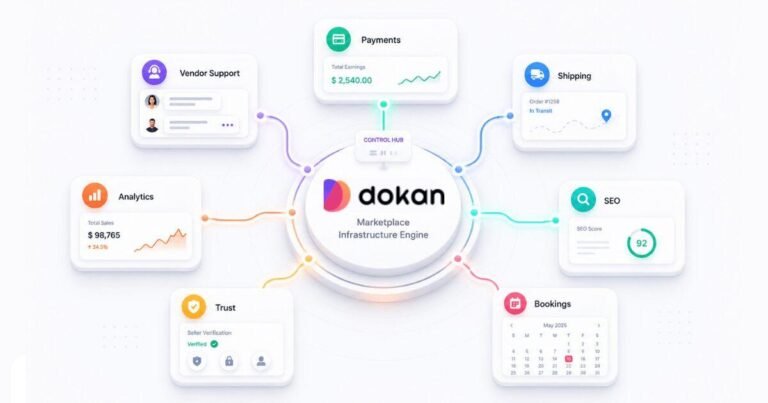
You can use the Dokan plugin to add multi-vendor functionality to WooCommerce.
With Dokan, marketplace owners can:
- Allow vendors to register.
- Create individual vendor stores.
- Manage vendor products.
- Set commission structures.
- Manage vendor orders.
- Configure withdrawals and payments.
- Create a centralized marketplace.
For example, you can build a marketplace similar to a multi-seller shopping platform where different businesses sell their products from one website.
WooCommerce provides the eCommerce foundation, while Dokan adds the multi-vendor functionality.
11. Advantages and Disadvantages of WooCommerce
Advantages
- Free and open-source core plugin.
- Easy product and order management.
- Extensive customization options.
- Supports physical and digital products.
- Multiple payment and shipping integrations.
- SEO-friendly platform.
- Large plugin and theme ecosystem.
- Can be extended into a multi-vendor marketplace.
Disadvantages
- Requires separate hosting.
- Needs regular updates and maintenance.
- Some advanced features require paid extensions.
- Poorly configured plugins can affect performance.
- Security and backups require ongoing attention.
- Complex customization may require professional development.
Despite these challenges, WooCommerce remains a flexible solution for businesses that want control over their online stores.
12. Is WooCommerce Good for Small Businesses?
Yes! WooCommerce is an excellent option for many small businesses.
It allows business owners to start selling products online without investing in a completely custom eCommerce platform.
You can begin with basic store functionality and gradually add features as your business grows.
For example, you can start with 20 products and later expand to thousands of products, introduce advanced shipping options, integrate marketing tools, and even build a multi-vendor marketplace.
This flexibility makes WooCommerce suitable for startups and growing businesses.
Conclusion
WooCommerce is a powerful eCommerce solution that makes it easier to build and manage an online store using WordPress.
From product management and payment integration to shipping, inventory, and order management, WooCommerce provides the essential tools needed to run an online business.
Its open-source nature and flexible ecosystem make it suitable for businesses of different sizes and industries.
Whether you want to launch a small online shop, a large eCommerce website, or a multi-vendor marketplace using Dokan, WooCommerce provides a strong foundation.
Need Help Building Your WooCommerce Store?
At D&D WebStudio, we specialize in WordPress, WooCommerce, and Dokan development. We help businesses build professional online stores, customize eCommerce functionality, and develop scalable multi-vendor marketplaces.
Contact our team to discuss your next eCommerce project.
Frequently Asked Questions (FAQs)
Q1. What is WooCommerce used for?
WooCommerce is used to create and manage online stores using WordPress. It allows businesses to sell physical products, digital downloads, services, and more.
Q2. Is WooCommerce free?
Yes. The core WooCommerce plugin is free and open source. However, you may need to pay for hosting, premium extensions, themes, and other services.
Q3. Do I need WordPress to use WooCommerce?
Yes. WooCommerce is a WordPress plugin and requires a WordPress installation.
Q4. Is WooCommerce good for beginners?
Yes. Beginners can create an online store using the WooCommerce setup wizard, built-in settings, and compatible themes.
Q5. Can I accept online payments with WooCommerce?
Yes. You can integrate supported payment gateways to accept credit cards, debit cards, UPI, and other payment methods.
Q6. Can I sell digital products with WooCommerce?
Yes. WooCommerce supports virtual and downloadable products, allowing you to sell eBooks, templates, software, and other digital products.
Q7. Can I create a multi-vendor marketplace with WooCommerce?
Yes. You can integrate Dokan with WooCommerce to allow multiple vendors to register, manage their stores, and sell products through your marketplace.
Q8. Is WooCommerce SEO friendly?
Yes. WooCommerce supports SEO-friendly product pages, categories, and URLs. You can further optimize your store using SEO plugins such as Yoast SEO and Rank Math.
Q9. Can I customize my WooCommerce store?
Yes. You can customize your store using themes, page builders, plugins, custom CSS, PHP, and other development solutions.
Q10. Is WooCommerce better than Shopify?
Both platforms have advantages. WooCommerce offers greater control and open-source customization, while Shopify provides a hosted eCommerce solution with managed infrastructure. Your choice depends on your business needs.