

Building a marketplace is easy — scaling it is the real challenge.
As your marketplace grows (more vendors, products, and traffic), performance issues can quickly appear if your system is not designed for scalability.
If you are using WordPress, WooCommerce, and Dokan, you must build a scalable architecture from the beginning.
In this guide, you’ll learn how to design a scalable Dokan marketplace architecture step-by-step.
🔴 What is Scalability?
Scalability means your system can:
✔ Handle more users
✔ Manage more vendors
✔ Process more orders
✔ Maintain performance under load
👉 Without scalability, your marketplace will slow down or crash.
🧠 Why Scalability Matters
As your marketplace grows:
❌ Slow loading pages
❌ Database overload
❌ Server crashes
❌ Poor user experience
With scalable architecture:
✔ Smooth performance
✔ Better uptime
✔ Faster loading
✔ Business growth
👉 Scalability = future-proof marketplace
⚙️ Core Components of Scalable Architecture
A scalable Dokan marketplace includes:
✔ Web server
✔ Database
✔ Caching system
✔ CDN
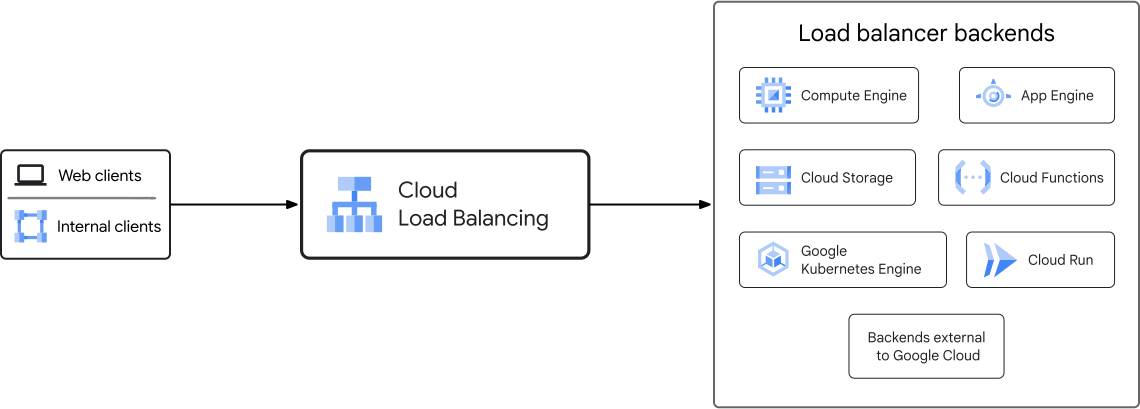
✔ Load balancer
✔ Background processing
👉 Each layer must be optimized.
🖥️ 1️⃣ Use High-Performance Hosting
Start with strong hosting.
Recommended:
✔ Cloud hosting (AWS, Google Cloud, DigitalOcean)
✔ VPS or dedicated servers
✔ Auto-scaling infrastructure
👉 Hosting is the foundation.
⚡ 2️⃣ Implement Caching Layers
Caching reduces server load.
Types:
✔ Page caching
✔ Object caching (Redis/Memcached)
✔ Browser caching
👉 Faster response, fewer queries.
🗄️ 3️⃣ Optimize Database for Scale
Database is the bottleneck in most marketplaces.
Optimize:
✔ Index important tables
✔ Clean unused data
✔ Optimize queries
✔ Use read replicas
👉 Especially important for wp_posts & wp_postmeta.
🌐 4️⃣ Use CDN (Content Delivery Network)
CDN improves speed globally.
Benefits:
✔ Faster content delivery
✔ Reduced server load
✔ Better performance
👉 Essential for high traffic.
🔄 5️⃣ Background Processing & Queues
Heavy tasks should not block users.
Examples:
✔ Email sending
✔ Order processing
✔ Report generation
Use:
✔ Cron jobs
✔ Queue systems
👉 Improves performance.
📦 6️⃣ Optimize WooCommerce & Dokan
Optimize platform:
✔ Reduce plugin load
✔ Optimize queries
✔ Disable unused features
✔ Use lightweight themes
👉 Keeps system efficient.
📊 7️⃣ Use Load Balancing
For high traffic:
✔ Multiple servers
✔ Traffic distribution
✔ Failover systems
👉 Prevents downtime.
🔐 8️⃣ Security & Stability
Security is part of scalability.
✔ Firewall
✔ Rate limiting
✔ Secure APIs
✔ Regular backups
👉 Protects system under load.
📱 9️⃣ API Optimization
If using mobile apps or integrations:
✔ Optimize REST API
✔ Use caching for API responses
✔ Limit unnecessary requests
👉 Ensures smooth integrations.
🚀 🔟 Monitoring & Scaling Strategy
Use monitoring tools:
✔ Server monitoring
✔ Database performance
✔ Error tracking
Scale when needed:
✔ Increase server resources
✔ Add nodes
✔ Optimize bottlenecks
👉 Continuous improvement is key.
📈 Real Growth Example
Marketplace scaling path:
- Shared hosting → VPS
- VPS → Cloud hosting
- Add caching + CDN
- Add load balancing
- Optimize database
👉 Step-by-step scaling approach.
🚨 Common Mistakes to Avoid
❌ Starting with cheap hosting
❌ Ignoring caching
❌ Too many plugins
❌ No database optimization
❌ No monitoring
👉 These cause performance issues.
📌 Scalability Checklist
✔ Cloud hosting
✔ Caching layers
✔ Database optimization
✔ CDN setup
✔ Load balancing
✔ Monitoring tools

Hire Me on Upwork – Dokan & WooCommerce Expert

 Chat on WhatsApp