
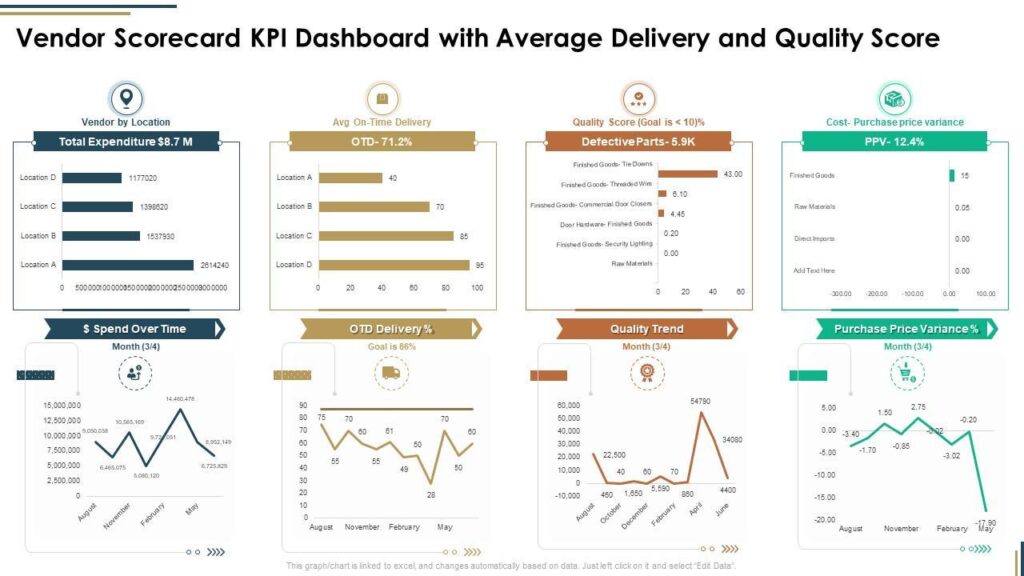


In any multi-vendor marketplace, vendors are the backbone of your business. Their performance directly affects customer satisfaction, sales, and platform reputation.
If you’re running a marketplace using Dokan with WooCommerce on WordPress, tracking vendor performance is not optional — it’s essential.
In this guide, you’ll understand why vendor performance tracking matters and how it impacts your marketplace growth.
🔴 What is Vendor Performance Tracking?
Vendor performance tracking means monitoring how vendors perform based on key metrics like:
✔ Sales
✔ Order fulfillment
✔ Customer ratings
✔ Delivery time
✔ Return/refund rates
👉 It helps you evaluate vendor quality and reliability
🧠 Why Vendor Performance Tracking is Important
🎯 1️⃣ Ensures Quality Control
Without tracking:
❌ Low-quality products
❌ Poor service
❌ Negative customer experience
With tracking:
✔ Identify poor-performing vendors
✔ Maintain marketplace quality
👉 Protects your brand reputation.
📊 2️⃣ Data-Driven Decisions
Tracking gives insights like:
✔ Top-performing vendors
✔ Low-performing vendors
✔ Best-selling products
👉 Helps you make smart business decisions
🛒 3️⃣ Improves Customer Experience
Customers expect:
✔ Fast delivery
✔ Quality products
✔ Good support
Tracking ensures:
✔ Vendors meet expectations
✔ Issues are identified quickly
👉 Leads to better reviews and loyalty.
💰 4️⃣ Increases Revenue
Better vendors = better sales.
✔ Promote high-performing vendors
✔ Remove poor performers
✔ Optimize product listings
👉 Direct impact on revenue.
⚖️ 5️⃣ Fair Marketplace Management
Tracking helps you:
✔ Reward good vendors
✔ Penalize poor performers
✔ Maintain fairness
👉 Creates a balanced ecosystem.
📈 Key Metrics to Track
📦 Order Fulfillment Rate
✔ Orders completed successfully
✔ Delivery success rate
👉 Measures reliability.
⭐ Customer Ratings & Reviews
✔ Product ratings
✔ Vendor feedback
👉 Measures customer satisfaction.
⏱️ Delivery Time
✔ Average delivery time
✔ Delays
👉 Measures efficiency.
🔁 Return & Refund Rate
✔ Number of returns
✔ Refund requests
👉 Measures product quality.
💰 Sales Performance
✔ Revenue per vendor
✔ Order volume
👉 Measures success.
⚙️ How to Track Vendor Performance in Dokan
With Dokan:
✔ Vendor reports dashboard
✔ Sales analytics
✔ Order tracking
✔ Review system
👉 Basic tracking is built-in.
🧑💻 Advanced Tracking (Custom Setup)
You can extend tracking by:
✔ Creating vendor scorecards
✔ Adding performance KPIs
✔ Automating reports
✔ Using custom dashboards
👉 Ideal for large marketplaces.
🔔 Use Performance-Based Actions
Based on tracking:
✔ Promote top vendors
✔ Feature best sellers
✔ Suspend poor performers
✔ Provide incentives
👉 Drives better performance.
📊 Example Vendor Scorecard
| Metric | Score |
|---|---|
| Delivery Time | 4.5/5 |
| Customer Rating | 4.8/5 |
| Return Rate | Low |
| Sales | High |
👉 Helps evaluate vendors easily.
🚀 Benefits of Vendor Tracking
✔ Better marketplace quality
✔ Increased customer trust
✔ Higher conversions
✔ Improved vendor competition
👉 Win-win for everyone.
🚨 Common Mistakes to Avoid
❌ Not tracking vendors
❌ Ignoring negative feedback
❌ No action on poor performance
❌ No clear KPIs
👉 These reduce platform quality.
📌 Vendor Performance Checklist
✔ Track key metrics
✔ Analyze data regularly
✔ Reward good vendors
✔ Improve poor performance
✔ Maintain transparency
👉 Follow this consistently.
📚 Internal Links

Hire Me on Upwork – Dokan & WooCommerce Expert

 Chat on WhatsApp