
WordPress: Best CRM Plugins (Complete Guide)
Managing customer relationships is essential for every growing business. Whether you run a WooCommerce store, service-based website, membership platform, or multi-vendor marketplace, a Customer Relationship Management (CRM) plugin helps you organize contacts, automate marketing, improve customer support, and increase sales.
WordPress offers a wide variety of CRM plugins, from lightweight contact managers to enterprise-grade automation platforms. Choosing the right CRM depends on your business goals, budget, and the level of automation you need.
In this guide, we’ll compare the best WordPress CRM plugins, their features, benefits, pricing considerations, and help you decide which one fits your website.
What is a WordPress CRM Plugin?
A WordPress CRM plugin allows you to manage customers, leads, contacts, and communication directly from your WordPress dashboard.
Instead of storing customer information in spreadsheets or multiple applications, a CRM centralizes everything in one place, making it easier to manage relationships and automate business processes.
A CRM can help you:
- Store customer information
- Track sales opportunities
- Manage leads
- Automate email marketing
- Record customer interactions
- Monitor sales performance
- Improve customer support
- Increase customer retention
Why Use a CRM Plugin?
As your business grows, managing customer relationships manually becomes difficult.
A CRM plugin helps you:
- Save time with automation
- Improve customer engagement
- Track every customer interaction
- Increase conversion rates
- Personalize communication
- Generate detailed business reports
- Improve sales forecasting
- Build long-term customer relationships
Key Features to Look For
When choosing a CRM plugin, consider these features:
- Contact Management
- Lead Tracking
- Sales Pipeline
- Email Marketing
- Workflow Automation
- WooCommerce Integration
- Contact Segmentation
- Reporting Dashboard
- Task Management
- Customer Notes
- Form Integration
- API Support
- Mobile Access
- GDPR Compliance
Best WordPress CRM Plugins
1. FluentCRM
FluentCRM is one of the most popular self-hosted CRM and email marketing plugins for WordPress.
Features
- Contact Management
- Email Campaigns
- Customer Tags
- Automation Funnels
- WooCommerce Integration
- Analytics Dashboard
Pros
- One-time ownership of customer data
- Fast and lightweight
- Excellent automation
Best For
WooCommerce stores and content creators.
2. HubSpot CRM
HubSpot provides a free CRM with powerful marketing and sales automation.
Features
- Contact Management
- Live Chat
- Email Marketing
- Sales Pipeline
- Marketing Automation
- Reporting
Pros
- Free plan available
- Excellent user interface
- Large integration ecosystem
Best For
Growing businesses and agencies.
3. WP ERP CRM
WP ERP combines CRM, HR, and Accounting into one WordPress solution.
Features
- Contact Management
- Sales CRM
- HR Module
- Accounting
- Email Logging
- Customer Notes
Pros
- Complete business management
- Native WordPress integration
Best For
Small and medium businesses.
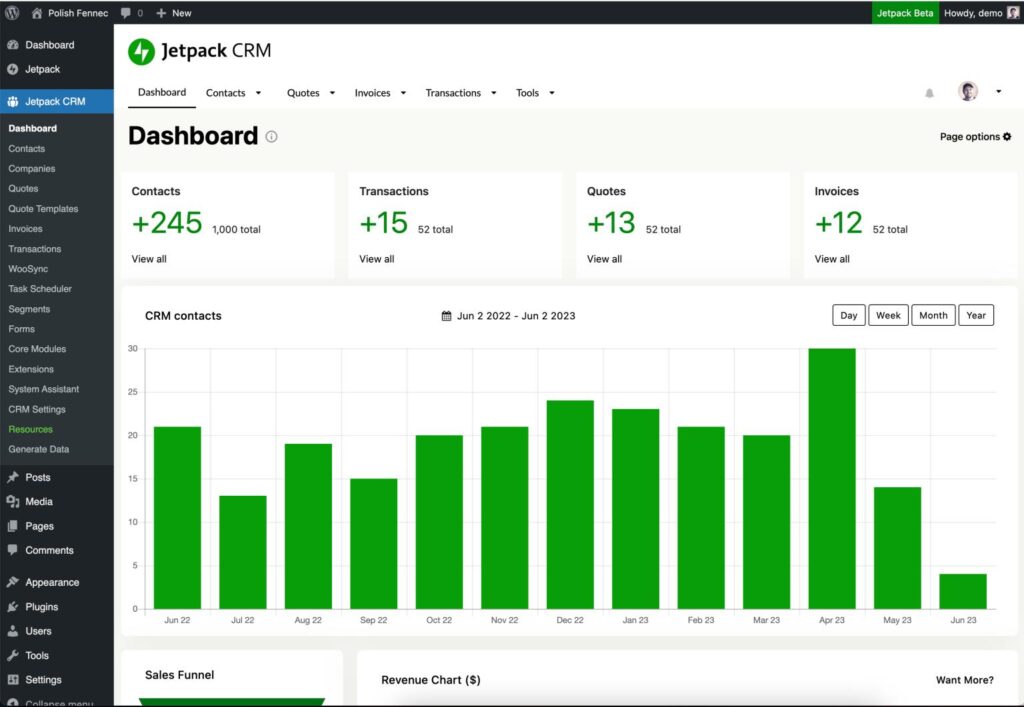
4. Jetpack CRM
Jetpack CRM is designed specifically for WordPress users who want a lightweight yet powerful CRM.
Features
- Contact Management
- Quotes & Invoices
- Customer History
- Transactions
- WooCommerce Sync
- Client Portal
Pros
- Simple interface
- Affordable pricing
Best For
Freelancers and service businesses.
5. Groundhogg
Groundhogg focuses on marketing automation and customer engagement.
Features
- Email Automation
- CRM Contacts
- Funnels
- Lead Scoring
- Campaign Tracking
- Sales Automation
Pros
- Powerful automation builder
- No monthly contact limits
Best For
Marketing-focused businesses.
6. Zoho CRM
Zoho CRM integrates with WordPress to manage leads and sales.
Features
- Lead Management
- Workflow Automation
- Sales Pipeline
- Email Campaigns
- AI Assistant
- Analytics
Best For
Sales teams and growing companies.
7. Salesforce CRM
Salesforce is a powerful enterprise CRM.
Features
- AI Insights
- Customer Journey Tracking
- Workflow Automation
- Opportunity Management
- Forecasting
- API Integrations
Best For
Large organizations and enterprise websites.
Plugin Comparison
| Plugin | Best For | WooCommerce | Email Automation | Free Version |
|---|---|---|---|---|
| FluentCRM | WooCommerce Stores | ✅ | ✅ | ❌ |
| HubSpot CRM | Growing Businesses | ✅ | ✅ | ✅ |
| WP ERP | Business Management | ✅ | Limited | ✅ |
| Jetpack CRM | Freelancers | ✅ | Limited | ✅ |
| Groundhogg | Marketing Automation | ✅ | ✅ | ✅ |
| Zoho CRM | Sales Teams | Via Integration | ✅ | Limited |
| Salesforce | Enterprise | Via Integration | ✅ | ❌ |
CRM Use Cases
WooCommerce Stores
Track purchases, automate follow-up emails, and create customer segments.
Service Businesses
Manage leads, proposals, appointments, and invoices.
Agencies
Track clients, projects, communication, and recurring revenue.
Membership Websites
Monitor subscriptions, member activity, and renewal reminders.
Multi-Vendor Marketplaces
Manage vendors, customers, payouts, and support interactions.
Marketing Automation
CRM plugins help automate:
- Welcome emails
- Abandoned cart reminders
- Product recommendations
- Birthday emails
- Newsletter campaigns
- Loyalty rewards
- Review requests
- Customer win-back campaigns
Automation saves time while improving engagement.
Customer Segmentation
Create customer groups based on:
- Purchase history
- Order value
- Product categories
- Membership level
- Location
- Customer role
- Last purchase date
Personalized communication increases conversions and customer loyalty.
Reporting & Analytics
A CRM should provide insights into:
- Total contacts
- New leads
- Conversion rates
- Customer lifetime value
- Revenue by campaign
- Email performance
- Sales pipeline
- Customer retention
These reports help you make informed business decisions.
Security Best Practices
Protect customer data by:
- Using SSL certificates
- Enabling two-factor authentication
- Limiting user permissions
- Encrypting sensitive information
- Backing up your database
- Keeping plugins updated
- Monitoring login activity
Common Mistakes
Choosing Too Many Features
Select a CRM that matches your current needs and can scale with your business.
Ignoring Automation
Take advantage of workflows to reduce manual work.
Poor Data Organization
Use tags and segments to keep customer information organized.
Skipping Integrations
Ensure your CRM integrates with WooCommerce, forms, email services, and other tools you already use.
CRM Selection Checklist
✅ Contact Management
✅ Lead Tracking
✅ Email Marketing
✅ Workflow Automation
✅ WooCommerce Integration
✅ Customer Segmentation
✅ Reporting Dashboard
✅ API Access
✅ Mobile Support
✅ Data Security
Final Thoughts
The best WordPress CRM plugin depends on your business goals. If you’re running a WooCommerce store, FluentCRM offers excellent native integration and marketing automation. HubSpot CRM is ideal for businesses looking for a free and scalable solution, while WP ERP provides an all-in-one business management platform. Jetpack CRM is a great fit for freelancers, and Groundhogg excels in advanced marketing automation.
Before choosing a CRM, consider your budget, required integrations, business size, and long-term growth plans. A well-implemented CRM will help you improve customer relationships, automate repetitive tasks, and drive sustainable business growth.

Hire Me on Upwork – Dokan & WooCommerce Expert

 Chat on WhatsApp