
Dokan: Integrating WhatsApp in Dokan Marketplace
Customer communication plays a major role in the success of any multi-vendor marketplace. Buyers often have questions about products, shipping, availability, pricing, and custom orders before making a purchase. Providing instant communication channels can significantly improve customer trust and increase sales.
One of the most effective communication tools available today is WhatsApp. With more than two billion users worldwide, WhatsApp has become an essential platform for customer support and business communication.
By integrating WhatsApp into your Dokan marketplace, you can allow customers to communicate directly with vendors, improve engagement, and increase conversion rates.
In this guide, we’ll explore how to integrate WhatsApp into a Dokan marketplace and the benefits it brings to both vendors and customers.
Why Integrate WhatsApp with Dokan?
WhatsApp provides instant and familiar communication.
Benefits include:
- Faster customer support
- Increased trust
- Better customer engagement
- More product inquiries
- Higher conversion rates
- Reduced support tickets
- Improved vendor-customer relationships
Many customers prefer messaging before purchasing, especially for high-value products.
Use Cases for WhatsApp in Dokan
Product Inquiries
Customers can ask:
- Product availability
- Product specifications
- Custom requests
Shipping Questions
Customers may inquire about:
- Delivery timelines
- Shipping costs
- International shipping
Negotiation and Custom Orders
Useful for:
- Handmade products
- Wholesale products
- Service marketplaces
Customer Support
Vendors can quickly resolve customer concerns.
WhatsApp improves communication throughout the buying journey.
Benefits for Vendors
Vendors receive:
Direct Customer Communication
No delays.
Higher Conversion Rates
Quick responses often lead to sales.
Better Customer Relationships
Personalized support builds loyalty.
More Repeat Customers
Satisfied buyers often return.
WhatsApp becomes a valuable sales channel.
Benefits for Marketplace Owners
Marketplace owners benefit from:
Increased Sales
Better communication improves conversions.
Improved Customer Satisfaction
Faster support experiences.
Reduced Platform Support Load
Customers contact vendors directly.
Better Vendor Retention
Vendors appreciate improved communication tools.
Communication features make marketplaces more attractive.
WhatsApp Integration Methods
There are several ways to integrate WhatsApp into Dokan.
WhatsApp Chat Button
Adds a floating button across the marketplace.
Vendor WhatsApp Button
Displays individual vendor contact buttons.
Product Page WhatsApp Integration
Customers contact vendors directly from products.
Store Page Integration
WhatsApp buttons appear on vendor store pages.
Each approach serves different business requirements.
Adding WhatsApp to Vendor Store Pages
A popular approach is allowing vendors to add their WhatsApp numbers.
Example button:
Chat with Seller on WhatsApp
Benefits:
- Direct communication
- Better customer experience
- Increased trust
Store page integration is often the most effective solution.
Adding WhatsApp to Product Pages
Product pages are where purchase decisions happen.
Examples:
Ask About This Product
Request a Custom Quote
Check Product Availability
A simple WhatsApp button can improve product conversions significantly.
WhatsApp Click-to-Chat Links
WhatsApp provides a simple URL format:
https://wa.me/919876543210
You can also pre-fill messages:
https://wa.me/919876543210?text=I%20am%20interested%20in%20your%20product
This creates a seamless communication experience.
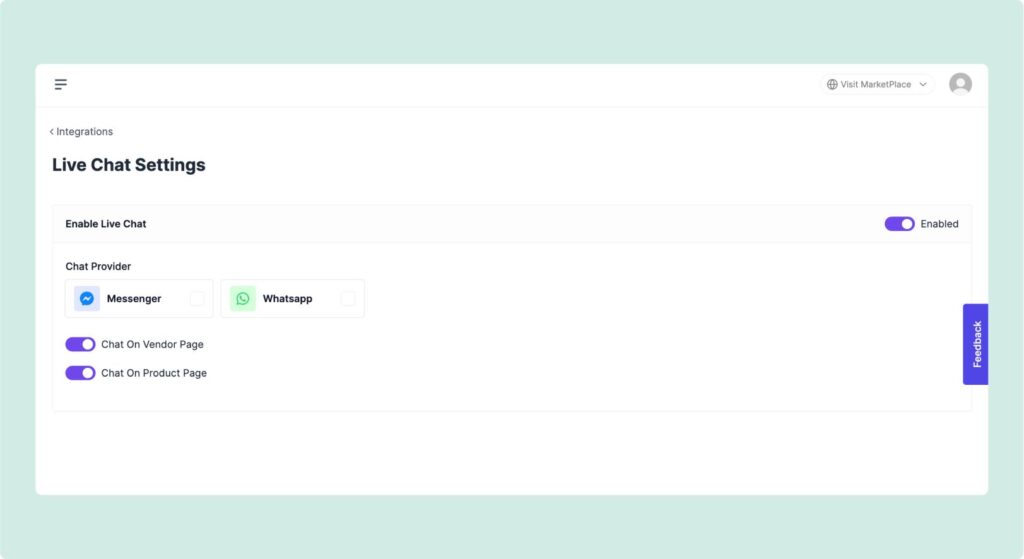
Allow Vendors to Manage WhatsApp Numbers
Marketplace owners can add vendor profile settings:
WhatsApp Number Field
Country Code
Enable/Disable Chat
Custom Message Templates
Providing flexibility improves vendor adoption.
WhatsApp for Service Marketplaces
Service-based marketplaces benefit greatly from WhatsApp.
Examples:
- Freelancers
- Consultants
- Designers
- Developers
- Coaches
Customers often need discussions before purchasing services.
WhatsApp for Wholesale Marketplaces
Wholesale customers frequently require:
- Custom pricing
- Bulk orders
- Negotiation
WhatsApp simplifies communication and improves conversions.
WhatsApp Business API Integration
Large marketplaces may require advanced functionality.
Features include:
Automated Replies
Business Profiles
Message Templates
Chat Management
Customer Support Automation
The WhatsApp Business API provides scalable communication capabilities.
Automating WhatsApp Notifications
Notifications can improve user experience.
Examples:
New Order Notifications
Order Status Updates
Shipping Updates
Withdrawal Notifications
Vendor Registration Alerts
Automation keeps users informed.
WhatsApp and Customer Trust
Customers often trust businesses more when direct communication is available.
Benefits:
Faster Responses
Personal Interaction
Reduced Purchase Anxiety
Better Customer Support
Trust directly impacts conversion rates.
Mobile Experience Advantages
Most WhatsApp users are mobile users.
Benefits include:
One-Click Communication
Instant Messaging
Better Mobile Conversions
Faster Customer Support
Mobile-first experiences improve marketplace performance.
WhatsApp and Conversion Rate Optimization
Communication directly impacts conversions.
Customers who receive quick answers are more likely to:
- Add products to cart
- Complete purchases
- Become repeat customers
WhatsApp often improves marketplace sales performance.
SEO Benefits of WhatsApp Integration
Although WhatsApp itself doesn’t directly improve rankings, it can positively influence:
User Engagement
Time on Site
Lower Bounce Rates
Better User Experience
These factors indirectly support SEO performance.
Security Considerations
Protect customer and vendor information.
Best practices include:
Spam Prevention
Vendor Verification
Privacy Policies
Rate Limiting
Secure Data Handling
Security is important for customer trust.
Recommended Plugins for WhatsApp Integration
Join.chat
Popular WhatsApp chat plugin.
Click to Chat
Simple WhatsApp integration.
WP Social Chat
Advanced WhatsApp features.
Custom Dokan Integration
Provides vendor-specific WhatsApp functionality.
Choose the solution that best fits your marketplace requirements.
Performance Considerations
WhatsApp integrations are generally lightweight.
However, monitor:
Third-Party Scripts
External API Calls
Mobile Performance
Core Web Vitals
Performance remains important.
Recommended Plugin Stack
For WhatsApp-enabled Dokan marketplaces:
Dokan Pro
Marketplace functionality.
WooCommerce
eCommerce engine.
Join.chat
WhatsApp integration.
FluentCRM
Customer automation.
LiteSpeed Cache
Performance optimization.
Cloudflare
Security and CDN.
This stack provides a strong communication foundation.
Common WhatsApp Integration Mistakes
Displaying Wrong Vendor Numbers
Causes customer confusion.
No Vendor Controls
Reduces flexibility.
Poor Mobile Design
Hurts user experience.
Excessive Popups
Can annoy users.
No Privacy Protection
Creates compliance issues.
Avoiding these mistakes improves customer satisfaction.
WhatsApp Integration Checklist
✓ Vendor WhatsApp Number Field
✓ Product Page Chat Button
✓ Store Page Chat Button
✓ Mobile Optimization
✓ Pre-Filled Messages
✓ WhatsApp Business Integration
✓ Automated Notifications
✓ Vendor Controls
✓ Privacy Compliance
✓ Performance Optimization
✓ Security Measures
✓ Analytics Tracking
Final Thoughts
WhatsApp integration is one of the easiest and most effective ways to improve communication in a Dokan marketplace. By allowing customers to contact vendors instantly, marketplaces can improve trust, increase conversions, and create better shopping experiences.
Whether you’re running a product marketplace, service marketplace, or wholesale platform, WhatsApp can become a valuable communication channel that benefits customers, vendors, and marketplace owners alike.
A simple “Chat on WhatsApp” button can often be the difference between losing a potential customer and closing a sale.

Hire Me on Upwork – Dokan & WooCommerce Expert

 Chat on WhatsApp