
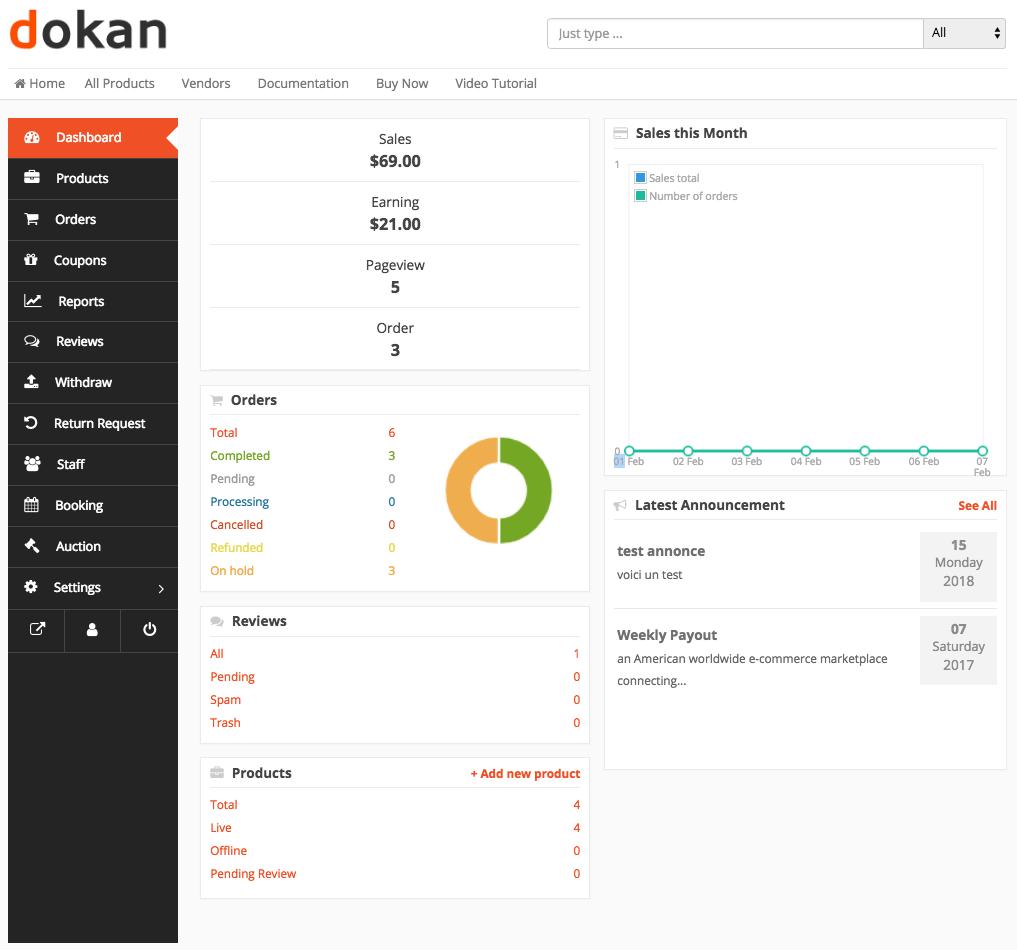
Dokan: Ultimate Dokan Marketplace Masterclass (Complete Beginner to Advanced Guide)
Building a successful multi-vendor marketplace is no longer limited to large companies like Amazon, Etsy, or eBay. Thanks to Dokan and WooCommerce, entrepreneurs can create powerful online marketplaces where multiple vendors sell products, manage their own stores, and grow their businesses—all from a single WordPress website.
Whether you’re launching a local marketplace, a B2B platform, a digital products store, or a global eCommerce marketplace, Dokan provides everything needed to build a scalable and profitable business.
This ultimate masterclass covers everything from installation and vendor management to payments, marketing, security, SEO, automation, and performance optimization.
What is Dokan?
Dokan is one of the most popular multi-vendor marketplace plugins for WordPress.
It transforms a standard WooCommerce store into a complete marketplace where:
- Multiple vendors can register
- Vendors manage their own stores
- Products are added independently
- Orders are processed automatically
- Marketplace owners earn commissions
Popular marketplace examples include:
- Amazon
- Etsy
- Flipkart
- eBay
- Local B2B marketplaces
Why Choose Dokan?
Dokan offers numerous advantages:
Easy Vendor Management
Each vendor receives an independent dashboard.
WooCommerce Integration
Built directly on WooCommerce.
Flexible Commission System
Charge percentage or fixed commissions.
Powerful Admin Controls
Approve vendors, manage products, and monitor sales.
Highly Scalable
Supports thousands of vendors and products.
Types of Marketplaces You Can Build
Using Dokan, you can create:
Fashion Marketplace
Electronics Marketplace
Grocery Marketplace
Pharmacy Marketplace
Handmade Products Marketplace
Digital Downloads Marketplace
Service Marketplace
Rental Marketplace
B2B Wholesale Marketplace
Hyperlocal Marketplace
Dokan is flexible enough for almost every business model.
Installing Dokan
Getting started is straightforward.
Step 1
Install WordPress.
Step 2
Install WooCommerce.
Step 3
Install Dokan Lite or Dokan Pro.
Step 4
Run the setup wizard.
Step 5
Configure marketplace settings.
Your marketplace is now ready for customization.
Vendor Registration
Allow sellers to join your marketplace.
Collect:
- Business Name
- Store Name
- Email Address
- Phone Number
- Address
- Tax Information
Enable admin approval for better quality control.
Vendor Dashboard
Each vendor can manage:
- Products
- Orders
- Coupons
- Shipping
- Withdrawals
- Reviews
- Analytics
The dashboard reduces admin workload.
Product Management
Vendors can create:
Simple Products
Variable Products
Digital Products
Downloadable Products
Subscription Products
Booking Products
Auction Products
Product flexibility supports different business types.
Marketplace Commission Models
Popular commission structures include:
Percentage Commission
Example:
10% per sale
Fixed Commission
Example:
$5 per order
Combined Commission
Example:
5% + $2
Flexible commissions maximize profitability.
Vendor Withdrawals
Support multiple payout methods:
- Bank Transfer
- PayPal
- Stripe Connect
- Razorpay
- Manual Withdrawals
Automated payouts improve vendor satisfaction.
Shipping Configuration
Options include:
Vendor Shipping
Flat Rate Shipping
Free Shipping
Local Delivery
Distance-Based Shipping
Flexible shipping improves customer experience.
Payment Gateway Integration
Popular gateways include:
Stripe
PayPal
Razorpay
Square
WooCommerce Payments
Offer multiple payment methods for higher conversions.
Marketplace SEO
Optimize:
Product Pages
Vendor Stores
Categories
Blog Content
Internal Linking
SEO helps generate long-term organic traffic.
Marketplace Speed Optimization
Performance directly impacts sales.
Recommended tools:
LiteSpeed Cache
Redis Object Cache
Cloudflare CDN
Image Optimization
Database Optimization
Fast websites convert better.
Mobile Optimization
Ensure:
Responsive Design
Mobile Checkout
Fast Loading Pages
Mobile Navigation
Most marketplace traffic comes from mobile devices.
Vendor Store Customization
Allow vendors to personalize:
- Logos
- Banners
- Store Description
- Social Links
- Store Policies
Professional stores improve customer trust.
Product Search & Filters
Improve product discovery with:
AJAX Search
Category Filters
Price Filters
Brand Filters
Location Filters
Good search functionality increases sales.
Customer Reviews
Enable:
Product Reviews
Vendor Reviews
Store Ratings
Verified Purchase Reviews
Reviews improve trust and SEO.
Marketing Automation
Automate:
Email Campaigns
Vendor Notifications
Customer Follow-ups
Coupon Campaigns
Review Requests
Automation saves time and improves engagement.
WhatsApp Integration
Allow:
Product Inquiries
Vendor Chat
Customer Support
Order Notifications
WhatsApp improves communication and conversions.
Loyalty Programs
Reward:
Vendors
Customers
Referrals
Reviews
Repeat Purchases
Loyalty programs increase retention.
Hyperlocal Marketplace Features
Implement:
Store Locator
Delivery Radius
Local Search
Same-Day Delivery
ZIP Code Restrictions
Ideal for local businesses and delivery services.
Security Best Practices
Protect your marketplace with:
SSL Certificates
Two-Factor Authentication
Firewall
Login Protection
Malware Scanning
Regular Updates
Security builds customer confidence.
Backup & Disaster Recovery
Protect your marketplace using:
Daily Backups
Cloud Storage
Real-Time Backups
Staging Environment
Recovery Testing
Always prepare for unexpected issues.
Vendor Analytics
Monitor:
Sales
Revenue
Orders
Conversion Rate
Best-Selling Products
Data helps vendors grow their businesses.
Marketplace Reports
Track:
Marketplace Revenue
Vendor Performance
Customer Growth
Refund Rates
Product Sales
Reports support better business decisions.
Scaling Your Marketplace
As your business grows:
Upgrade Hosting
Optimize Database
Use Object Caching
CDN Integration
Queue Background Tasks
Scalability ensures consistent performance.
Recommended Plugin Stack
Dokan Pro
Marketplace management.
WooCommerce
eCommerce engine.
Rank Math SEO
Search engine optimization.
LiteSpeed Cache
Website performance.
Redis Object Cache
Database optimization.
FluentCRM
Marketing automation.
WP Mail SMTP
Reliable email delivery.
Cloudflare
Security and CDN.
FiboSearch
Advanced product search.
Advanced Coupons
Promotions and discounts.
This plugin stack creates a powerful, scalable marketplace.
Common Marketplace Mistakes
Accepting Every Vendor
Verify vendors before approval.
Ignoring Website Performance
Slow sites reduce conversions.
Weak SEO Strategy
Limits organic traffic.
Poor Vendor Communication
Reduces engagement.
No Backup Plan
Risks business continuity.
Limited Payment Options
Can reduce completed purchases.
Avoiding these mistakes improves long-term marketplace success.
Ultimate Dokan Marketplace Checklist
✅ Install WordPress & WooCommerce
✅ Configure Dokan Settings
✅ Enable Vendor Registration
✅ Set Commission Rules
✅ Configure Payment Gateways
✅ Configure Shipping
✅ Optimize Product Search
✅ Improve Store SEO
✅ Enable Customer Reviews
✅ Set Up WhatsApp Support
✅ Create Loyalty Programs
✅ Configure Local Delivery
✅ Optimize Website Speed
✅ Secure Your Marketplace
✅ Schedule Automated Backups
✅ Track Marketplace Analytics
✅ Automate Marketing Campaigns
✅ Improve Mobile Experience
✅ Test Checkout Regularly
✅ Continuously Optimize Performance
Final Thoughts
Dokan is one of the most powerful solutions for building a professional multi-vendor marketplace on WordPress. From vendor management and commission systems to shipping, payments, SEO, performance optimization, and marketing automation, it provides everything needed to create a scalable online marketplace.
Whether you’re building a local marketplace, a global eCommerce platform, a B2B marketplace, or a niche industry solution, mastering Dokan allows you to create a business that can grow alongside your vendors and customers.
Success comes from combining the right technology with excellent vendor support, fast performance, strong security, and a customer-first shopping experience.

Hire Me on Upwork – Dokan & WooCommerce Expert

 Chat on WhatsApp