
WooCommerce: Advanced Commission & Revenue Management (Complete Guide 2026)
As a WooCommerce business grows, managing revenue becomes more complex. Simple sales reports may no longer be enough when a store has multiple sales channels, affiliates, partners, vendors, commissions, refunds, discounts, subscriptions, or custom pricing agreements.
Advanced Commission & Revenue Management in WooCommerce provides a structured approach to tracking revenue, calculating commissions, managing payouts, reconciling transactions, and understanding the true financial performance of an online business.
A well-designed revenue management system can reduce manual calculations, improve financial visibility, and help businesses make better decisions.
What Is WooCommerce Commission & Revenue Management?
Commission and revenue management involves tracking how money generated through WooCommerce is distributed between different parties.
Depending on the business model, this may include:
- Store Revenue
- Vendor Commissions
- Affiliate Commissions
- Partner Commissions
- Marketplace Fees
- Payment Fees
- Shipping Revenue
- Refunds
- Discounts
- Taxes
- Payouts
The goal is to create a reliable calculation and reporting system for every transaction.
Why Advanced Revenue Management Matters
A basic WooCommerce store may only need to track:
Sales → Costs → Profit
A more complex business may need to track:
Gross Sales → Discounts → Taxes → Shipping → Payment Fees → Commissions → Refunds → Net Revenue → Payouts
Without clear rules, financial calculations can become difficult to manage.
Advanced revenue management can help:
- Improve Financial Accuracy
- Automate Commission Calculations
- Reduce Manual Accounting
- Track Partner Earnings
- Improve Revenue Reporting
- Simplify Reconciliation
- Identify Profitable Products
- Improve Business Decisions
WooCommerce Revenue Structure
A useful revenue model should clearly define different financial components.
For example:
Gross Product Sales
↓
Discounts
↓
Refunds
↓
Taxes
↓
Shipping
↓
Payment Fees
↓
Commissions
↓
Net Revenue
The exact calculation depends on the store’s business model and accounting requirements.
Commission Models
1. Percentage Commission
A percentage of the transaction is assigned as commission.
Example:
Sale: $500
Commission: 10%
Commission Amount: $50
Remaining Amount: $450
This is one of the simplest commission models.
2. Fixed Commission
A fixed amount is charged for each transaction.
Example:
Order Value: $500
Fixed Commission: $25
Remaining Amount: $475
This can work well when the business wants a predictable fee regardless of order size.
3. Percentage + Fixed Commission
A business can combine both approaches.
Example:
10% + $5
For a $500 order:
- Percentage commission = $50
- Fixed fee = $5
- Total commission = $55
- Remaining amount = $445
4. Tiered Commission
Commission rates can change according to sales volume.
| Monthly Sales | Commission |
|---|---|
| $0–$5,000 | 15% |
| $5,001–$20,000 | 12% |
| $20,001+ | 10% |
Tiered pricing can reward high-performing partners, affiliates, or vendors.
5. Product-Based Commission
Different products can have different commission rates.
For example:
- Product A → 5%
- Product B → 10%
- Product C → 15%
This can be useful when product margins differ significantly.
6. Category-Based Commission
Commission can also be calculated according to product category.
Example:
| Category | Commission |
|---|---|
| Electronics | 8% |
| Fashion | 12% |
| Accessories | 15% |
| Services | 20% |
Category-based rules can help align commissions with product profitability.
7. Partner-Specific Commission
Businesses working with affiliates, resellers, agents, or partners may need individual commission agreements.
For example:
Partner A → 8%
Partner B → 10%
Partner C → 12%
Partner-specific rules should be documented so there is no confusion during reconciliation.
Commission Rules Priority
When multiple rules apply, the system should have a clearly defined hierarchy.
A possible structure is:
Global Rule
↓
Category Rule
↓
Product Rule
↓
Partner Rule
The actual priority should be based on the business requirements.
A documented rule hierarchy makes commission calculations easier to understand and troubleshoot.
Commission on Discounts
Discounts can significantly affect commission calculations.
For example:
Product Price: $200
Discount: $40
Customer Pays: $160
If commission is 10%, the business needs to decide whether the commission is calculated from:
- $200
- $160
This rule should be established before implementing automated calculations.
Commission on Shipping
Shipping revenue may or may not be included in commission calculations.
For example:
Product: $100
Shipping: $15
Commission: 10%
Possible approaches include:
Product Only
Commission = $10
Product + Shipping
Commission = $11.50
The business should choose a consistent method.
Commission and Taxes
Taxes should be handled separately from commission calculations where appropriate.
Consider:
- Product Taxes
- Shipping Taxes
- Tax Exemptions
- Regional Tax Rules
- Tax-Inclusive Pricing
- Tax-Exclusive Pricing
Tax treatment varies by jurisdiction, so businesses should confirm their specific accounting requirements with a qualified professional.
Refunds & Commission Reversals
Refunds need to be incorporated into revenue calculations.
Example:
Original Sale: $300
Commission: $30
Customer Refund: $300
The system may need to reverse the original commission.
A transaction history should clearly show:
- Original Sale
- Commission
- Refund
- Commission Reversal
- Final Balance
Partial Refunds
Partial refunds require proportional calculations.
For example:
Original Order: $500
Refund: $100
The system needs to determine how the refund affects:
- Vendor or Partner Earnings
- Marketplace Revenue
- Commission
- Payment Fees
- Taxes
Automating these calculations reduces the risk of accounting mistakes.
Multiple Commission Recipients
Some WooCommerce businesses may need to distribute revenue among several parties.
For example:
Customer Payment
↓
WooCommerce Order
↓
- Affiliate Commission
- Sales Representative Commission
- Partner Commission
- Platform Revenue
A custom revenue system can calculate each component separately.
Affiliate Commission Management
Affiliate programs can generate additional sales while rewarding partners.
Useful information includes:
- Affiliate
- Referral
- Order
- Commission Rate
- Commission Amount
- Refund
- Payout Status
Affiliate commissions should be reconciled against actual completed transactions.
Sales Representative Commissions
Businesses with sales teams can connect WooCommerce orders to sales representatives.
Commission rules may depend on:
- Sales Value
- Product Category
- Customer Type
- Salesperson
- Monthly Target
- Revenue Tier
This can support more sophisticated incentive programs.
Revenue Attribution
Revenue attribution helps businesses understand where sales originate.
Possible sources include:
- Organic Search
- Paid Advertising
- Email Marketing
- Affiliate Traffic
- Sales Representatives
- Direct Traffic
- Social Media
- Referral Partners
Attribution data can be combined with commission calculations to understand acquisition costs and channel profitability.
Net Revenue vs Gross Revenue
One of the most important distinctions in revenue management is the difference between gross and net revenue.
Gross Revenue
Total sales before deductions.
Net Revenue
Revenue after applicable deductions such as:
- Discounts
- Refunds
- Returns
- Certain fees
The exact definition should be consistent across business reports.
Revenue by Product
Product-level revenue reporting can show:
- Units Sold
- Gross Revenue
- Discounts
- Refunds
- Net Revenue
- Commission
- Estimated Margin
This helps identify products that generate significant revenue versus products that generate actual profitability.
Revenue by Category
Category reporting can help management understand which areas of the catalog are performing best.
Track:
- Sales
- Orders
- Average Order Value
- Discounts
- Refunds
- Commission
- Net Revenue
Revenue by Customer
Customer-level reporting can provide insights into:
- Total Orders
- Total Spend
- Average Order Value
- Last Purchase
- Refunds
- Customer Lifetime Value
This information can support customer retention and segmentation strategies.
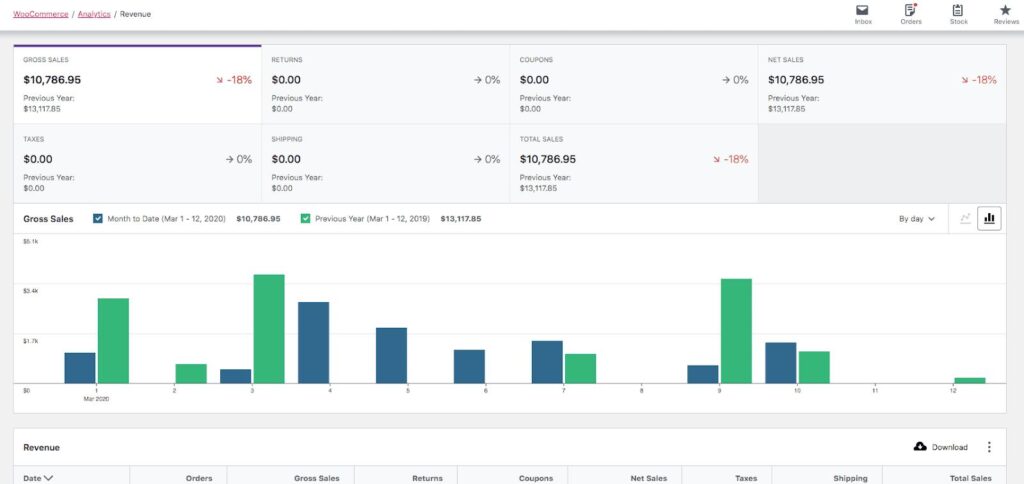
Revenue Dashboard
A centralized dashboard can display:
Sales
- Gross Sales
- Net Sales
- Orders
- Average Order Value
Commissions
- Total Commission
- Pending Commission
- Paid Commission
- Reversed Commission
Revenue
- Gross Revenue
- Net Revenue
- Refunds
- Discounts
- Fees
Payouts
- Pending Payouts
- Completed Payouts
- Failed Payouts
Financial Reconciliation
Revenue management should include regular reconciliation.
Compare WooCommerce records against:
- Payment Gateway
- Bank Account
- Accounting Software
- Affiliate Platform
- Partner Statements
Reconciliation helps identify:
- Missing Payments
- Duplicate Transactions
- Incorrect Commissions
- Refund Differences
- Payout Errors
Commission Reports
Useful reports include:
Partner Commission Report
Shows earnings by partner.
Product Commission Report
Shows commissions generated by individual products.
Category Commission Report
Shows commission by category.
Date-Based Revenue Report
Shows revenue during a selected period.
Refund Report
Shows refunds and related commission adjustments.
Revenue Export
Businesses may need to export financial data for accounting and analysis.
Useful formats include:
- CSV
- XLSX
Export fields can include:
- Order ID
- Customer
- Product
- Quantity
- Gross Sales
- Discount
- Tax
- Shipping
- Commission
- Refund
- Net Revenue
- Payment Status
- Date
WooCommerce Revenue Automation
Automation can handle repetitive financial processes.
Examples include:
- Commission Calculation
- Commission Approval
- Refund Adjustments
- Payout Calculation
- Revenue Reports
- Low Balance Alerts
- Commission Notifications
- Scheduled Exports
Automation can reduce manual administrative work.
Custom WooCommerce Development
Some businesses require commission and revenue rules that aren’t available through standard configuration.
Custom development can support:
- Advanced Commission Rules
- Partner-Specific Rates
- Product-Level Rules
- Category-Level Rules
- Tiered Commissions
- Revenue Splitting
- Custom Dashboards
- Financial Exports
- Automated Reconciliation
Custom logic should be documented and tested thoroughly.
API & Accounting Integration
WooCommerce revenue data can be synchronized with external systems.
Possible integrations include:
- Accounting Platforms
- ERP Systems
- CRM Platforms
- Payment Gateways
- Affiliate Systems
- Business Intelligence Platforms
Integration architecture should include:
- Authentication
- Validation
- Error Handling
- Logging
- Retry Logic
- Duplicate Prevention
Security & Financial Data
Revenue systems contain sensitive business information.
Protect financial data through:
- Role-Based Access
- Strong Authentication
- HTTPS
- Secure APIs
- Activity Logging
- Restricted Reports
- Regular Backups
Not every administrator needs access to every financial report.
Use the principle of least privilege.
Testing Revenue Calculations
Before launching advanced commission functionality, test realistic scenarios.
Test 1: Standard Order
Verify the basic calculation.
Test 2: Discount
Verify commission after a coupon.
Test 3: Shipping
Verify whether shipping is included.
Test 4: Tax
Verify the intended tax treatment.
Test 5: Full Refund
Verify commission reversal.
Test 6: Partial Refund
Verify proportional adjustment.
Test 7: Multiple Recipients
Verify that each recipient receives the correct amount.
Test 8: Payout
Verify the final available balance.
Common Revenue Management Mistakes
No Clear Commission Rules
Undefined calculations can create financial disputes.
Mixing Gross and Net Revenue
Reports should clearly distinguish the two.
Ignoring Refunds
Refunds can make commission and revenue reports inaccurate.
Manual Calculations
Spreadsheets can become difficult to maintain as order volume grows.
No Reconciliation
WooCommerce records should be compared against actual payment and accounting records.
Too Much Admin Access
Financial information should be restricted to authorized users.
WooCommerce Commission & Revenue Management Checklist
Commission
- Default Commission
- Percentage Commission
- Fixed Commission
- Tiered Commission
- Product Commission
- Category Commission
- Partner Commission
Revenue
- Gross Revenue
- Net Revenue
- Discounts
- Refunds
- Taxes
- Shipping
- Payment Fees
Payouts
- Pending Commissions
- Approved Commissions
- Paid Commissions
- Reversed Commissions
- Payout History
Reporting
- Product Reports
- Category Reports
- Partner Reports
- Customer Reports
- Revenue Reports
- Refund Reports
- Export
Operations
- Reconciliation
- Automation
- API Integration
- Security
- Audit Logs
- Backup
Best Practices
- Define commission rules before automating them.
- Clearly document how discounts and refunds affect commissions.
- Separate gross revenue from net revenue.
- Automate repetitive calculations.
- Reconcile WooCommerce transactions regularly.
- Provide transparent commission reports.
- Restrict access to sensitive financial information.
- Test edge cases before deploying custom revenue logic.
- Keep detailed transaction records.
- Review commission structures as the business grows.
Final Thoughts
Advanced Commission & Revenue Management can give WooCommerce businesses much greater control over complex financial workflows.
Whether you’re managing affiliates, sales representatives, partners, vendors, or multiple revenue channels, the key is to establish clear rules for commissions, discounts, shipping, taxes, refunds, payouts, and net revenue.
A reliable system should automate calculations while maintaining a detailed transaction history that makes every financial adjustment easy to understand.
For growing WooCommerce businesses, combining custom commission logic, automated reporting, payment reconciliation, accounting integrations, and secure financial dashboards can create a scalable revenue management process.
The goal isn’t simply to calculate commissions. It’s to build a transparent, accurate, and maintainable financial system that helps the business understand where revenue comes from, where money is being distributed, and how the store is actually performing.

Hire Me on Upwork – Dokan & WooCommerce Expert

 Chat on WhatsApp