
WooCommerce: WooCommerce B2B Pricing & Wholesale Setup
Business-to-Business (B2B) eCommerce is transforming how manufacturers, wholesalers, distributors, and suppliers sell products online. Unlike traditional B2C stores, B2B customers expect wholesale pricing, bulk ordering, tax exemptions, custom payment terms, and personalized purchasing experiences.
WooCommerce is a flexible eCommerce platform that can be extended into a powerful B2B solution using the right plugins and configurations. It supports customizable pricing, user roles, payment gateways, shipping methods, and automation, making it suitable for businesses of all sizes.
In this guide, you’ll learn how to set up wholesale pricing and build a professional WooCommerce B2B store.
What is WooCommerce B2B Pricing?
B2B pricing allows different customer groups to see different product prices.
Examples:
- Retail Customers
- Wholesale Buyers
- Dealers
- Distributors
- VIP Business Clients
Each group can receive its own pricing structure.
Benefits of Wholesale Pricing
A B2B pricing system helps you:
- Increase bulk sales
- Build long-term customer relationships
- Simplify pricing management
- Encourage repeat orders
- Improve customer satisfaction
- Support multiple business customer types
Wholesale pricing creates a better buying experience for professional customers.
Create Customer Roles
The first step is defining customer types.
Examples:
Retail Customer
Standard product pricing.
Wholesale Customer
Discounted prices.
Distributor
Special negotiated pricing.
Dealer
Exclusive business rates.
User roles allow WooCommerce to display different prices for different customers.
Restrict Store Access
Many B2B stores don’t display prices to public visitors.
Options include:
- Hide prices for guests
- Require business registration
- Login to view pricing
- Private product catalogs
This helps protect wholesale pricing.
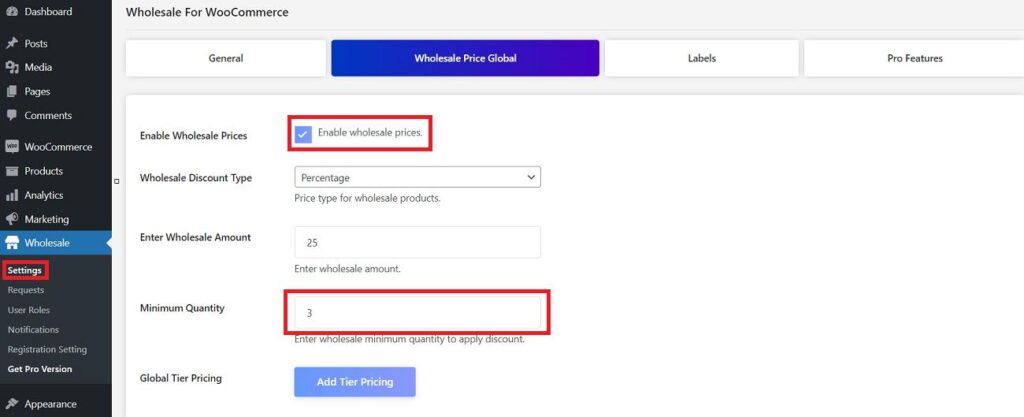
Set Wholesale Prices
Assign separate prices for business customers.
Example:
| Customer Type | Price |
|---|---|
| Retail | $100 |
| Wholesale | $85 |
| Distributor | $75 |
| VIP Dealer | $70 |
Tiered pricing encourages larger purchases.
Quantity-Based Pricing
Offer discounts based on order quantity.
Example:
| Quantity | Price |
|---|---|
| 1–9 | $100 |
| 10–49 | $90 |
| 50–99 | $80 |
| 100+ | $70 |
Bulk discounts increase average order value.
Minimum Order Quantity (MOQ)
Require customers to purchase a minimum quantity.
Examples:
- Minimum 10 pieces
- Minimum ₹10,000 order
- Minimum 50 kg
- Minimum 5 cartons
MOQ improves profitability.
Minimum Order Value
Set minimum purchase amounts.
Examples:
- Minimum order: ₹5,000
- Minimum wholesale order: $200
- Distributor minimum: $1,000
This helps reduce processing costs.
Category-Based Pricing
Different categories can have different wholesale rules.
Examples:
Electronics
10% wholesale discount.
Furniture
15% wholesale discount.
Industrial Equipment
Custom pricing.
Category pricing provides greater flexibility.
Role-Based Discounts
Automatically apply discounts based on customer roles.
Examples:
Wholesale Customer
15% off.
Dealer
20% off.
VIP Partner
25% off.
Role-based pricing removes manual work.
Product-Specific Wholesale Pricing
Some products require unique pricing.
Examples:
- Premium products
- Clearance inventory
- Exclusive brands
Individual product pricing provides maximum control.
Hide Retail Prices
Many wholesalers only show business pricing after login.
Benefits:
- Protects wholesale margins
- Encourages account registration
- Supports dealer networks
This is common in B2B stores.
Request for Quote (RFQ)
Allow customers to request custom pricing.
RFQs work well for:
- Large orders
- Custom products
- Industrial equipment
- International buyers
RFQs help close high-value sales.
Bulk Order Forms
Speed up purchasing.
Popular features:
SKU Search
CSV Upload
Quick Order Tables
Bulk Add-to-Cart
Business buyers appreciate fast ordering.
Tax Management
Support business taxation.
Examples:
GST
VAT
Tax Exempt Customers
Reverse Charge
Business Invoices
Accurate tax handling improves compliance.
Business Registration Forms
Collect:
- Company Name
- GST/VAT Number
- Business Address
- Contact Person
- Industry
- Phone Number
Business information simplifies order processing.
Payment Methods
Offer flexible payment options.
Examples:
Stripe
PayPal
Razorpay
Bank Transfer
Purchase Orders
Net 30 / Net 60 Terms
Flexible payments improve customer satisfaction.
Shipping Configuration
B2B stores often require:
Freight Shipping
Warehouse Pickup
Local Delivery
Flat Rate Shipping
Custom Shipping Quotes
Shipping flexibility supports business buyers.
Customer Account Management
Allow businesses to manage:
- Saved addresses
- Order history
- Invoices
- Quotes
- Payment methods
Customer portals improve efficiency.
Inventory Management
Monitor:
Stock Levels
Backorders
Warehouse Availability
Supplier Inventory
Inventory visibility helps prevent delays.
Marketing for Wholesale Stores
Use:
Email Marketing
LinkedIn Campaigns
Industry Events
Content Marketing
Google Ads
B2B marketing focuses on long-term relationships.
SEO for B2B WooCommerce Stores
Optimize:
Product Pages
Category Pages
Industry Keywords
Technical Documentation
Internal Links
SEO generates qualified business traffic.
Performance Optimization
Large B2B stores require fast performance.
Recommended tools:
LiteSpeed Cache
Redis Object Cache
Cloudflare CDN
Image Optimization
Database Cleanup
Fast stores improve conversion rates.
Analytics & Reporting
Track:
Wholesale Revenue
Average Order Value
Customer Lifetime Value
Bulk Orders
RFQ Conversion Rate
Analytics support better business decisions.
Recommended B2B Plugins
B2BKing
Complete B2B and wholesale solution.
Wholesale Suite
Wholesale pricing and ordering.
Dynamic Pricing & Discounts
Flexible pricing rules.
Request a Quote Plugin
Quote management.
Advanced Custom Fields (ACF)
Business-specific registration fields.
Choose plugins that match your workflow and business model.
Recommended Plugin Stack
WooCommerce
Store foundation.
B2BKing
Wholesale pricing and customer roles.
Request a Quote Plugin
Quote management.
FluentCRM
Customer automation.
WP Mail SMTP
Reliable email delivery.
LiteSpeed Cache
Performance optimization.
Redis Object Cache
Object caching.
Cloudflare
Security and CDN.
This stack creates a scalable B2B WooCommerce store.
Common B2B Pricing Mistakes
No Customer Segmentation
Every customer sees the same pricing.
Missing MOQ Rules
Reduces wholesale profitability.
Poor Registration Process
Creates unnecessary friction.
No RFQ System
Misses enterprise opportunities.
Weak Performance
Large catalogs become slow.
Ignoring SEO
Reduces long-term lead generation.
Avoiding these issues improves both user experience and sales.
WooCommerce B2B Setup Checklist
✅ Business Customer Roles
✅ Wholesale Pricing
✅ Quantity Discounts
✅ Minimum Order Quantity
✅ Minimum Order Value
✅ RFQ System
✅ Bulk Order Forms
✅ Business Registration
✅ Tax Configuration
✅ Shipping Rules
✅ Multiple Payment Methods
✅ Customer Dashboard
✅ SEO Optimization
✅ Performance Optimization
✅ Analytics Tracking
✅ Automated Email Workflows
✅ Secure Login
✅ Mobile Optimization
Final Thoughts
WooCommerce provides a powerful foundation for building a professional B2B wholesale store. By combining customer roles, wholesale pricing, quantity discounts, RFQs, business registration, and flexible payment options, you can deliver a seamless purchasing experience for business buyers.
Whether you’re selling industrial products, wholesale fashion, electronics, construction materials, or office supplies, the right B2B setup can streamline operations, strengthen customer relationships, and drive long-term revenue growth.

Hire Me on Upwork – Dokan & WooCommerce Expert

 Chat on WhatsApp