
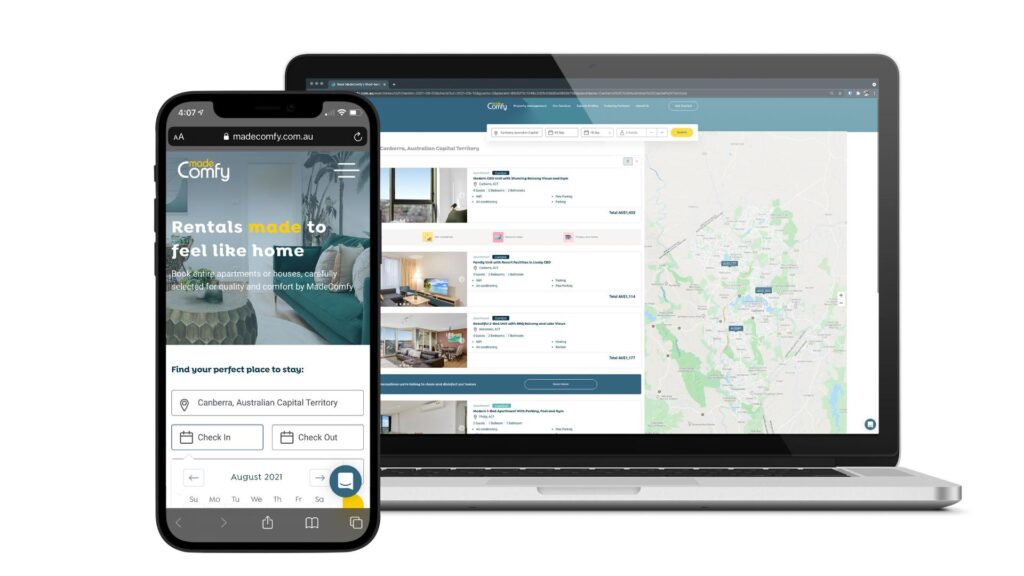
WooCommerce: WooCommerce Booking & Rental Setup
The online booking and rental industry has experienced tremendous growth in recent years. Businesses offering vacation rentals, equipment rentals, appointments, event spaces, vehicle rentals, coaching sessions, and professional services now rely on online booking systems to automate reservations and improve customer experience.
WooCommerce is not limited to selling physical products. With the right booking and rental plugins, it can become a complete reservation platform capable of handling bookings, rentals, appointments, recurring reservations, security deposits, and online payments.
In this guide, you’ll learn how to build a professional booking and rental system using WooCommerce.
What is WooCommerce Booking?
WooCommerce Booking allows customers to reserve products or services online for a specific date and time.
Examples include:
- Hotel Rooms
- Vacation Homes
- Vehicle Rentals
- Equipment Rentals
- Doctor Appointments
- Salon Bookings
- Event Venues
- Photography Sessions
- Online Consultations
- Sports Equipment Rentals
Customers simply choose their preferred date and complete payment online.
Benefits of WooCommerce Booking Systems
A booking system offers numerous advantages.
24/7 Online Reservations
Customers can book anytime.
Automatic Scheduling
Reduce manual booking management.
Online Payments
Collect payments instantly.
Better Customer Experience
Simple and convenient booking.
Increased Revenue
Accept more reservations with less administration.
Types of Booking Businesses
WooCommerce supports many booking models.
Property Rentals
Hotels, villas, apartments.
Vehicle Rentals
Cars, bikes, scooters.
Equipment Rentals
Construction tools, cameras, machinery.
Appointment Booking
Doctors, consultants, salons.
Event Booking
Wedding venues, conference halls.
Class Scheduling
Yoga, fitness, music lessons.
Service Bookings
Freelancers, agencies, home services.
Choosing the Right Booking Plugin
Several plugins integrate seamlessly with WooCommerce.
Popular choices include:
WooCommerce Bookings
Official WooCommerce extension with flexible booking rules.
RnB – WooCommerce Rental & Booking
Designed for rental businesses with pricing and inventory controls.
Bookings for WooCommerce
Suitable for appointments and reservations.
Amelia
Excellent for appointment-based businesses.
Choose a plugin based on your business model and required features.
Creating Bookable Products
Convert products into bookable services.
Example:
Camera Rental
Rental Period:
Daily
Availability:
Monday–Sunday
Price:
₹1,500/day
Customers can reserve directly from the product page.
Booking Calendar
A booking calendar helps customers view availability.
Display:
Available Dates
Reserved Dates
Blocked Dates
Holidays
Maintenance Days
Real-time calendars prevent double bookings.
Flexible Booking Durations
Offer multiple rental periods.
Examples:
Hourly
Perfect for meeting rooms.
Daily
Ideal for vehicle rentals.
Weekly
Suitable for vacation homes.
Monthly
Useful for office equipment or furniture rentals.
Flexible options attract more customers.
Dynamic Pricing
Automatically adjust pricing based on booking conditions.
Examples:
Weekend Pricing
Higher rates on weekends.
Holiday Pricing
Special seasonal rates.
Peak Season Pricing
Higher demand equals higher prices.
Long-Term Discounts
Lower daily rates for extended bookings.
Dynamic pricing maximizes revenue.
Security Deposits
Collect refundable deposits for valuable rental items.
Examples:
- Cameras
- Cars
- Construction Equipment
- Musical Instruments
Deposits reduce financial risk.
Availability Rules
Control when products can be booked.
Examples:
- Disable Sundays
- Minimum 2-day rental
- Maximum 30-day booking
- Buffer time between bookings
Availability rules simplify scheduling.
Resource Management
Assign shared resources to bookings.
Examples:
Staff Members
Meeting Rooms
Equipment
Vehicles
Prevent overlapping reservations automatically.
Multiple Quantity Bookings
Allow customers to reserve multiple units.
Example:
Available:
20 Bicycles
Customer books:
5 Bicycles
Remaining Availability:
15 Bicycles
Inventory updates automatically.
Booking Confirmation
Choose between:
Automatic Approval
Bookings confirmed instantly.
Manual Approval
Admin reviews before confirmation.
Manual approval works well for premium rentals.
Cancellation Policies
Offer flexible cancellation options.
Examples:
Free Cancellation
Within 24 hours.
Partial Refund
50% refund before booking date.
Non-Refundable
Suitable for promotional pricing.
Clear policies reduce disputes.
Email & SMS Notifications
Automate communication.
Examples:
Booking Confirmation
Payment Receipt
Reminder Emails
Cancellation Notice
Return Reminder
Timely notifications improve customer satisfaction.
Payment Gateway Integration
Accept online payments using:
Stripe
PayPal
Razorpay
WooCommerce Payments
Bank Transfer
Offer multiple payment methods to improve conversions.
Rental Agreements
Display clear rental terms.
Include:
Usage Rules
Damage Policy
Late Return Charges
Refund Policy
Security Deposit Terms
Transparent agreements build trust.
Customer Dashboard
Allow customers to manage:
- Upcoming Bookings
- Booking History
- Invoices
- Cancellations
- Account Information
A self-service dashboard improves the user experience.
Vendor Booking Management
If you’re building a multi-vendor platform, vendors should be able to:
- Manage bookings
- Update availability
- Block dates
- Set pricing
- View customer details
This works well with Dokan-powered marketplaces.
SEO for Booking Websites
Optimize pages using keywords such as:
- Book online
- Equipment rental
- Hotel booking
- Camera rental
- Appointment booking
- Vehicle rental
Create location-based landing pages for additional traffic.
Marketing Strategies
Promote bookings using:
Google Ads
Facebook & Instagram Ads
Email Marketing
Referral Programs
WhatsApp Campaigns
Seasonal Discounts
Marketing helps increase reservations throughout the year.
Mobile Optimization
Ensure your booking website supports:
Responsive Layout
Mobile Calendar
Fast Checkout
Click-to-Call
GPS Integration
Most bookings now happen on mobile devices.
Performance Optimization
Booking websites handle many real-time requests.
Improve speed with:
LiteSpeed Cache
Redis Object Cache
Cloudflare CDN
Image Optimization
Database Cleanup
Fast performance improves both SEO and user experience.
Security Best Practices
Protect customer information using:
SSL Certificate
Secure Payment Processing
Two-Factor Authentication
User Role Management
Daily Backups
Malware Protection
Security is essential for booking platforms.
Analytics & KPIs
Monitor important metrics.
Total Bookings
Booking Revenue
Occupancy Rate
Average Booking Value
Cancellation Rate
Customer Retention
Analytics help improve pricing and operational decisions.
Best WooCommerce Booking Plugins
WooCommerce Bookings
The official extension offering flexible booking rules, availability management, and seamless WooCommerce integration.
Best For
Hotels, rentals, appointments, and service businesses.
RnB – WooCommerce Rental & Booking
Specialized for rental businesses with inventory, deposits, and pricing controls.
Best For
Equipment rentals, vehicle rentals, and furniture rentals.
Amelia
An advanced appointment booking plugin with staff scheduling, automated notifications, and online payments.
Best For
Clinics, salons, consultants, coaches, and service providers.
Bookings for WooCommerce
Provides an easy-to-use booking interface for appointments and reservations.
Best For
Small businesses and startups.
Recommended Plugin Stack
WooCommerce
Core eCommerce platform.
WooCommerce Bookings
Booking engine.
RnB – WooCommerce Rental & Booking
Rental management.
FluentCRM
Marketing automation.
WP Mail SMTP
Reliable email delivery.
Rank Math SEO
Search engine optimization.
LiteSpeed Cache
Performance optimization.
Redis Object Cache
Object caching.
Cloudflare
Security and CDN.
This plugin stack provides a complete booking and rental solution for WooCommerce.
Common Booking Website Mistakes
No Booking Calendar
Confuses customers.
Poor Mobile Experience
Leads to abandoned bookings.
Weak Cancellation Policy
Creates customer dissatisfaction.
No Automated Notifications
Increases missed bookings.
Slow Website
Reduces conversions.
Ignoring SEO
Limits long-term growth.
Avoiding these issues creates a smoother booking experience.
WooCommerce Booking & Rental Setup Checklist
✅ Booking Plugin Installed
✅ Bookable Products Created
✅ Availability Calendar
✅ Flexible Booking Durations
✅ Dynamic Pricing
✅ Security Deposits
✅ Availability Rules
✅ Booking Confirmation Workflow
✅ Payment Gateway Integration
✅ Customer Dashboard
✅ Email & SMS Notifications
✅ SEO Optimization
✅ Mobile Optimization
✅ Performance Optimization
✅ Security Hardening
Final Thoughts
WooCommerce is a powerful platform for building online booking and rental websites. Whether you’re managing vacation rentals, vehicle rentals, equipment hire, appointments, or professional services, the right booking plugin combined with WooCommerce can automate reservations, improve customer satisfaction, and increase revenue.
By implementing booking calendars, dynamic pricing, secure payments, automated notifications, and mobile-friendly design, you can create a reliable booking system that scales with your business and delivers a seamless experience for customers.

Hire Me on Upwork – Dokan & WooCommerce Expert

 Chat on WhatsApp