
WooCommerce: WooCommerce Customer Registration & Account Management (Complete Guide 2026)
Customer accounts are an important part of a successful WooCommerce store. A well-designed registration and account system makes it easier for customers to manage orders, addresses, personal information, downloads, subscriptions, and future purchases.
At the same time, forcing every visitor through a complicated registration process can create unnecessary friction and increase cart abandonment.
WooCommerce Customer Registration & Account Management should therefore focus on making account creation simple, secure, useful, and easy to manage across desktop and mobile devices.
This guide explains how WooCommerce customer registration works, how to configure account settings, improve the My Account experience, manage customer data, and implement best practices for security and usability.
What Is WooCommerce Customer Registration?
WooCommerce customer registration allows shoppers to create an account on an online store.
A customer account can provide access to:
- Order History
- Account Details
- Saved Addresses
- Payment Methods
- Downloads
- Subscriptions
- Saved Information
- Password Management
The exact options depend on the WooCommerce extensions and features installed on the store.
Why Customer Accounts Matter
Customer accounts can provide several benefits.
Faster Future Purchases
Returning customers don’t have to repeatedly enter the same information.
Order Management
Customers can review previous and current orders from their account.
Better Customer Experience
A centralized account area gives customers one place to manage their store activity.
Customer Retention
Accounts make it easier to support repeat purchases and personalized experiences.
Personalized Marketing
With appropriate consent and privacy controls, customer information can support segmentation and relevant marketing campaigns.
Guest Checkout vs Customer Registration
WooCommerce stores can choose whether customers should create accounts before purchasing.
Guest Checkout
Customers can purchase without creating an account.
Advantages:
- Faster checkout
- Less friction
- Useful for first-time buyers
Customer Accounts
Customers create or use an account during checkout.
Advantages:
- Easier repeat purchases
- Order history
- Saved addresses
- Account management
For many stores, offering guest checkout while allowing optional account creation provides a good balance.
WooCommerce Account Settings
WooCommerce provides account-related settings that allow store owners to control how customer accounts are created and managed.
Common considerations include:
- Account Creation During Checkout
- Account Creation on the My Account Page
- Username Generation
- Password Requirements
- Privacy Notices
The exact options can vary depending on the WooCommerce version and installed extensions.
Designing the Registration Form
A registration form should request only information that is genuinely necessary.
Common fields may include:
- Email Address
- Username
- Password
Additional information can be collected later through the account area or checkout when appropriate.
Avoid asking customers for unnecessary information during initial registration.
Email Verification
Email verification can add an additional layer of account validation.
A typical workflow is:
Registration → Verification Email → Customer Confirms → Account Activated
Email verification can be particularly useful for stores concerned about fake registrations or account abuse.
Password Management
Customers should have an easy way to:
- Create a Password
- Change a Password
- Reset a Forgotten Password
Password reset workflows should be simple while maintaining appropriate security protections.
Avoid displaying sensitive account information unnecessarily.
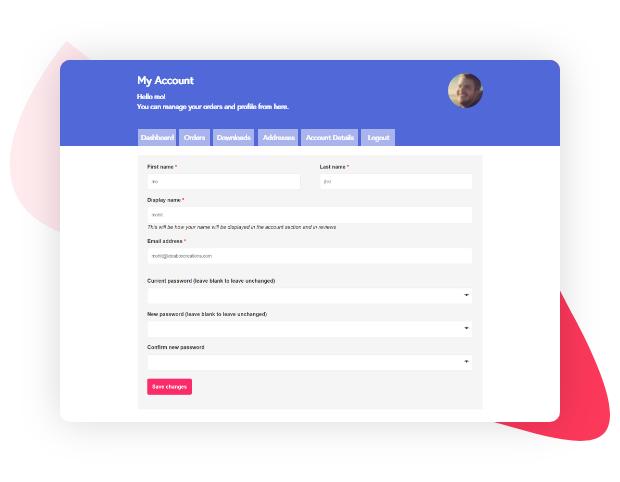
WooCommerce My Account Page
The My Account area is the central hub for registered customers.
Depending on the store configuration, it can provide access to:
- Dashboard
- Orders
- Downloads
- Addresses
- Account Details
- Payment Methods
- Logout
Additional extensions can add more account sections.
WooCommerce Customer Dashboard
A useful account dashboard should make important information easy to find.
For example:
Welcome, Customer
- Recent Orders
- Account Details
- Saved Addresses
- Payment Methods
- Downloads
- Support
Avoid cluttering the dashboard with unnecessary information.
Order Management
Customers should be able to review their order history.
Useful information includes:
- Order Number
- Order Date
- Order Status
- Order Total
- Products
- Payment Status
- Shipping Information
Depending on the store’s configuration, customers may also be able to view invoices, reorder products, request refunds, or track shipments.
Saved Addresses
Customer accounts can store billing and shipping information.
This can make future purchases faster.
Customers should be able to:
- Add an Address
- Edit an Address
- Delete an Address
- Set Preferred Information
Make address forms simple and appropriate for the markets being served.
Payment Methods
Depending on the payment gateway, customers may be able to manage saved payment methods through their account.
For security, WooCommerce generally relies on payment providers to handle sensitive payment credentials rather than storing raw card information directly in WordPress.
The exact account functionality depends on the payment gateway being used.
Account Details
Customers should be able to manage appropriate account information such as:
- Name
- Display Name
- Email Address
- Password
Additional profile fields may be added when required by the store.
Avoid exposing information that customers do not need to see.
Customer Registration at Checkout
Registration can be integrated directly into checkout.
A customer might see an option such as:
Create an account?
If selected, their account can be created as part of the checkout process.
This approach can reduce friction compared with forcing users to register before they can purchase.
One-Page Registration & Checkout
For conversion-focused stores, reducing unnecessary steps can improve the shopping experience.
A streamlined journey can be:
Product → Cart → Checkout → Account Creation → Payment → Order Confirmation
The customer should not have to navigate through multiple unrelated pages to complete a purchase.
Customer Account Security
Customer accounts contain personal and potentially sensitive information.
Protect accounts with:
- HTTPS
- Strong Passwords
- Secure Password Reset
- Login Protection
- Two-Factor Authentication Where Appropriate
- Regular Software Updates
- Role-Based Access
- Security Monitoring
Customers should never be able to access another customer’s account information.
Preventing Account Abuse
Stores may encounter:
- Fake Registrations
- Automated Signups
- Credential Stuffing
- Brute-Force Attempts
- Spam Accounts
Security controls can include:
- Rate Limiting
- Login Protection
- CAPTCHA Where Appropriate
- Email Verification
- Two-Factor Authentication
- Monitoring Suspicious Activity
Security measures should be balanced against customer convenience.
Customer Data Privacy
Customer account management should follow applicable privacy requirements.
Consider:
- Data Minimization
- Privacy Notices
- Consent Management
- Data Access Requests
- Data Deletion Processes
- Secure Data Storage
- Limited Administrative Access
Only collect and retain customer information that is necessary for legitimate business purposes.
Customizing the My Account Page
WooCommerce account pages can be customized to match the store’s requirements.
Possible additions include:
- Loyalty Points
- Membership Details
- Support Tickets
- Wishlist
- Subscriptions
- Reward History
- Vendor Information
- Personalized Recommendations
Custom account sections should have clear navigation and consistent design.
Customer Account UX
Improve account usability by:
- Using Clear Navigation
- Grouping Related Information
- Highlighting Recent Orders
- Making Actions Easy to Find
- Using Mobile-Friendly Forms
- Providing Clear Success Messages
- Showing Helpful Error Messages
Customers should understand what they can do from each account section.
Mobile Customer Accounts
The My Account area should work well on smartphones.
Test:
- Login
- Registration
- Password Reset
- Order History
- Addresses
- Account Details
- Payment Methods
Avoid interfaces that require excessive horizontal scrolling or tiny controls.
Customer Communication
Customer accounts can work alongside automated communication.
Useful notifications include:
- Welcome Email
- Account Confirmation
- Password Reset
- Order Confirmation
- Shipping Notification
- Delivery Notification
- Review Request
Communication should be useful rather than excessive.
CRM Integration
Customer accounts can be connected to CRM and marketing systems.
Possible data synchronization includes:
- Customer Profile
- Order History
- Customer Segments
- Marketing Preferences
- Support Interactions
CRM integration can help businesses build more personalized customer journeys.
Customer Segmentation
Customers can potentially be grouped based on:
- Number of Orders
- Total Spend
- Last Purchase
- Product Categories Purchased
- Location
- Customer Type
For example:
New Customer → Repeat Customer → High-Value Customer → Inactive Customer
Segmentation can support relevant marketing campaigns and customer retention strategies.
Customer Account Analytics
Monitor account-related metrics such as:
- Registration Rate
- Account Creation During Checkout
- Login Rate
- Repeat Purchase Rate
- Password Reset Requests
- Customer Retention
- Customer Lifetime Value
These metrics can help identify account-related friction.
Common Customer Registration Problems
Forcing Registration
Mandatory registration can add friction for first-time buyers.
Too Many Fields
Long registration forms can reduce completion rates.
Poor Password Reset
Customers who cannot recover their accounts may abandon future purchases.
Confusing Account Navigation
Customers should easily understand where to find orders, addresses, and account settings.
Poor Mobile UX
Account pages should be tested carefully on smartphones.
WooCommerce Customer Account Checklist
Registration
- Simple Registration Form
- Clear Password Requirements
- Email Verification Where Appropriate
- Guest Checkout Option
- Account Creation During Checkout
Account Management
- Dashboard
- Order History
- Addresses
- Account Details
- Password Management
- Payment Methods Where Supported
- Downloads Where Applicable
Security
- HTTPS
- Login Protection
- Secure Password Reset
- Account Monitoring
- Two-Factor Authentication Where Appropriate
- Regular Updates
UX
- Mobile-Friendly
- Clear Navigation
- Helpful Error Messages
- Clear Success Messages
- Simple Forms
Privacy
- Privacy Notice
- Data Minimization
- Consent Management
- Data Access Process
- Data Deletion Process
- Secure Data Handling
Best Practices
- Keep registration forms short.
- Offer guest checkout when appropriate.
- Allow account creation during checkout.
- Make password recovery easy and secure.
- Keep the My Account area organized.
- Optimize account pages for mobile.
- Avoid collecting unnecessary customer information.
- Protect customer accounts with appropriate security controls.
- Integrate customer accounts with CRM systems only when there is a clear business need.
- Test the complete registration-to-purchase journey regularly.
Final Thoughts
WooCommerce Customer Registration & Account Management should make it easier for customers to return, manage orders, update their information, and complete future purchases.
The best approach is to balance convenience and security. A short registration process, optional account creation, a well-organized My Account dashboard, secure authentication, clear order management, and mobile-friendly account pages can create a significantly better customer experience.
For growing WooCommerce stores, customer accounts can also become an important foundation for CRM integration, customer segmentation, personalization, loyalty programs, and retention strategies.
The goal is simple: make creating and managing an account useful enough that customers want to use it—not something they are forced to navigate through.

Hire Me on Upwork – Dokan & WooCommerce Expert

 Chat on WhatsApp