
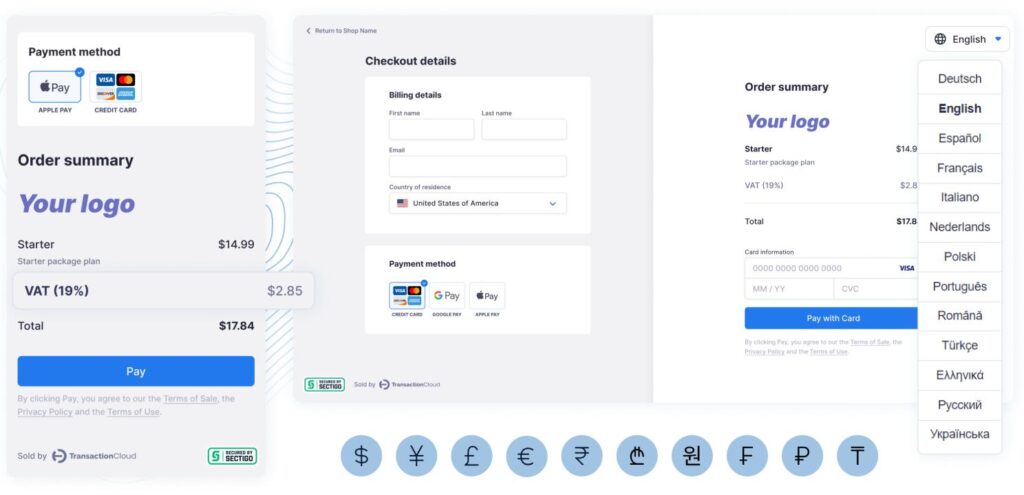
WooCommerce: WooCommerce Multi-Currency Guide
Selling products globally is no longer limited to large enterprises. With WooCommerce, businesses of every size can expand into international markets and offer customers a localized shopping experience. One of the most important features of a global eCommerce store is multi-currency support.
Customers are more likely to complete a purchase when prices are displayed in their local currency. A multi-currency WooCommerce store automatically converts prices, supports multiple payment gateways, and improves customer trust by eliminating the need for manual currency conversion.
This guide explains everything you need to know about setting up a WooCommerce multi-currency store, including plugins, exchange rates, payment gateways, SEO, and best practices.
What is WooCommerce Multi-Currency?
Multi-currency functionality allows customers to:
- View prices in their local currency
- Switch between currencies manually
- Pay using supported international payment gateways
- Shop without calculating exchange rates
Examples of supported currencies include:
- US Dollar (USD)
- Euro (EUR)
- British Pound (GBP)
- Indian Rupee (INR)
- Australian Dollar (AUD)
- Canadian Dollar (CAD)
- UAE Dirham (AED)
- Japanese Yen (JPY)
This creates a smoother international shopping experience.
Why Use Multiple Currencies?
Offering multiple currencies provides several business benefits.
Higher Conversion Rates
Customers prefer familiar pricing.
Better Customer Trust
Local currency increases confidence.
Global Expansion
Sell products worldwide.
Reduced Cart Abandonment
Transparent pricing removes uncertainty.
Improved User Experience
Customers don’t need external currency converters.
Multi-currency support can significantly increase international sales.
How WooCommerce Multi-Currency Works
The system automatically:
- Detects customer location.
- Displays the preferred currency.
- Converts product prices.
- Calculates taxes.
- Processes payment in the selected currency.
Everything happens automatically during checkout.
Dynamic Currency Conversion
Prices update based on live exchange rates.
Example:
Base Price
$100 USD
Displayed As
- €92 EUR
- ₹8,350 INR
- £78 GBP
Automatic conversion keeps pricing current.
Fixed Currency Pricing
Instead of automatic conversion, you can assign custom prices.
Example:
| Currency | Product Price |
|---|---|
| USD | $100 |
| EUR | €95 |
| GBP | £80 |
| INR | ₹8,500 |
Fixed pricing is useful when pricing varies by market.
Automatic Currency Detection
WooCommerce plugins can detect a customer’s preferred currency using:
IP Address
Browser Language
Billing Country
Shipping Country
Customer Selection
Automatic detection improves convenience.
Manual Currency Switcher
Add a currency switcher to your store.
Common locations include:
- Header
- Navigation Menu
- Sidebar
- Footer
- Product Pages
Allow customers to change currencies whenever they want.
Exchange Rate Management
Maintain accurate pricing using:
Automatic Exchange Rate Updates
Daily or hourly updates from trusted providers.
Manual Exchange Rates
Override rates for strategic pricing.
Custom Margins
Protect profits by adding conversion margins.
Accurate exchange rates are essential for international stores.
Supported Payment Gateways
Choose gateways that process multiple currencies.
Stripe
Supports dozens of international currencies.
PayPal
Accepts payments worldwide.
Razorpay
Excellent for Indian businesses.
WooCommerce Payments
Integrated WooCommerce payment solution.
Authorize.Net
Popular with international merchants.
Offering multiple payment options increases checkout success.
Shipping by Country
Create location-based shipping rules.
Examples:
USA
Free shipping over $100.
Europe
Flat-rate shipping.
India
Express delivery.
Australia
Weight-based shipping.
Localized shipping improves customer satisfaction.
Tax Configuration
Configure taxes by region.
Examples:
GST
India
VAT
European Union
Sales Tax
United States
Custom Regional Taxes
Country-specific rules.
Correct tax calculations ensure compliance.
Multi-Language Integration
Combine multiple currencies with multiple languages.
Popular plugins include:
WPML WooCommerce Multilingual & Multicurrency
Translate products and manage currencies from one interface.
TranslatePress
Visual website translation.
Polylang
Multilingual WordPress solution.
Localization helps you reach international audiences.
Customer Experience
Improve international shopping by providing:
Local Currency
Local Language
Local Payment Methods
Local Shipping Options
Region-Specific Promotions
Localized experiences improve customer loyalty.
SEO for International Stores
Optimize your store using:
Country-Specific Landing Pages
Hreflang Tags
Localized Product Descriptions
Regional Keywords
International Backlinks
Global SEO increases organic traffic.
Marketing Strategies
Promote your international WooCommerce store through:
Google Shopping
International Google Ads
Facebook & Instagram Ads
Email Marketing
Influencer Partnerships
Local Market Campaigns
Targeted marketing improves global sales.
Mobile Optimization
Ensure your store supports:
Responsive Design
Fast Currency Switching
Mobile Checkout
Local Payment Options
Optimized Product Pages
A mobile-friendly store increases conversions.
Performance Optimization
Multi-currency websites require optimized performance.
Use:
LiteSpeed Cache
Redis Object Cache
Cloudflare CDN
Image Optimization
Database Cleanup
Fast websites improve user experience and SEO.
Security Best Practices
Protect customer data using:
SSL Certificate
Secure Payment Processing
Two-Factor Authentication
Fraud Detection
Daily Backups
Security builds confidence in international shoppers.
Analytics & Reporting
Track key metrics such as:
Revenue by Currency
Sales by Country
Conversion Rate
Average Order Value
Top Performing Markets
Customer Retention
Analytics help identify profitable regions.
Best WooCommerce Multi-Currency Plugins
WPML WooCommerce Multilingual & Multicurrency
Supports multiple languages, currencies, and localized checkout.
Best For
Global businesses selling in multiple countries.
WOOCS – WooCommerce Currency Switcher
Automatically converts prices using live exchange rates.
Best For
Stores that need flexible currency switching.
CURCY – Multi Currency for WooCommerce
Provides automatic exchange rates, fixed pricing, and payment gateway compatibility.
Best For
Small and medium-sized stores.
FOX Currency Switcher
Offers manual and automatic currency switching with customizable display options.
Best For
Businesses seeking a lightweight multi-currency solution.
Recommended Plugin Stack
WooCommerce
Core eCommerce platform.
WPML WooCommerce Multilingual & Multicurrency
Language and currency management.
WOOCS Currency Switcher
Automatic currency conversion.
Stripe
International payment processing.
Rank Math SEO
International SEO optimization.
FluentCRM
Email marketing automation.
WP Mail SMTP
Reliable email delivery.
LiteSpeed Cache
Performance optimization.
Redis Object Cache
Database caching.
Cloudflare
Global CDN and website security.
This plugin stack provides a complete international WooCommerce solution.
Common Multi-Currency Mistakes
Outdated Exchange Rates
Results in inaccurate pricing.
Unsupported Payment Methods
Limits international purchases.
Ignoring Local Taxes
Creates compliance issues.
Poor Mobile Experience
Reduces conversions.
Weak International SEO
Limits organic visibility.
Slow Currency Switching
Hurts user experience.
Avoiding these mistakes helps build a reliable international store.
WooCommerce Multi-Currency Checklist
✅ Multi-Currency Plugin Installed
✅ Automatic Currency Detection
✅ Currency Switcher Added
✅ Live Exchange Rates
✅ Fixed Pricing (Optional)
✅ International Payment Gateways
✅ Regional Shipping Rules
✅ Country-Based Taxes
✅ Multi-Language Support
✅ International SEO
✅ Mobile Optimization
✅ Performance Optimization
✅ Security Hardening
✅ Analytics Dashboard
Final Thoughts
WooCommerce makes it possible for businesses to sell globally with a professional multi-currency shopping experience. By implementing automatic currency conversion, localized pricing, international payment gateways, and region-specific shipping, you can remove barriers that often prevent international customers from completing purchases.
Pair your multi-currency setup with multilingual support, international SEO, and fast website performance to create a truly global WooCommerce store. As your business expands into new markets, these features will improve customer trust, increase conversions, and support sustainable international growth.

Hire Me on Upwork – Dokan & WooCommerce Expert

 Chat on WhatsApp