
WooCommerce: WooCommerce UX Improvements (Complete Guide 2026)
A great WooCommerce store needs more than attractive products and competitive prices. Customers expect a fast, simple, and trustworthy shopping experience from the moment they land on a website until they complete their order.
WooCommerce UX Improvements focus on removing friction from the customer journey, making products easier to discover, simplifying checkout, improving mobile usability, and helping customers complete purchases with confidence.
A well-optimized user experience can improve conversion rates, reduce cart abandonment, increase average order value, and encourage repeat purchases.
This guide covers practical WooCommerce UX improvements that can help create a smoother and more conversion-focused online store.
What Is WooCommerce UX?
WooCommerce UX refers to how easily customers can interact with an online store.
It covers:
- Navigation
- Product Search
- Product Pages
- Shopping Cart
- Checkout
- Payments
- Shipping
- Order Tracking
- Customer Accounts
- Mobile Experience
- Customer Support
The goal is simple: make it easy for customers to find, evaluate, purchase, and receive products.
Why WooCommerce UX Matters
A poor user experience can result in:
- Higher Cart Abandonment
- Lower Conversion Rates
- More Support Requests
- Poor Customer Satisfaction
- Fewer Repeat Purchases
Improving UX can help:
- Increase Conversions
- Reduce Friction
- Improve Customer Trust
- Increase Average Order Value
- Improve Retention
1. Simplify Website Navigation
Customers should be able to find important products and categories quickly.
Use:
- Clear Navigation Menus
- Logical Product Categories
- Breadcrumbs
- Search
- Filters
- Sorting
- Clear Calls to Action
Avoid overly complicated menus with too many unnecessary options.
2. Improve WooCommerce Search
Search is particularly important for stores with large product catalogs.
Consider adding:
- Autocomplete
- Search Suggestions
- Product Images in Results
- Category Filters
- Price Filters
- Brand Filters
- Product Attribute Filters
Search results should be relevant and fast.
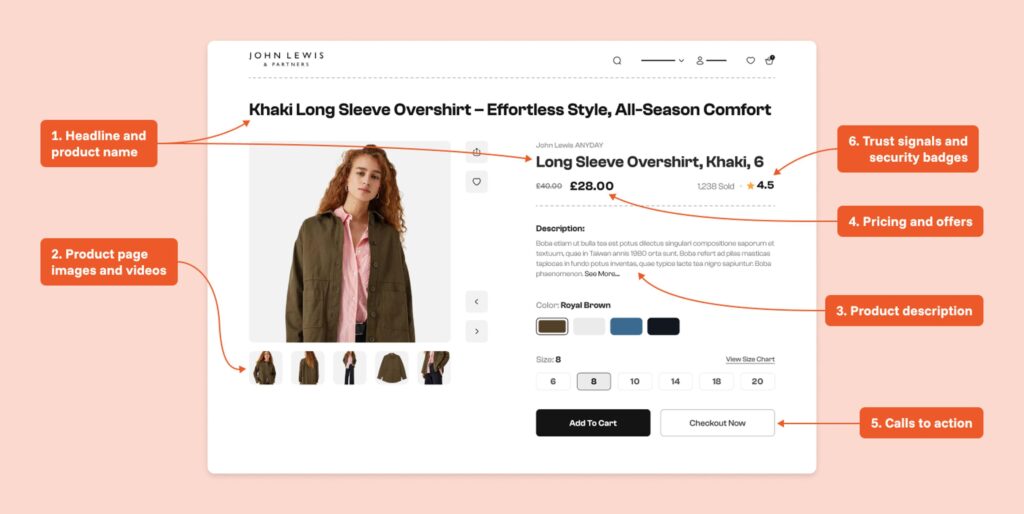
3. Optimize Product Pages
Product pages should provide enough information for customers to make purchasing decisions.
Include:
- High-Quality Product Images
- Clear Product Titles
- Pricing
- Product Variations
- Stock Availability
- Product Descriptions
- Reviews
- Shipping Information
- Return Information
- Frequently Asked Questions
Place the Add to Cart button where it is easy to find.
4. Improve Product Images
Product images have a major influence on eCommerce purchasing decisions.
Consider providing:
- Multiple Product Images
- Zoom Functionality
- Product Gallery
- Different Product Angles
- Product Videos
- Lifestyle Images
Optimize image file sizes so high-quality visuals don’t unnecessarily slow down the page.
5. Make Product Information Scannable
Avoid presenting product information as large blocks of text.
Use:
- Headings
- Bullet Points
- Tables
- Icons
- Tabs
- Expandable Sections
Customers should be able to quickly find important information.
6. Improve Calls to Action
Important actions should be visually clear.
Examples include:
- Add to Cart
- Buy Now
- View Cart
- Proceed to Checkout
- Add to Wishlist
Use consistent labels throughout the website.
7. Simplify the Shopping Cart
The cart should clearly display:
- Product
- Image
- Quantity
- Price
- Discounts
- Shipping
- Taxes
- Order Total
Allow customers to easily update quantities or remove products.
Avoid forcing customers through unnecessary steps before checkout.
8. Optimize Checkout
Checkout is one of the most important areas for UX improvement.
Consider:
- Guest Checkout
- Fewer Form Fields
- Address Autocomplete
- Clear Error Messages
- Multiple Payment Options
- Simple Order Summary
- Mobile-Friendly Forms
Remove fields that aren’t necessary for completing the transaction.
9. Reduce Cart Abandonment
Common causes of cart abandonment include:
- Unexpected Shipping Costs
- Complicated Checkout
- Forced Account Creation
- Limited Payment Options
- Slow Website
- Unclear Return Policies
Address these issues before adding unnecessary promotional elements.
10. Make Shipping Information Clear
Display shipping information early in the customer journey.
Include:
- Shipping Cost
- Estimated Delivery Time
- Available Shipping Methods
- Delivery Regions
- Free Shipping Threshold
- Tracking Information
Unexpected costs at checkout can negatively affect conversions.
11. Improve Payment UX
Offer payment methods that are appropriate for your target customers.
Depending on your market, options may include:
- Credit Cards
- Debit Cards
- UPI
- PayPal
- Digital Wallets
- Bank Transfers
- Buy Now, Pay Later
Make payment errors easy to understand and provide clear next steps.
12. Optimize Mobile UX
Your store should work smoothly across smartphones and tablets.
Test:
- Navigation
- Search
- Product Galleries
- Add-to-Cart Buttons
- Cart
- Checkout
- Payment Forms
- Account Pages
Make buttons large enough to tap comfortably and keep important information visible.
13. Improve Website Speed
Performance is a major part of UX.
Optimize:
- Images
- CSS
- JavaScript
- Database Queries
- Caching
- Hosting
- CDN
- Third-Party Scripts
Monitor Core Web Vitals and investigate pages that perform poorly.
14. Add Trust Signals
Customers need confidence before making a purchase.
Useful trust signals include:
- Customer Reviews
- Product Ratings
- Secure Payment Indicators
- Clear Return Policy
- Shipping Information
- Contact Information
- Money-Back Guarantees where applicable
- Customer Support Options
Trust elements should be visible at relevant points in the buying journey.
15. Improve Reviews
Product reviews help customers evaluate products before purchasing.
Consider displaying:
- Star Ratings
- Written Reviews
- Verified Purchase Labels
- Customer Photos
- Review Sorting
- Review Filtering
Ask customers for reviews after successful delivery.
16. Improve Customer Accounts
Customer account pages should make it easy to manage:
- Orders
- Addresses
- Payment Methods
- Account Details
- Downloads
- Subscriptions
- Returns
Avoid unnecessary account settings that create confusion.
17. Improve Order Tracking
Customers should easily see:
- Order Status
- Shipping Status
- Tracking Number
- Estimated Delivery
- Delivered Items
Clear tracking reduces support requests and improves post-purchase confidence.
18. Personalize the Shopping Experience
Personalization can include:
- Recently Viewed Products
- Related Products
- Frequently Bought Together
- Personalized Recommendations
- Customer-Specific Offers
- Relevant Categories
Use personalization carefully so it remains helpful rather than intrusive.
19. Improve Product Recommendations
Product recommendations can increase average order value.
Useful recommendation types include:
Related Products
Products related to the current product.
Frequently Bought Together
Products commonly purchased with the current item.
Recently Viewed
Products previously viewed by the customer.
Personalized Recommendations
Products selected based on customer behavior and purchase history.
20. Improve Customer Support
Customers should have an easy way to ask questions.
Possible options include:
- Live Chat
- Contact Forms
- Helpdesk Tickets
- Knowledge Base
Fast support can prevent customers from abandoning a purchase.
WooCommerce UX Analytics
Track metrics such as:
- Conversion Rate
- Cart Abandonment Rate
- Checkout Completion Rate
- Average Order Value
- Bounce Rate
- Product Page Engagement
- Search Usage
- Repeat Purchase Rate
- Customer Lifetime Value
Use these metrics to identify areas where customers are experiencing friction.
A/B Testing for UX
Don’t assume every UX change will improve conversions.
Test different versions of:
- Product Page Layouts
- Call-to-Action Buttons
- Checkout Fields
- Product Images
- Shipping Messages
- Promotional Offers
- Navigation
- Search Interfaces
Measure results before making major changes permanent.
Accessibility
A good WooCommerce UX should also be accessible.
Consider:
- Keyboard Navigation
- Sufficient Text Contrast
- Descriptive Labels
- Alt Text for Images
- Accessible Form Fields
- Clear Error Messages
- Screen Reader Compatibility
Accessibility improvements can benefit all users, not just users with disabilities.
Common WooCommerce UX Mistakes
Too Many Popups
Excessive popups can interrupt the shopping experience.
Complicated Navigation
Customers should not have to search through multiple menus to find products.
Too Many Checkout Fields
Only request information that is genuinely necessary.
Hidden Shipping Costs
Unexpected fees can cause customers to abandon their carts.
Poor Mobile Experience
A desktop-friendly store isn’t automatically mobile-friendly.
Slow Product Pages
Large images and unnecessary scripts can negatively affect performance.
WooCommerce UX Optimization Checklist
✅ Simple Navigation
✅ Fast Search
✅ Clear Product Pages
✅ High-Quality Images
✅ Strong Calls to Action
✅ Simple Cart
✅ Streamlined Checkout
✅ Transparent Shipping
✅ Multiple Payment Options
✅ Mobile Optimization
✅ Fast Website
✅ Trust Signals
✅ Easy Order Tracking
✅ Customer Support
✅ Analytics & A/B Testing
Best Practices
- Design the store around customer goals.
- Keep navigation simple and predictable.
- Provide enough product information to support purchase decisions.
- Reduce unnecessary checkout fields.
- Show shipping costs and delivery estimates clearly.
- Optimize the experience for mobile users.
- Use analytics to identify customer friction.
- Test important UX changes rather than relying on assumptions.
- Keep WooCommerce, themes, and plugins updated.
- Review the complete customer journey regularly.
Final Thoughts
WooCommerce UX improvements are not limited to changing colors or moving buttons. The strongest UX strategy improves the entire customer journey—from product discovery and search to checkout, payment, delivery, and post-purchase support.
By simplifying navigation, improving product pages, reducing checkout friction, optimizing mobile performance, providing clear shipping information, and using customer data responsibly, WooCommerce stores can create a smoother shopping experience and improve business performance.
Start with the areas causing the most customer friction, measure the results, and continue optimizing based on real user behavior.

Hire Me on Upwork – Dokan & WooCommerce Expert

 Chat on WhatsApp