
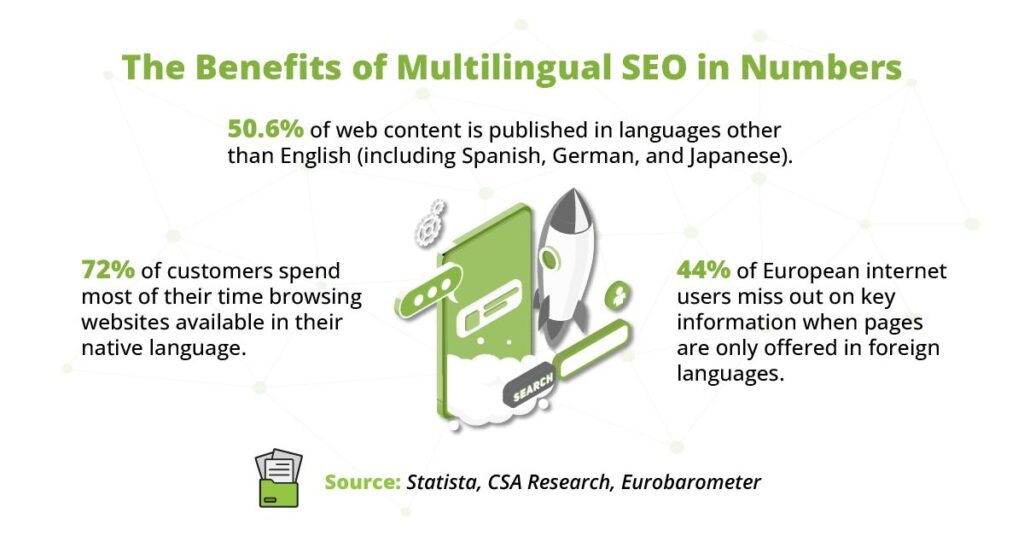
Expanding your WooCommerce store to international markets requires more than just shipping products worldwide. Customers are more likely to purchase when they can browse products, read descriptions, and complete checkout in their native language.
WPML (WordPress Multilingual Plugin) is one of the most popular solutions for creating multilingual WooCommerce stores. It allows store owners to translate products, categories, checkout pages, customer emails, and store content into multiple languages while maintaining SEO performance.
In this guide, you’ll learn how to set up WPML with WooCommerce and create a fully multilingual online store.
Why Create a Multilingual WooCommerce Store?
A multilingual store helps businesses reach customers across different countries and languages.
Benefits include:
- Increased international sales
- Better customer experience
- Improved trust and credibility
- Higher conversion rates
- Expanded market reach
- Better multilingual SEO
Customers prefer shopping in their native language, making localization a key factor in global eCommerce success.
What Is WPML?
WPML is a premium WordPress plugin that allows websites to operate in multiple languages.
Key features include:
- Product translations
- Category translations
- URL translations
- SEO support
- Language switchers
- WooCommerce integration
WPML works seamlessly with WooCommerce, making it one of the most popular multilingual eCommerce solutions.
Benefits of WPML for WooCommerce
Complete Product Translation
Translate:
- Product titles
- Descriptions
- Short descriptions
- Product attributes
- Product specifications
Multilingual Checkout
Customers can complete purchases in their preferred language.
SEO-Friendly URLs
Create translated URLs such as:
- example.com/en/product/
- example.com/fr/product/
- example.com/es/product/
Currency Support
Display prices in multiple currencies for international customers.
Vendor and Marketplace Compatibility
WPML works well with WooCommerce extensions and marketplace platforms.
WPML Plugin Requirements
Before setup, install:
WordPress
Latest stable version.
WooCommerce
Core eCommerce functionality.
WPML Multilingual CMS
Primary translation plugin.
WooCommerce Multilingual & Multicurrency
Official WPML extension for WooCommerce.
String Translation
Translates themes, plugins, and dynamic content.
These components provide a complete multilingual environment.
Installing WPML
Step 1: Purchase WPML
Download WPML from the official website.
Step 2: Install Core Plugins
Install:
- WPML Multilingual CMS
- String Translation
- WooCommerce Multilingual & Multicurrency
Step 3: Activate Plugins
Activate all required components through the WordPress dashboard.
Step 4: Run Setup Wizard
WPML automatically launches its configuration wizard.
The wizard helps configure:
- Default language
- Additional languages
- Language switchers
Configuring Languages
WPML allows unlimited language support.
Examples include:
- English
- Spanish
- French
- German
- Italian
- Arabic
- Hindi
- Japanese
Choose languages based on your target markets.
Default Language
Your primary store language.
Secondary Languages
Additional translated versions of your store.
Translating WooCommerce Products
Product translation is one of the most important tasks.
Translate Product Titles
Create localized product names.
Translate Product Descriptions
Translate:
- Product details
- Features
- Benefits
- Specifications
Translate Product Attributes
Examples:
- Size
- Color
- Material
- Brand
Consistent translations improve customer trust.
Translating Product Categories
Category translation improves navigation and SEO.
Examples:
English
Electronics
Spanish
Electrónica
French
Électronique
Localized categories help users find products faster.
Translating Store Pages
Translate essential WooCommerce pages including:
Shop Page
Cart Page
Checkout Page
My Account Page
Terms & Conditions
Privacy Policy
Customers should never encounter untranslated content during checkout.
WooCommerce Multicurrency Setup
International customers often prefer local currencies.
WPML supports:
- USD
- EUR
- GBP
- INR
- AUD
- CAD
Benefits include:
- Better user experience
- Increased conversions
- Improved pricing transparency
Currency switching can be automated based on customer location.
Language Switcher Configuration
Language switchers allow users to change languages easily.
Popular locations include:
Header Navigation
Most common placement.
Footer Area
Secondary location.
Sidebar
Useful for content-heavy websites.
Mobile Menu
Essential for mobile users.
A visible language switcher improves usability.
Translating WooCommerce Emails
Transactional emails should match customer language preferences.
Translate:
Order Confirmations
Shipping Notifications
Payment Confirmations
Refund Emails
Account Notifications
Localized communication improves professionalism and customer trust.
Multilingual SEO Optimization
WPML includes powerful SEO features.
Language-Specific URLs
Examples:
- /en/
- /fr/
- /de/
Hreflang Tags
Help search engines understand language versions.
Localized Keywords
Perform keyword research separately for each language.
Unique Content
Avoid relying solely on automatic translations.
Proper multilingual SEO improves international rankings.
Mobile Optimization
Most international shoppers use mobile devices.
Ensure:
- Mobile-friendly language switchers
- Responsive translations
- Fast page loading
- Localized checkout experiences
Mobile optimization directly impacts conversions.
Performance Optimization
Multilingual stores require additional resources.
Use Caching
Recommended solutions:
- LiteSpeed Cache
- WP Rocket
Implement Redis
Object caching improves multilingual database performance.
Use Cloudflare
Global CDN delivery improves speed worldwide.
Optimize Images
Use:
- WebP
- AVIF
- Lazy loading
Performance remains critical for SEO and user experience.
Common WPML Challenges
Incomplete Translations
Missing content creates poor user experiences.
Translation Synchronization
Products must remain consistent across languages.
Performance Slowdowns
Additional content increases database load.
Duplicate Content Risks
Improper multilingual setup may cause SEO issues.
Plugin Compatibility
Always verify compatibility before adding new plugins.
Recommended Plugin Stack
For a professional multilingual WooCommerce store:
WooCommerce
Core store functionality.
WPML
Language management.
WooCommerce Multilingual & Multicurrency
Product and currency translations.
LiteSpeed Cache
Performance optimization.
Cloudflare
Global content delivery.
WP Mail SMTP
Reliable multilingual email delivery.
This stack provides a stable multilingual eCommerce foundation.
WooCommerce WPML Setup Checklist
✓ Install WPML
✓ Install WooCommerce Multilingual
✓ Configure Languages
✓ Translate Products
✓ Translate Categories
✓ Configure Currency Switcher
✓ Set Up Language Switcher
✓ Translate Emails
✓ Enable Hreflang Tags
✓ Optimize SEO
✓ Improve Performance
✓ Test Checkout Process
Final Thoughts
WPML makes it possible to transform a WooCommerce store into a truly global eCommerce platform. By translating products, categories, checkout pages, emails, and store content, businesses can reach new audiences and improve customer experiences worldwide.
With proper multilingual SEO, currency support, performance optimization, and localization strategies, a WooCommerce WPML setup can significantly increase international traffic and sales.
Whether you’re selling physical products, digital downloads, subscriptions, or services, a multilingual WooCommerce store provides a powerful competitive advantage in today’s global marketplace.

Hire Me on Upwork – Dokan & WooCommerce Expert

 Chat on WhatsApp