
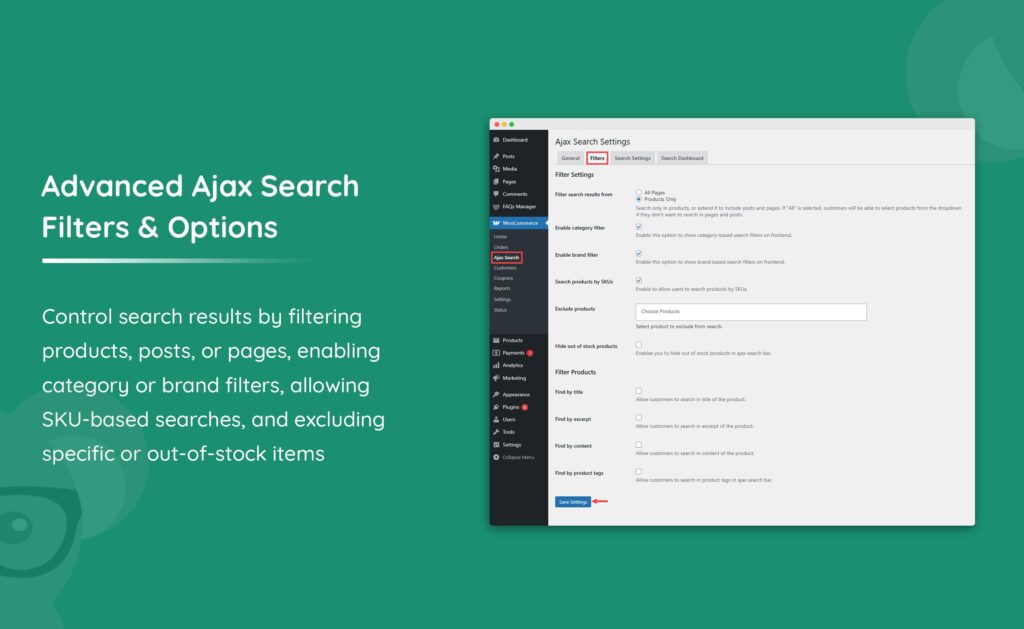
Search functionality is one of the most important features of any modern website. Whether you’re running a blog, WooCommerce store, membership platform, learning management system, directory website, or multi-vendor marketplace, users expect to find information quickly and accurately.
Unfortunately, the default WordPress search system often falls short when websites grow larger and content becomes more complex. This is where advanced search systems become essential.
An advanced search system improves content discovery, increases user engagement, reduces bounce rates, and helps visitors find exactly what they need in seconds.
Why Advanced Search Matters
Visitors who use search are often highly engaged users. They already know what they’re looking for and want immediate results.
A poor search experience can lead to:
- User frustration
- Increased bounce rates
- Lost sales
- Lower engagement
- Reduced conversions
An advanced search system helps:
- Improve user experience
- Increase page views
- Boost conversions
- Improve product discovery
- Reduce support requests
- Increase customer satisfaction
For content-heavy websites, search can directly impact business growth.
Limitations of Default WordPress Search
The built-in WordPress search function has several limitations.
Basic Keyword Matching
Default search only performs simple keyword matching.
It may fail to understand:
- Related terms
- Synonyms
- Misspellings
- User intent
Limited Search Scope
Default search primarily focuses on:
- Post titles
- Post content
It often ignores:
- Custom fields
- Product attributes
- Taxonomies
- Metadata
Poor Relevance Ranking
Search results may not always display the most relevant content first.
This can frustrate visitors and reduce engagement.
Features of an Advanced Search System
Modern search systems offer powerful features beyond basic keyword matching.
Instant Search Suggestions
Also known as live search or autocomplete.
As users type, suggestions appear instantly.
Benefits include:
- Faster searching
- Better user experience
- Reduced typing effort
AJAX Search
AJAX search updates results without reloading the page.
Benefits include:
- Faster interactions
- Better mobile experience
- Improved usability
Faceted Search
Faceted search allows users to filter results using multiple criteria.
Examples:
- Categories
- Tags
- Product attributes
- Price ranges
- Authors
- Dates
This is especially useful for WooCommerce stores and marketplaces.
Search Analytics
Advanced systems track:
- Popular searches
- Failed searches
- User behavior
- Conversion paths
These insights help improve content and product organization.
Advanced Search for WooCommerce
WooCommerce stores often contain hundreds or thousands of products.
Advanced product search can include:
Product Titles
Search products by name.
Product Descriptions
Search detailed product information.
Product Categories
Allow category-based filtering.
Product Attributes
Examples:
- Size
- Color
- Material
- Brand
SKU Search
Enable customers to search products using SKU numbers.
This is particularly useful for B2B and wholesale stores.
Advanced Search for Marketplaces
Multi-vendor marketplaces require even more sophisticated search systems.
Customers may search by:
Vendor
Search products from specific sellers.
Location
Find vendors based on geographic regions.
Ratings
Filter results by customer reviews.
Availability
Display products that are currently in stock.
Advanced marketplace search improves product discovery and customer trust.
Implementing AJAX Search
AJAX search has become a standard feature for modern websites.
Benefits include:
- Real-time results
- Faster performance
- Better user experience
- Reduced page reloads
Popular use cases:
- Product search
- Blog search
- Knowledge base search
- Directory search
AJAX search is particularly effective on mobile devices.
Search Filters and Facets
Advanced search systems often include filtering options.
Common filters include:
Categories
Help users narrow content by topic.
Tags
Allow more specific content filtering.
Date Filters
Useful for blogs and news websites.
Author Filters
Helpful for multi-author websites.
Custom Taxonomies
Provide highly specialized filtering options.
Faceted filtering dramatically improves search usability.
Search Personalization
Modern search systems can personalize results based on user behavior.
Examples:
- Recent searches
- Purchase history
- Viewing history
- Favorite categories
Benefits include:
- Better relevance
- Higher engagement
- Increased conversions
Personalized search experiences are becoming increasingly common in eCommerce.
Search Performance Optimization
Search systems can generate heavy database queries.
Performance optimization is essential.
Object Caching
Use Redis or Memcached to improve search speed.
Search Indexing
Pre-index content to reduce query complexity.
Database Optimization
Optimize WordPress tables regularly.
CDN Integration
Use Cloudflare to improve global search performance.
These strategies help maintain fast search experiences.
Elasticsearch and Advanced Search Engines
Large websites often use dedicated search engines.
Elasticsearch
A powerful open-source search platform.
Benefits include:
- Lightning-fast searches
- Advanced relevance scoring
- Scalability
- Faceted search
Algolia
Cloud-based search solution.
Benefits include:
- Instant search
- AI-powered ranking
- Real-time indexing
Both solutions are excellent for large WordPress websites.
Mobile Search Optimization
Most website traffic now comes from mobile devices.
Mobile search should include:
- Large search fields
- Touch-friendly controls
- Voice search support
- Fast autocomplete
A poor mobile search experience can negatively impact conversions.
Search Analytics and Reporting
Search analytics provide valuable insights.
Track:
- Most searched keywords
- Zero-result searches
- Popular products
- User engagement
Benefits include:
- Improved content strategy
- Better product organization
- Increased conversions
Analytics help identify opportunities for optimization.
Best WordPress Search Plugins
SearchWP
One of the most powerful WordPress search plugins.
Features:
- Custom field searching
- PDF searching
- WooCommerce support
Relevanssi
Improves search relevance significantly.
Features:
- Fuzzy matching
- Partial matches
- Custom ranking
Ivory Search
Lightweight search enhancement plugin.
Ajax Search Lite
Provides real-time AJAX search functionality.
Common Search Mistakes
Ignoring Search Analytics
Without analytics, optimization becomes difficult.
Poor Mobile Search Design
Mobile users expect fast, intuitive search experiences.
Slow Search Performance
Heavy queries reduce usability.
No Filters
Filters help users refine results quickly.
Weak Relevance Ranking
Poor result ordering frustrates users.
Advanced Search System Checklist
✓ AJAX Search
✓ Autocomplete Suggestions
✓ Product Search
✓ Category Filters
✓ Custom Field Search
✓ Search Analytics
✓ Mobile Optimization
✓ Faceted Filtering
✓ Search Personalization
✓ Performance Optimization
✓ Search Indexing
✓ SEO-Friendly Search Pages
Final Thoughts
Advanced search systems are essential for modern WordPress websites. As content libraries, product catalogs, and marketplaces grow, users need faster and more accurate ways to discover information.
By implementing AJAX search, faceted filters, personalized results, search analytics, and powerful search engines like Elasticsearch or Algolia, website owners can dramatically improve user experience and engagement.
Whether you’re managing a blog, WooCommerce store, online marketplace, membership website, or enterprise platform, investing in advanced search functionality can significantly increase customer satisfaction and business performance.

Hire Me on Upwork – Dokan & WooCommerce Expert

 Chat on WhatsApp