
WordPress: Live Chat Plugins Guide (Complete Guide)
Customer expectations have changed dramatically in recent years. Visitors no longer want to wait hours—or even minutes—for answers to their questions. They expect instant support while browsing your website. Whether you run a WooCommerce store, a multi-vendor marketplace, a business website, or a membership platform, live chat can significantly improve customer satisfaction, increase conversions, and boost sales.
WordPress offers a wide range of live chat plugins that help businesses provide real-time support, automate responses with AI chatbots, and manage customer conversations from a centralized dashboard.
In this comprehensive guide, we’ll compare the best WordPress live chat plugins, explain their features, and help you choose the right solution for your website.
Why Use a Live Chat Plugin?
Live chat enables website visitors to communicate directly with your business without leaving the page.
Benefits include:
- Instant customer support
- Higher conversion rates
- Reduced cart abandonment
- Increased customer trust
- Better lead generation
- Improved customer retention
- Faster issue resolution
- Enhanced user experience
For WooCommerce stores, answering customer questions before checkout often results in more completed purchases.
Key Features to Look For
Before selecting a live chat plugin, ensure it provides:
- Real-Time Chat
- AI Chatbot
- Mobile App
- Visitor Tracking
- File Sharing
- Chat History
- Offline Messages
- Email Integration
- CRM Integration
- Team Collaboration
- Automation Rules
- Analytics & Reports
- Multi-Language Support
- Customizable Chat Widget
Best WordPress Live Chat Plugins
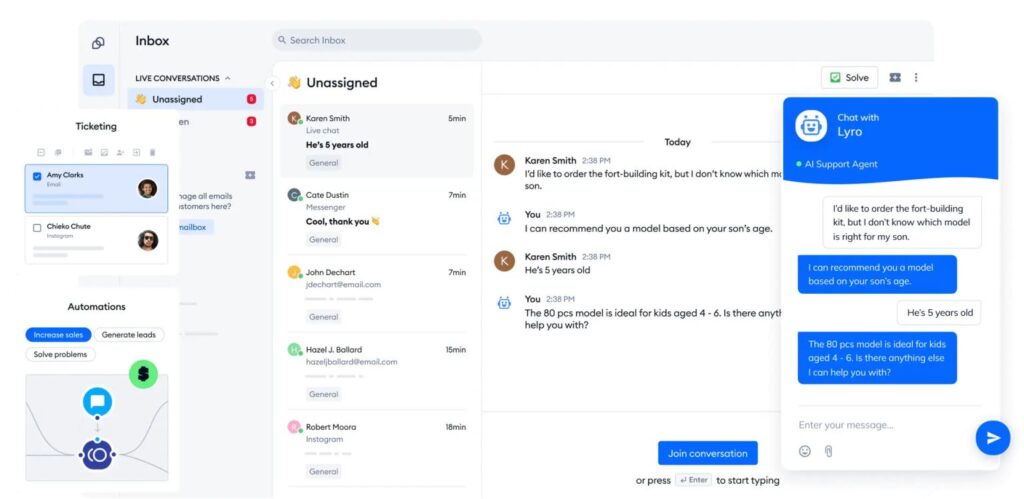
1. Tidio Live Chat
Tidio is one of the most popular live chat solutions for WordPress and WooCommerce.
Features
- AI Chatbots
- Live Chat
- Email Integration
- Visitor Tracking
- Mobile Apps
- Automation Flows
- Knowledge Base Integration
Pros
- Easy setup
- Excellent free plan
- Modern interface
- WooCommerce integration
Best For
Small businesses, WooCommerce stores, and growing online shops.
2. LiveChat
LiveChat is a premium customer support platform designed for businesses that require professional customer service.
Features
- Real-Time Messaging
- File Sharing
- Team Collaboration
- Chat Routing
- Customer Ratings
- Reporting
- CRM Integration
Pros
- Enterprise-grade reliability
- Advanced reporting
- Powerful automation
Best For
Medium and large businesses.
3. Crisp
Crisp combines live chat, chatbot automation, video calls, and customer messaging into one platform.
Features
- Shared Team Inbox
- AI Chatbot
- Video Chat
- Mobile Support
- Customer Timeline
- Campaign Messaging
Pros
- Excellent collaboration tools
- Omnichannel communication
- User-friendly interface
Best For
Startups and SaaS businesses.
4. HubSpot Live Chat
HubSpot provides live chat as part of its CRM platform.
Features
- Live Chat
- CRM Integration
- Chatbots
- Contact Management
- Email Marketing
- Automation Workflows
Pros
- Free CRM included
- Powerful marketing automation
- Customer history tracking
Best For
Businesses already using HubSpot CRM.
5. Zendesk Messaging
Zendesk offers enterprise-level customer communication.
Features
- AI Bots
- Live Chat
- Ticket System
- Help Center
- Multi-Channel Support
- Advanced Analytics
Pros
- Scalable
- Excellent customer support tools
- Enterprise integrations
Best For
Large businesses and customer support teams.
6. Fluent Support
Fluent Support is a self-hosted WordPress helpdesk solution built specifically for WordPress websites.
Features
- Ticket Management
- Email Piping
- WooCommerce Integration
- Customer History
- Automation
- Reporting
Pros
- Data stays on your server
- Native WordPress experience
- Affordable pricing
Best For
WordPress agencies and WooCommerce businesses.
Plugin Comparison
| Plugin | AI Chatbot | CRM Integration | Mobile App | Free Version | WooCommerce Support |
|---|---|---|---|---|---|
| Tidio | ✅ | ✅ | ✅ | ✅ | ✅ |
| LiveChat | Limited | ✅ | ✅ | Trial | ✅ |
| Crisp | ✅ | ✅ | ✅ | ✅ | ✅ |
| HubSpot Live Chat | ✅ | ✅ | ✅ | ✅ | ✅ |
| Zendesk Messaging | ✅ | ✅ | ✅ | Trial | ✅ |
| Fluent Support | ❌ | Limited | ❌ | ❌ | ✅ |
WooCommerce Integration
Most live chat plugins integrate seamlessly with WooCommerce and allow support teams to:
- View customer orders
- Check purchase history
- Recommend products
- Assist during checkout
- Resolve payment issues
- Track shipping questions
This enables faster and more personalized customer service.
AI Chatbots
Modern AI-powered chatbots can automate many repetitive tasks, including:
- Answering FAQs
- Tracking orders
- Product recommendations
- Collecting customer information
- Booking appointments
- Routing conversations
- Escalating complex issues
AI chatbots improve response times while reducing the workload on support teams.
CRM Integration
Many live chat plugins connect with CRM platforms such as:
- HubSpot CRM
- Zoho CRM
- Salesforce
- FluentCRM
- WP ERP
CRM integration helps businesses track customer interactions, purchase history, and support requests from a single dashboard.
Analytics & Reporting
Track important metrics such as:
- Total Conversations
- Average Response Time
- Customer Satisfaction Score (CSAT)
- Chat Resolution Rate
- Missed Chats
- Agent Performance
- Conversion Rate
- Sales Generated Through Chat
Analyzing these metrics helps improve customer service quality.
Security Best Practices
Protect customer data by:
- Using HTTPS/SSL
- Enabling two-factor authentication
- Limiting staff permissions
- Encrypting chat data
- Updating plugins regularly
- Monitoring suspicious activity
- Backing up chat records
Common Mistakes
Delayed Responses
Visitors expect fast replies. Set realistic response time goals.
Ignoring Offline Visitors
Enable offline forms or automated email collection when agents are unavailable.
Poor Chat Widget Placement
Place the chat widget where it’s visible but does not obstruct important content.
Overusing Chatbots
Allow customers to easily connect with a human when AI cannot resolve their issue.
Live Chat Best Practices
- Respond within a few minutes whenever possible.
- Personalize conversations using customer names and order details.
- Use proactive chat invitations carefully.
- Train your support team regularly.
- Keep chatbot knowledge bases updated.
- Review analytics to improve performance.
- Test the chat experience on desktop and mobile devices.
Live Chat Plugin Checklist
✅ Real-Time Messaging
✅ AI Chatbot
✅ WooCommerce Integration
✅ CRM Integration
✅ Mobile Support
✅ Visitor Tracking
✅ Analytics Dashboard
✅ Offline Messages
✅ File Sharing
✅ Multi-Language Support
Final Thoughts
Choosing the right WordPress live chat plugin depends on your business size, budget, and support requirements. Tidio is an excellent all-round solution for most websites, Crisp is ideal for startups and collaborative teams, HubSpot Live Chat is perfect if you already use HubSpot CRM, and Zendesk Messaging provides enterprise-grade customer support capabilities. If you prefer to keep support data within WordPress, Fluent Support offers a robust self-hosted alternative.
Implementing live chat is more than adding a widget to your website—it’s about delivering timely, helpful, and personalized customer support that builds trust, improves conversions, and strengthens long-term customer relationships.
SEO Details
SEO Title
Meta Description
Focus Keyword
Suggested URL Slug
Suggested Tags

Hire Me on Upwork – Dokan & WooCommerce Expert

 Chat on WhatsApp