
Search is one of the most important features of any website. Whether you’re running a blog, WooCommerce store, membership site, learning platform, directory website, or multi-vendor marketplace, visitors rely on search to quickly find the content, products, or information they need.
Unfortunately, the default WordPress search system is often too basic for modern websites. As your website grows, search performance, accuracy, and relevance become increasingly important.
By implementing advanced search optimization techniques, you can improve user experience, increase engagement, reduce bounce rates, and boost conversions.
In this guide, we’ll explore the most effective WordPress search optimization techniques for modern websites.
Why Search Optimization Matters
Users who use search typically have high intent.
Benefits of optimized search include:
- Faster content discovery
- Better user experience
- Increased engagement
- Higher conversion rates
- More page views
- Lower bounce rates
Visitors who quickly find what they’re looking for are more likely to stay on your website and take action.
Understanding WordPress Default Search
The built-in WordPress search system works by searching:
- Post titles
- Post content
However, it often ignores:
- Custom fields
- Product attributes
- Taxonomies
- PDFs
- Metadata
- User-generated content
As websites grow larger, default search limitations become more noticeable.
Improve Search Relevance
One of the biggest challenges is showing the most relevant results first.
Strategies include:
Weighted Search Results
Prioritize:
- Post titles
- Product names
- Important keywords
Exact Match Priority
Display exact matches before partial matches.
Content Freshness
Promote recently updated content when appropriate.
Better relevance improves user satisfaction.
Implement AJAX Search
AJAX search displays results instantly as users type.
Benefits include:
- Real-time search suggestions
- Faster interactions
- Better mobile experience
- Reduced page reloads
Users receive immediate feedback, making search more intuitive.
AJAX search is now considered a standard website feature.
Add Live Search Suggestions
Autocomplete suggestions help users complete searches faster.
Examples:
Typing:
“word”
Suggestions:
- WordPress Plugin Development
- WordPress Security Guide
- WordPress Optimization Tips
Benefits include:
- Faster searches
- Better product discovery
- Increased engagement
Autocomplete reduces search friction.
Enable Search by Custom Fields
Many websites store important information in custom fields.
Examples:
WooCommerce
- SKU
- Product attributes
- Brands
Real Estate Websites
- Property locations
- Price ranges
Directory Websites
- Business categories
- Locations
Including custom fields improves search accuracy.
Optimize WooCommerce Product Search
WooCommerce stores require specialized search functionality.
Allow customers to search by:
Product Titles
Product Descriptions
Product Categories
Product Attributes
Product Tags
SKU Numbers
Enhanced product search improves conversion rates significantly.
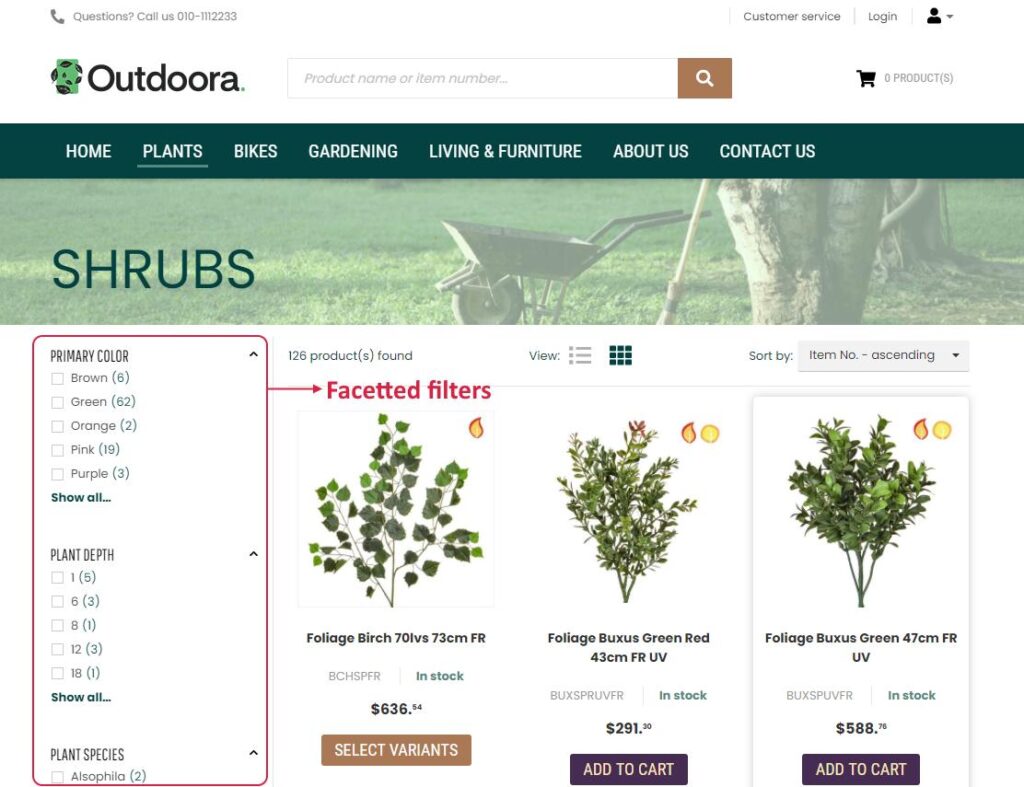
Implement Faceted Search
Faceted search allows users to refine results using filters.
Examples include:
Categories
Tags
Authors
Dates
Product Attributes
Price Ranges
Faceted search is especially useful for:
- WooCommerce stores
- Marketplaces
- Directories
- Large content websites
It dramatically improves content discovery.
Add Typo Tolerance and Fuzzy Search
Users frequently make spelling mistakes.
Examples:
Search:
“wordpres”
Should return:
“WordPress”
Fuzzy search helps by supporting:
- Typo correction
- Partial matching
- Synonym recognition
This improves search success rates.
Search Analytics and Reporting
Search data provides valuable insights into user behavior.
Track:
Most Popular Searches
Identify trending content.
No-Result Searches
Discover missing content opportunities.
Search Conversion Rates
Measure effectiveness.
Search Trends
Understand visitor interests.
Analytics help guide content and product strategies.
Mobile Search Optimization
Most website traffic now comes from mobile devices.
Optimize search for mobile users by providing:
- Large search bars
- Fast AJAX results
- Touch-friendly filters
- Responsive layouts
A poor mobile search experience can significantly reduce engagement.
Optimize Search Speed
Fast search results are critical.
Optimization techniques include:
Redis Object Cache
Reduce database load.
LiteSpeed Cache
Improve overall performance.
Database Optimization
Regularly clean and optimize tables.
Search Indexing
Pre-index content for faster lookups.
Speed directly impacts user satisfaction.
Use Elasticsearch for Large Websites
Large websites often require more advanced search engines.
Elasticsearch offers:
- High-speed searches
- Advanced relevance scoring
- Scalable architecture
- Complex filtering capabilities
Ideal for:
- Large WooCommerce stores
- News websites
- Directories
- Marketplaces
Elasticsearch significantly improves search performance.
Search Engine Friendly Search Pages
Search result pages can support SEO when implemented correctly.
Best practices include:
Clean URLs
Examples:
/search/wordpress-plugin-developmentProper Meta Tags
Avoid indexing low-value search pages.
Internal Linking
Connect search results to relevant content.
Structured Navigation
Improve crawlability.
Proper SEO implementation prevents duplicate content issues.
Search Security Best Practices
Search functionality can become a security risk if not handled properly.
Recommendations include:
Input Validation
Sanitize search queries.
Rate Limiting
Prevent automated abuse.
Query Optimization
Avoid expensive database queries.
Activity Monitoring
Monitor unusual search behavior.
Security protects website performance and stability.
Best WordPress Search Plugins
SearchWP
Advanced WordPress search customization.
Features:
- Custom field searching
- PDF indexing
- WooCommerce integration
Relevanssi
Improves relevance and partial matching.
Ajax Search Lite
Provides instant AJAX search functionality.
ElasticPress
Integrates WordPress with Elasticsearch.
Ideal for large websites.
Common Search Optimization Mistakes
Ignoring Search Analytics
Data is essential for improvement.
Poor Mobile Experience
Mobile users often represent most traffic.
No AJAX Search
Modern users expect instant results.
Weak Search Relevance
Irrelevant results frustrate visitors.
Slow Search Performance
Search delays reduce engagement.
Avoiding these mistakes improves user experiences.
WordPress Search Optimization Checklist
✓ AJAX Search
✓ Live Search Suggestions
✓ Search by Custom Fields
✓ Faceted Search
✓ WooCommerce Search Optimization
✓ Typo Tolerance
✓ Search Analytics
✓ Mobile Optimization
✓ Redis Caching
✓ Database Optimization
✓ Elasticsearch (For Large Sites)
✓ Security Hardening
Final Thoughts
Search optimization is one of the most effective ways to improve user experience on a WordPress website. Visitors who use search are often your most engaged users, making search functionality a critical part of website performance and conversion optimization.
By implementing AJAX search, faceted filtering, typo tolerance, custom field indexing, analytics tracking, caching, and advanced search engines like Elasticsearch, website owners can dramatically improve content discovery and engagement.
Whether you’re running a blog, WooCommerce store, marketplace, membership platform, directory, or enterprise website, investing in search optimization will help users find what they need faster and increase overall website success.

Hire Me on Upwork – Dokan & WooCommerce Expert

 Chat on WhatsApp