
Choosing the right website platform is a critical business decision.
Two of the most talked-about options today are WordPress and Webflow. Both are powerful — but they serve different business goals.
Before you build your site (or switch platforms), this honest comparison will help you choose based on speed, flexibility, scalability, cost, and long-term growth.
🔴 Why This Comparison Matters
Many businesses choose tools based on:
-
A demo video
-
A quick review
-
Popular opinion
But the wrong platform can lead to:
-
High rebuild costs
-
Slow performance
-
Limited growth
-
Developer lock-in
Choosing the right platform from the start saves time, money, and headaches.
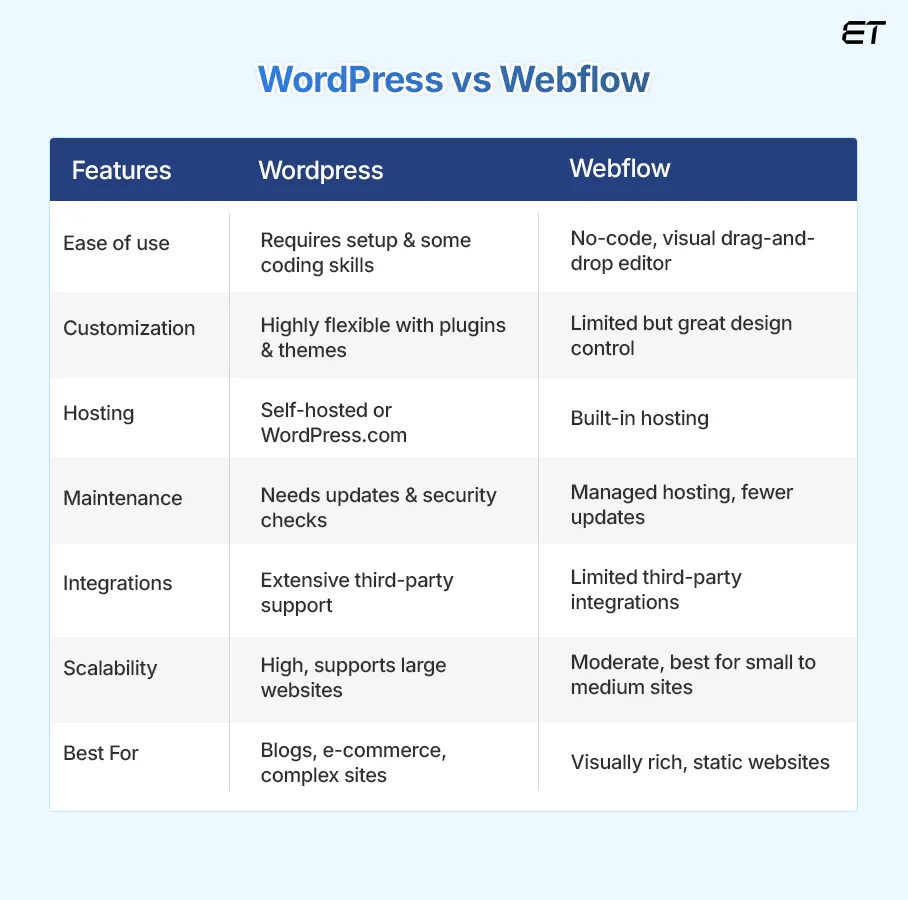


🧠 Quick Summary: WordPress vs Webflow
| Feature | WordPress | Webflow |
|---|---|---|
| Ease of Use | ⭐⭐⭐ | ⭐⭐⭐⭐ |
| Learning Curve | Medium | Steep (but visual) |
| Flexibility | ⭐⭐⭐⭐⭐ | ⭐⭐⭐ |
| Custom Development | Excellent | Limited |
| Ecommerce Support | Excellent (WooCommerce) | Good |
| SEO Control | Excellent | Very Good |
| Cost | Low ★★★★★ | Higher ★★ |
| Community & Plugins | Huge | Small |
| Performance | Depends on setup | Very good out of the box |
1️⃣ Ease of Use & Learning Curve
WordPress
-
Classic dashboard with menus
-
Not visual out of the box
-
Easy for content once set up
✔ Best for content-driven sites
Webflow
-
Visual designer (Figma-like)
-
Steeper learning curve
-
Design-first approach
✔ Great for visual designers
Winner (Ease): 🏆 Webflow (once you learn it)
2️⃣ Flexibility & Customization
WordPress
-
Unlimited customization
-
Themes + builders (Elementor, Bricks, Gutenberg)
-
Custom code everywhere
-
Powerful API options
✔ Ideal for complex sites & apps
Webflow
-
Visual design only
-
Limited backend logic
-
No open-ended plugin ecosystem
Winner (Flexibility): 🏆 WordPress
3️⃣ Ecosystem & Plugins
WordPress
-
60,000+ plugins
-
Plugins for virtually any feature
-
Large worldwide developer community
Webflow
-
Limited built-ins
-
Marketplace smaller
Winner (Ecosystem): 🏆 WordPress
4️⃣ SEO & Content Control
WordPress
-
Full control over meta tags, slugs, structured data
-
Powerful SEO plugins (Yoast, Rank Math)
✔ Best for content SEO
Webflow
-
Very good SEO controls
-
Clean code & performance
✔ Great for marketing sites
Winner (SEO): 🏆 WordPress (slightly)
5️⃣ Ecommerce Capabilities
WordPress (WooCommerce)
-
Full ecommerce support
-
Digital + physical + subscriptions
-
Marketplace plugins (Dokan, WCFM)
✔ Better for scalable stores
Webflow Ecommerce
-
Built-in ecommerce
-
Limited compared to WooCommerce
✔ Good for small catalogs
Winner (Ecommerce): 🏆 WordPress
6️⃣ Custom Development & Integrations
WordPress
-
Unlimited custom themes
-
API integrations
-
Headless implementations
✔ Best for advanced apps
Webflow
-
Limited backend customization
-
Integrates well with Zapier, Make
✔ Great for frontend logic
Winner (Custom Dev): 🏆 WordPress
7️⃣ Performance & Speed
WordPress
-
Depends on hosting & optimization
-
Unlimited control with optimization
Webflow
-
Built-in performance
-
CDN + caching out of the box
Winner (Performance): 🏆 Webflow (out of the box)
8️⃣ Cost of Ownership
WordPress
-
Core is free
-
Hosting + plugins + dev
✔ Can be very affordable
Webflow
-
Plans start higher
-
Designer-centric pricing
✔ Predictable, but pricier
Winner (Cost): 🏆 WordPress (flexible budgets)
9️⃣ Security & Maintenance
WordPress
-
Security depends on setup
-
Plugins & maintenance required
✔ Needs care
Webflow
-
Managed platform
-
Automatic security updates
✔ Hands-off
Winner (Maintenance): 🏆 Webflow
🧩 When to Choose WordPress (Best Fit)
Choose WordPress if you:
✔ Want full flexibility
✔ Need ecommerce with complex features
✔ Plan custom development
✔ Serve a large audience
✔ Want full SEO control
Best for:
-
Marketplaces
-
Membership sites
-
Large blogs
-
Enterprise websites
🧩 When to Choose Webflow (Best Fit)
Choose Webflow if you:
✔ Want visual design control
✔ Build brochure or portfolio sites
✔ Don’t plan heavy backend logic
✔ Prefer thing-works-out-of-the-box
Best for:
-
Designers & agencies
-
Small business sites
-
Landing pages
⚠️ Common Mistakes to Avoid
❌ Choosing Webflow expecting unlimited backend logic
❌ Choosing WordPress without planning optimization
❌ Not considering long-term maintenance
👉 The right choice depends on business goals, not popularity.
📚 Also Read

Hire Me on Upwork – Dokan & WooCommerce Expert

 Chat on WhatsApp