
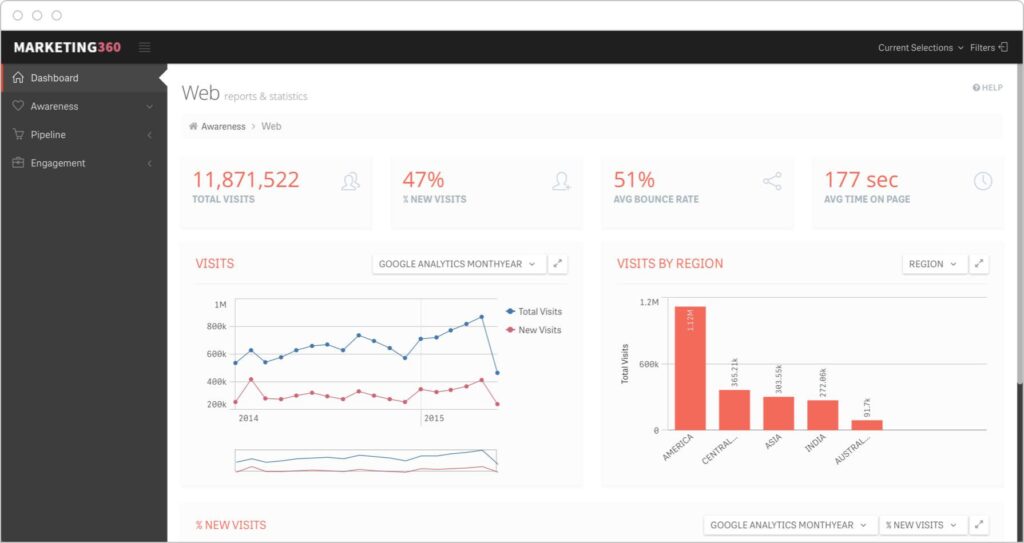


Website analytics are essential for understanding how visitors interact with your website. Whether you run a blog, business website, online store, marketplace, portfolio, or membership platform, analytics tools help you track performance, user behavior, traffic sources, conversions, and growth opportunities.
With WordPress, website owners can integrate powerful analytics tools to monitor every aspect of website performance and make data-driven decisions.
Website analytics tools help track:
- Traffic sources
- Visitor behavior
- Page performance
- Conversion rates
- User engagement
- SEO performance
- Sales analytics
- Marketing effectiveness
In this complete guide, you’ll learn about the best website analytics tools for WordPress, their features, setup methods, reporting systems, and best practices for improving website performance using analytics data.
Why Website Analytics Matter
Understand Visitor Behavior


Analytics help website owners understand:
- Which pages users visit
- How long visitors stay
- Which content performs best
- Where visitors leave the site
- Which devices users prefer
This helps improve website structure and user experience.
Improve SEO Performance
Analytics tools reveal:
- Organic traffic trends
- Search engine performance
- Keyword performance
- Bounce rates
- User engagement metrics
This helps optimize SEO strategies.
Increase Conversion Rates
By analyzing visitor behavior, businesses can improve:
- Landing pages
- Checkout flows
- Forms
- Calls-to-action
- Product pages
This increases conversions and revenue.
Measure Marketing Campaigns
Analytics tools help track:
- Social media traffic
- Paid advertising performance
- Email marketing campaigns
- Affiliate traffic
- Referral sources
This improves marketing ROI.
Best Website Analytics Tools for WordPress
Google Analytics


Google Analytics is the most popular website analytics platform in the world.
Features
- Real-time visitor tracking
- Traffic source analysis
- User behavior reports
- Conversion tracking
- Audience demographics
- Device analytics
- Event tracking
Best For
- Blogs
- Business websites
- WooCommerce stores
- Marketplaces
- Large websites
Google Analytics Metrics
Important metrics include:
- Users
- Sessions
- Bounce rate
- Average session duration
- Conversion rate
- Traffic sources
MonsterInsights
MonsterInsights simplifies Google Analytics integration inside WordPress.
Features
- Google Analytics integration
- Dashboard reports
- eCommerce tracking
- Form tracking
- Affiliate link tracking
- Real-time stats
Best For
- Beginners
- WooCommerce websites
- Bloggers
- Small businesses
Site Kit by Google


Site Kit by Google integrates multiple Google services into WordPress.
Connected Services
- Google Analytics
- Google Search Console
- Google AdSense
- Google PageSpeed Insights
- Google Tag Manager
Best For
- SEO tracking
- Performance monitoring
- Google ecosystem integration
Microsoft Clarity
Microsoft Clarity focuses on user behavior tracking.
Features
- Heatmaps
- Session recordings
- Click tracking
- Scroll tracking
- Rage click detection
Best For
- UX optimization
- Conversion improvement
- User experience analysis
Hotjar


Hotjar provides advanced visual behavior analytics.
Features
- Heatmaps
- Session recordings
- Feedback polls
- Conversion funnels
- User surveys
Best For
- UX research
- Landing page optimization
- Conversion analysis
Matomo Analytics
Matomo is a privacy-focused analytics alternative.
Features
- Self-hosted analytics
- GDPR-friendly tracking
- Visitor analytics
- Heatmaps
- Goal tracking
Best For
- Privacy-focused websites
- GDPR compliance
- Enterprise websites
Clicky Analytics


Clicky provides real-time website analytics.
Features
- Live visitor tracking
- Heatmaps
- Uptime monitoring
- Traffic reports
- Goal tracking
Best For
- Real-time monitoring
- Small businesses
- Bloggers
WooCommerce Analytics Tools
For eCommerce websites using:
- WooCommerce
analytics become even more important.
Key WooCommerce metrics include:
- Revenue
- Orders
- Conversion rate
- Average order value
- Refunds
- Product performance
Recommended tools:
- MonsterInsights
- Google Analytics
- WooCommerce Analytics
SEO Analytics Tools


SEO analytics tools help track:
- Keyword rankings
- Organic traffic
- Backlinks
- Click-through rates
- Search visibility
Popular tools:
- Google Search Console
- Ahrefs
- SEMrush
Important Website Analytics Metrics
Traffic Sources
Track visitors from:
- Search engines
- Social media
- Direct traffic
- Email campaigns
- Referral websites
Bounce Rate
Bounce Rate=Single Page SessionsTotal Sessions×100\text{Bounce Rate} = \frac{\text{Single Page Sessions}}{\text{Total Sessions}} \times 100
A high bounce rate may indicate poor user experience or irrelevant traffic.
Conversion Rate
Conversion Rate=ConversionsVisitors×100\text{Conversion Rate} = \frac{\text{Conversions}}{\text{Visitors}} \times 100
This measures how effectively your website converts visitors into customers or leads.
Average Session Duration
Longer sessions usually indicate stronger user engagement.
Pages Per Session
This shows how deeply users explore your website.
Heatmaps & User Behavior Tracking


Heatmaps visually show how users interact with your website.
They help identify:
- Most-clicked areas
- Scroll behavior
- User attention zones
- Navigation problems
This improves UI/UX optimization.
Real-Time Analytics
Real-time tracking shows:
- Active visitors
- Live page views
- Current traffic sources
- Live conversions
Real-time data helps monitor campaigns and sudden traffic spikes.
Website Speed & Performance Analytics
Website speed directly affects:
- SEO
- Bounce rate
- User experience
- Conversion rates
Popular tools:
- Google PageSpeed Insights
- GTmetrix
Security & Privacy Analytics
Analytics systems should follow privacy regulations.
Important Privacy Practices
Cookie Consent
Inform users about tracking systems.
GDPR Compliance
Protect visitor data carefully.
IP Anonymization
Reduce privacy risks.
Use Secure Connections
Always use HTTPS.
Custom Analytics Dashboards


Advanced websites often use custom dashboards to combine:
- Traffic reports
- SEO reports
- Sales reports
- Marketing analytics
- Customer analytics
Custom dashboards improve reporting efficiency.
Performance Optimization for Analytics Systems
Analytics tools can impact website speed if not configured properly.
Best Practices
Load Scripts Efficiently
Avoid loading unnecessary tracking scripts.
Use Tag Management
Use:
- Google Tag Manager
to organize tracking codes.
Use Caching Plugins
Recommended plugins:
- LiteSpeed Cache
- WP Rocket
Optimize Database Usage
Large analytics datasets should be cleaned regularly.
Common Analytics Mistakes
Tracking Too Many Metrics
Too much data can create confusion.
Focus on actionable KPIs.
Ignoring User Behavior
Traffic alone is not enough. Understand how users interact with pages.
Not Monitoring Mobile Performance
Mobile analytics are essential for modern websites.
Poor Goal Tracking
Without conversion goals, analytics become less useful.
Ignoring Website Speed
Heavy analytics scripts can slow down websites.
Best Practices for WordPress Website Analytics
Track Core KPIs
Focus on:
- Traffic
- Conversion rate
- Bounce rate
- User engagement
- Revenue
Use Heatmaps
Visual behavior tracking improves UX optimization.
Combine Multiple Analytics Tools
Different tools provide different insights.
Monitor SEO Performance
Track rankings, traffic, and search visibility regularly.
Review Reports Frequently
Analytics only help when reviewed consistently.
Final Thoughts
Website analytics tools are essential for understanding user behavior, improving SEO, optimizing conversions, and growing successful websites with WordPress.
By combining traffic analytics, heatmaps, SEO reports, user behavior tracking, conversion analysis, and performance monitoring, website owners can make smarter decisions and improve overall website performance.
Whether you manage a blog, WooCommerce store, marketplace, business website, or membership platform, strong analytics systems are critical for long-term digital growth.