
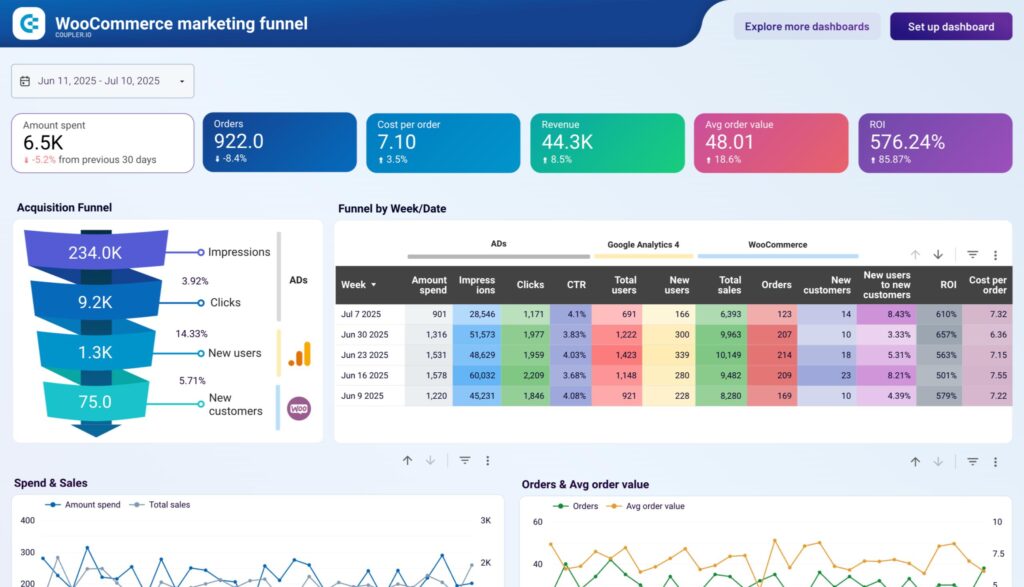


Default analytics in WooCommerce are helpful — but if you want real business insights, you need custom WooCommerce reports.
With WordPress, you can build powerful dashboards to track sales, customers, products, and performance metrics tailored to your store.
In this guide, you’ll learn how to create and use custom reports in WooCommerce.
🔴 What are Custom WooCommerce Reports?
Custom reports are tailored analytics dashboards designed specifically for your business needs.
Instead of generic reports, you can track:
✔ Sales by category
✔ Product performance
✔ Customer behavior
✔ Marketing ROI
👉 Custom reports = actionable data
🧠 Why Custom Reports Matter
Default WooCommerce reports:
❌ Limited insights
❌ No custom KPIs
❌ Basic filtering
Custom reports provide:
✔ Deep insights
✔ Better decisions
✔ Growth opportunities
✔ Business optimization
👉 Data-driven eCommerce success.
📊 Key Reports You Should Build
💰 1️⃣ Sales & Revenue Reports
Track:
✔ Total sales
✔ Daily/monthly trends
✔ Revenue by product/category
👉 Understand growth.
🛒 2️⃣ Product Performance Reports
Track:
✔ Best-selling products
✔ Low-performing items
✔ Stock performance
👉 Optimize inventory.
👥 3️⃣ Customer Reports
Track:
✔ New vs returning customers
✔ Customer lifetime value
✔ Purchase behavior
👉 Improve marketing.
📦 4️⃣ Order Reports
Track:
✔ Order volume
✔ Order status
✔ Fulfillment rate
👉 Improve operations.
📉 5️⃣ Conversion Reports
Track:
✔ Conversion rate
✔ Cart abandonment
✔ Funnel drop-offs
👉 Increase sales.
⚙️ Methods to Create Custom Reports
🧑💻 Method 1: Custom Development (Advanced)
Using WordPress:
✔ Query database (wp_posts, wp_postmeta)
✔ Write custom SQL queries
✔ Build dashboards in admin panel
✔ Use chart libraries (Chart.js)
👉 Full control.
🔌 Method 2: Use Reporting Plugins
Popular tools:
✔ Metorik
✔ Advanced WooCommerce Reporting
✔ WP DataTables
Features:
✔ Pre-built dashboards
✔ Export reports
✔ Advanced filters
👉 Quick setup.
📊 Method 3: External Analytics Tools
Use tools like:
✔ Google Analytics (GA4)
✔ Looker Studio
👉 Connect WooCommerce data for deeper insights.
📈 Dashboard Best Practices
✔ Show key KPIs first
✔ Use charts & graphs
✔ Add filters (date, product, category)
✔ Keep UI clean
👉 Easy to understand.
🔁 Automate Reports
✔ Schedule daily/weekly reports
✔ Email summaries
✔ Export CSV/PDF
👉 Saves time.
🔐 Data Accuracy & Security
Ensure:
✔ Correct queries
✔ Secure access
✔ Role-based permissions
👉 Protect data.
📱 Mobile-Friendly Reports
✔ Responsive design
✔ Quick insights
✔ Simple navigation
👉 Useful for admins on mobile.
🚀 Advanced Reporting Features
Add:
✔ Real-time analytics
✔ AI insights
✔ Predictive analysis
✔ KPI dashboards
👉 Next-level analytics.
📈 Real Impact
With custom reports:
✔ Better decisions
✔ Higher conversions
✔ Improved marketing ROI
✔ Increased revenue
👉 Data becomes your advantage.
🚨 Common Mistakes to Avoid
❌ Tracking too many metrics
❌ Poor dashboard design
❌ Ignoring insights
❌ No automation
👉 Focus on important data.
📌 Custom Reporting Checklist
✔ Define KPIs
✔ Choose method
✔ Build dashboard
✔ Test accuracy
✔ Automate reports
👉 Follow this step-by-step.
📚 Internal Links

Hire Me on Upwork – Dokan & WooCommerce Expert

 Chat on WhatsApp